


Photoshop user created batch command for saving PSD to JPG appends the word “copy” to end of JPG fil
Photoshop V24.6.0, Windows 10x64 22H2 OS Build 19045.3086
I’m using Photoshop V24.6.0, and until the last update, had a batch command that worked perfectly, and then with the 24.6.0 release stopped completely.
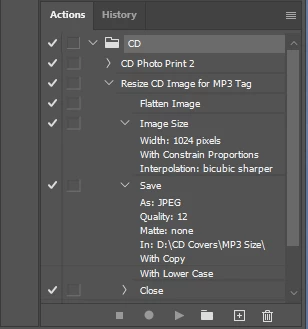
It’s a basic action I recorded that opens all PSDs in a pre-specified source folder, flattens the image, resizes the image and then saves as a JPEG in a different pre-specified destination folder. It’s a convenient action that I use frequently and just does exactly what I want…or it did!
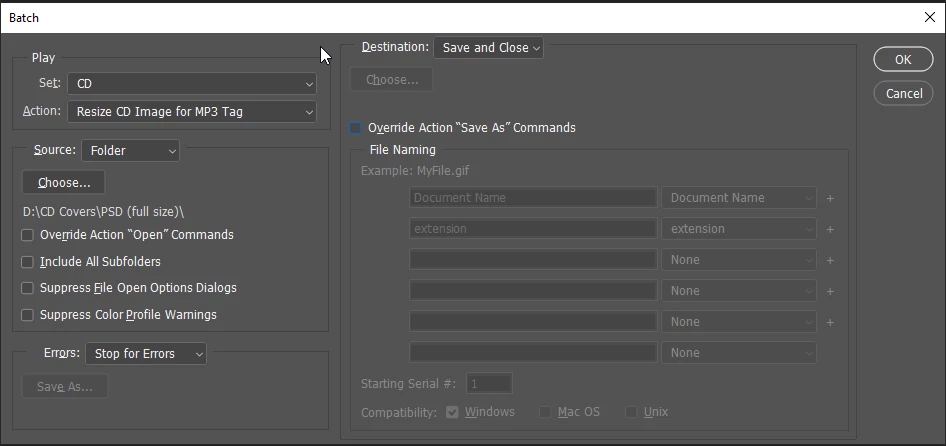
I recorded a new action, duplicating the previous steps with the exception of “Save As” which I changed to “Save A Copy”. (I know Adobe changed the Save As feature some time ago from the menu file commands, but the batch command kept on working.) The new action works fine, but every JPEG file now has the word “copy” appended to the filename. If I enable the option in the batch dialog to “Override Action Save As Commands”, the JPEG files do not have the word “copy” appended to the filename, but they’re not saved in the correct folder, they are saved instead to the source folder containing the PSD files.
Neither the appended “copy” to the JPEG filename or saving into the wrong folder are show stoppers, just damned annoying. Anyway to fix it? I;ve added screen shots of the process below.
Steve
 AdChoices