Participant
June 6, 2017
Question

photoshop won't open .dds files correctly

  • June 6, 2017
  • 3 replies
  • 99505 views

Hi

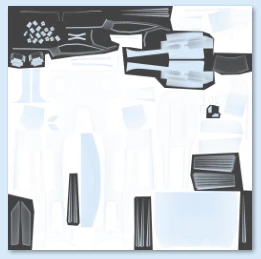
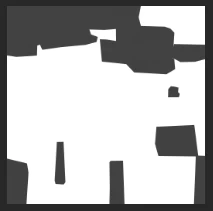
Since I would like to get into making custom decals for Rocket League, I will need to be able to open and manipulate .dds files. There's a Nvidia plug-in to do so, however this doesn't work for me as the image does not properly load. In the images below you will see on the left the image that's supposed to open up and on the right what's actually opening. As you guys can see there is a lot of the image that just goes "missing" after opening it up with Photoshop. I made sure to download the right version of the program, downloaded from here: NVIDIA Texture Tools for Adobe Photoshop | NVIDIA Developer. I am currently using adobe cc 2017. Am i doing something wrong? If so, what can I do to make it work? 

Thanks for reading this, and who knows you might be my saviour

This topic has been closed for replies.

3 replies

iwinxpAuthor
Participant
June 7, 2017

After a lot of searching I found what was going wrong. Turns out my alpha colour channel was unticked... Opening .dds files in Photoshop CC 2017 works just fine.

Participant
August 18, 2017

That is actually the solution. By default when opening the .dds files in Photoshop, it has the 5th channel hidden. Just click the checkbox and untick some of the color channels and it will show up fine.

af8d411687c9ef85263f3bfedfa367a9.png

January 10, 2018

Depends on what DDS plugin you use, if you use the new Intel plugin, you can't preserve the alpha layer that is saved with NVidia plugin, instead, it's simply lost, GIMP can read it and export as TGA file, then you can import it in CC.

And the Nvidia plugin does not work correctly in CC.

Trevor.Dennis
Community Expert
Community Expert
June 6, 2017

There appear to be a few links out there for ways to open .dds files in Photoshop CC, but you could probably find another app that will convert files to a Photoshop friends format.   For instance

DDS Converter

iwinxpAuthor
Participant
June 6, 2017

That's one way to do it yeah, but I would really like not having to use other software to convert my files, since doing this will take quite some time when doing big projects.

JJMack
Community Expert
Community Expert
June 6, 2017

Try installing CS6 using the Creative cloud desktop application. The Plugin may work with it.  However Adobe did change some Plug-in support in subscription cs6.  You may need Perpetuals CS6. The link you posted for Nvidia does not show CC 2017

NVIDIA Texture Tools for Adobe Photoshop

A collection of texture tools generating normal maps, texture compression, mip map generation and cube map formatting packaged as a plugin for Adobe Photoshop 5.0, 5.1, 6.0, 7.0, CS, CS2, CS3, CS4, CS5 and CS6.

JJMack
iwinxpAuthor
Participant
June 6, 2017

I just installed Adobe CS6, made sure the plugin was installed in the right directory and still no succes. I get the exact same result.