


Participant
September 17, 2019
Answered

Picked colours automatically are background colours, but I want them to be foreground colours, why??

  • September 17, 2019
  • 5 replies
  • 1655 views

Sorry for maybe not being clear enough, because my English isn't that good, but here's my problem:

Yesterday I was working in Photoshop and all of the sudden when I picked a colour (through the dropper or in the swatches panel, didn't make a difference), instead of the picked colour automaticcaly being the foreground colour (don't know if that's the correct word), it transferred as the background colour.

Of course I could just switch them, but when I pick a new colour, the same problem occured. So every time I want to paint in a certain colour I have to switch the background/foreground colour.  I don't understand what I did or what I should do to solve this. Because I just want to have a picked colour immediately be the foreground colour.
Correct answer davescm

Hi

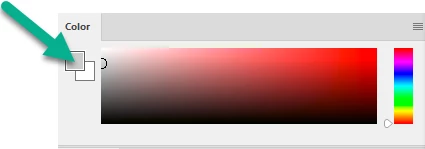
Open the Color panel and click here :

Dave

5 replies

Muqqarib Hassan
Inspiring
September 17, 2019

Hi, 

the color chosen by the eyedropper (foreground/background) is determined by which swatch is

active in the color panel. The active swatch should have a black square around it.


If all else fails, resetting the photoshop preferences might set things straight.


Hold down the Shift+Alt+Ctrl keys while starting photoshop until you get a dialogue

asking to delete the Photoshop settings file and click Yes.

OR Go to Edit>Preferences>General > and rest photoshop preferences.

TMTI user 1
Known Participant
October 26, 2020

This has been bugging me for ages! I seldom if ever use the colour panel, I just use the direct colour pickers for where I'm working.

davescm
Community Expert
davescmCommunity ExpertCorrect answer
Community Expert
September 17, 2019

Hi

Open the Color panel and click here :

Dave

Participant
September 17, 2019
Aaaaah, Thanx! I think this just solved it! Such a simple solution, oh my God! I was clicking it in the more left part and that didn't work.
davescm
Community Expert
Community Expert
September 17, 2019
You're welcome 🙂
Participant
September 17, 2019

Participant
September 17, 2019

c.pfaffenbichler
Community Expert
Community Expert
September 17, 2019

In the Color Panel (Window > Color) which is selected, the Foreground or the Background Color? 

Please post a screenshot including all pertinent Panels.