

Known Participant
September 25, 2024
Answered

Pls help) changing text layers to one line text photoshop script

  • September 25, 2024
  • 2 replies
  • 664 views

Hi!

I'm searching for the script that makes all text layers to one line text like below  @ @

Is it possible this function working on phoshop? 
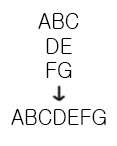
This topic has been closed for replies.
Correct answer Stephen Marsh

Presuming that "hard" paragraph returns are used, not shift "soft" returns:


/*
Text Replace in All Text Layers and Groups.jsx
v1.0 - 25th July 2024, Stephen Marsh
https://community.adobe.com/t5/photoshop-ecosystem-discussions/batch-adding-line-break-behind-every-comma-of-text-layer/m-p/14753971
*/

#target photoshop

if (app.documents.length > 0) {
    var doc = app.activeDocument;
    processLayersAndGroups(doc.layers);
} else {
    alert("A document must be open to run this script!");
}

function changeTextContents(layer) {
    // Check if the layer is a text layer
    if (layer.kind == LayerKind.TEXT) {
        // Regular expression to change comma+space to comma+return
        layer.textItem.contents = layer.textItem.contents.replace(/\r/g, '');
    }
}

function processLayersAndGroups(layers) {
    // Recursively process the root/top-level layers
    for (var i = 0; i < layers.length; i++) {
        var layer = layers[i];
        if (layer.typename == "ArtLayer") {
            changeTextContents(layer);
            // Recursively process the layers within all groups
        } else if (layer.typename == "LayerSet") {
            processLayersAndGroups(layer.layers);
        }
    }
}


Or:


/*
Utility PS Scripts created by David M. Converse ©2018-21

This script is a demo of replacing text

Last modified 6/2/2021

Licensed under the Apache License, Version 2.0 (the "License");
you may not use this file except in compliance with the License.
You may obtain a copy of the License at

    http://www.apache.org/licenses/LICENSE-2.0

Unless required by applicable law or agreed to in writing, software
distributed under the License is distributed on an "AS IS" BASIS,
WITHOUT WARRANTIES OR CONDITIONS OF ANY KIND, either express or implied.
See the License for the specific language governing permissions and
limitations under the License.
*/
#target photoshop

layerUpdate();

function layerUpdate(){
    if(documents.length > 0){
        var originalDialogMode = app.displayDialogs;
        app.displayDialogs = DialogModes.ERROR;
        var originalRulerUnits = preferences.rulerUnits;
        try{
            var docRef = activeDocument;
            preferences.rulerUnits = Units.POINTS;
            for(var i = 0; i < docRef.artLayers.length; i++){
                var LayerRef = docRef.artLayers[i];
                if(LayerRef.kind == LayerKind.TEXT){
                    var TextRef = LayerRef.textItem;
                    var layerText = TextRef.contents;
                    var newText = layerText.replace(/\r/g, '');
                    TextRef.contents= newText;
                    }
                }
            preferences.rulerUnits = originalRulerUnits;
            app.displayDialogs = originalDialogMode;
            }
        catch(e){
            }
        }
    }


2 replies

Stephen Marsh
Community Expert
Stephen MarshCommunity ExpertCorrect answer
Community Expert
September 25, 2024

Presuming that "hard" paragraph returns are used, not shift "soft" returns:


/*
Text Replace in All Text Layers and Groups.jsx
v1.0 - 25th July 2024, Stephen Marsh
https://community.adobe.com/t5/photoshop-ecosystem-discussions/batch-adding-line-break-behind-every-comma-of-text-layer/m-p/14753971
*/

#target photoshop

if (app.documents.length > 0) {
    var doc = app.activeDocument;
    processLayersAndGroups(doc.layers);
} else {
    alert("A document must be open to run this script!");
}

function changeTextContents(layer) {
    // Check if the layer is a text layer
    if (layer.kind == LayerKind.TEXT) {
        // Regular expression to change comma+space to comma+return
        layer.textItem.contents = layer.textItem.contents.replace(/\r/g, '');
    }
}

function processLayersAndGroups(layers) {
    // Recursively process the root/top-level layers
    for (var i = 0; i < layers.length; i++) {
        var layer = layers[i];
        if (layer.typename == "ArtLayer") {
            changeTextContents(layer);
            // Recursively process the layers within all groups
        } else if (layer.typename == "LayerSet") {
            processLayersAndGroups(layer.layers);
        }
    }
}


Or:


/*
Utility PS Scripts created by David M. Converse ©2018-21

This script is a demo of replacing text

Last modified 6/2/2021

Licensed under the Apache License, Version 2.0 (the "License");
you may not use this file except in compliance with the License.
You may obtain a copy of the License at

    http://www.apache.org/licenses/LICENSE-2.0

Unless required by applicable law or agreed to in writing, software
distributed under the License is distributed on an "AS IS" BASIS,
WITHOUT WARRANTIES OR CONDITIONS OF ANY KIND, either express or implied.
See the License for the specific language governing permissions and
limitations under the License.
*/
#target photoshop

layerUpdate();

function layerUpdate(){
    if(documents.length > 0){
        var originalDialogMode = app.displayDialogs;
        app.displayDialogs = DialogModes.ERROR;
        var originalRulerUnits = preferences.rulerUnits;
        try{
            var docRef = activeDocument;
            preferences.rulerUnits = Units.POINTS;
            for(var i = 0; i < docRef.artLayers.length; i++){
                var LayerRef = docRef.artLayers[i];
                if(LayerRef.kind == LayerKind.TEXT){
                    var TextRef = LayerRef.textItem;
                    var layerText = TextRef.contents;
                    var newText = layerText.replace(/\r/g, '');
                    TextRef.contents= newText;
                    }
                }
            preferences.rulerUnits = originalRulerUnits;
            app.displayDialogs = originalDialogMode;
            }
        catch(e){
            }
        }
    }


wellearnAuthor
Known Participant
September 25, 2024

Hello, Stephen 🙂 long time no see~!
OMG you help me this time again. 
It works very well
THANK YOU SO MUCH T T!!!! nowdays I have little time so can't make the code @ @ 

Have a nice day and enjoy autumn~!

Stephen Marsh
Community Expert
Community Expert
September 25, 2024
quote

Hello, Stephen 🙂 long time no see~!
OMG you help me this time again. 
It works very well
THANK YOU SO MUCH T T!!!! nowdays I have little time so can't make the code @ @ 

Have a nice day and enjoy autumn~!


By @wellearn


You're welcome... I'm enjoying spring though! 

Derek Cross
Community Expert
Community Expert
September 25, 2024

Not sure what you need. Do you understand that there are two different ways of adding horizontal text in Photoshop?

Here's how:

Add point text (to add a few words like a heading or title) or paragraph text.

Point text: Click anywhere on the canvas and type the text.

Paragraph text: Drag the cursor on the canvas to create a bounding box and type your paragraph. 

wellearnAuthor
Known Participant
September 25, 2024

Hello, Derek 
Oh my english skill is not very well x)

Yep, on the point text, the text is devided because of many <br> so I need to remove the <br> and make it one sentence, but I couldn't find the script.. T T
