New Participant
December 30, 2021
Answered

PNGSaveOptions Script VERY SLOW

  • December 30, 2021
  • 3 replies
  • 1792 views

I'm trying to create a script that saves the document as a PNG (so that I can add a suffix in the file name of my action).

I've found online a script using "PNGSaveOptions". However when I use this (no matter the 0-9 compression I choose) it exports at a very slow speed (it lags around the 90% mark and I've needed to forcequit after 10 minutes+). 


When I do a simple "File>Save as Copy>PNG>Fastest" it takes just seconds. 


My images are large (8000px) and I have plenty so my current script is just unusable. Is there a different script I could use to export as PNG? I feel like PNGSaveOptions must be a legacy option or something.


Current script (I'm using PS 2022):
var doc = app.activeDocument;
var filePath = activeDocument.fullName.path;
var pngFile = File(filePath + "/" + "myname.png");
pngSaveOptions = new PNGSaveOptions();
pngFile.compression = 0
pngFile.interlaced = false;
doc.saveAs(pngFile, pngSaveOptions, true, Extension.LOWERCASE);

This topic has been closed for replies.
Correct answer JJMack

On my slow 2 GHz PC Windows 10 Photoshop  23.1 Save as Copy a PNG scripted Action manager code save a 8000 px by 8000 px PNG lowest compression lager file size to my ssd in 5 seconds.
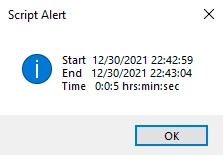


/* =======================================================================
// 2021  John J. McAssey (JJMack)
// ======================================================================= */
// This script is supplied as is. It is provided as freeware.
// The author accepts no liability for any problems arising from its use.
// enable double-clicking from Mac Finder or Windows Explorer
#target photoshop // this command only works in Photoshop CS2 and higher
// bring application forward for double-click events
app.bringToFront();
/////////////////////////////////////////////////////////////////////////
//                      SET-UP Global Variables                        //       
/////////////////////////////////////////////////////////////////////////
var scriptPath =  $.fileName.substr(0,$.fileName.lastIndexOf("/")+1);
var scriptName =  $.fileName.substr($.fileName.lastIndexOf("/")+1,$.fileName.lastIndexOf("."));
scriptName =  scriptName.substr(0,scriptName.lastIndexOf("."));
var scriptExt =  $.fileName.substr($.fileName.lastIndexOf("."));
//alert(scriptPath + scriptName + scriptExt);

// Initialize variables used in mainline	
var folderListCopy = new Array;
var fileListCopy = new Array;
var fileTypes = "";
var logData = "";

// Save the current preferences and Set Photoshop to use pixels and display no dialogs
var startRulerUnits = app.preferences.rulerUnits;
var startTypeUnits = app.preferences.typeUnits;
var startDisplayDialogs = app.displayDialogs;
app.displayDialogs = DialogModes.NO;
app.preferences.rulerUnits = Units.PIXELS;
app.preferences.typeUnits = TypeUnits.PIXELS;

try {
	startDate = (getDateTime());
	var fileName =  app.activeDocument.name.replace(/\.[^\.]+$/, '');	// strip the extension off =  app.activeDocument.name.replace(/\.[^\.]+$/, '');	// strip the extension off
	var fileType = ".png"
	var outputFile = new File(Folder.desktop + "/" + fileName + fileType ); 
	SaveCopyAsPng(6, outputFile, true, true);
	endDate = (getDateTime());
	alert("Start  " + startDate + "\n" 
		+ "End   " + endDate   + "\nTime   " 
		+ elapseTime(startDate,endDate) + " hrs:min:sec"
	);		
}
catch(e) { alert(e + ': on line ' + e.line, 'Photoshop Error', true); }  
// Return the app preferences
app.preferences.rulerUnits = startRulerUnits;
app.preferences.typeUnits = startTypeUnits;
app.displayDialogs = startDisplayDialogs;

///////////////////////////////////////////////////////////////////////////////////////////////////////////////////////////////////////////////

//////////////////////////////////////////////////////////
function SaveCopyAsPng(compression, In, copy, lowerCase) {
	var descriptor = new ActionDescriptor();
	var descriptor2 = new ActionDescriptor();
	descriptor2.putEnumerated( stringIDToTypeID( "method" ), stringIDToTypeID( "PNGMethod" ), stringIDToTypeID( "quick" ));
	descriptor2.putEnumerated( stringIDToTypeID( "PNGInterlaceType" ), stringIDToTypeID( "PNGInterlaceType" ), stringIDToTypeID( "PNGInterlaceAdam7" ));
	descriptor2.putEnumerated( stringIDToTypeID( "PNGFilter" ), stringIDToTypeID( "PNGFilter" ), stringIDToTypeID( "PNGFilterAdaptive" ));
	descriptor2.putInteger( stringIDToTypeID( "compression" ), compression );
	descriptor.putObject( stringIDToTypeID( "as" ), stringIDToTypeID( "PNGFormat" ), descriptor2 );
	descriptor.putPath( charIDToTypeID( "In  " ), In );
	descriptor.putInteger( stringIDToTypeID( "documentID" ), 1045 );
	descriptor.putBoolean( stringIDToTypeID( "copy" ), copy );
	descriptor.putBoolean( stringIDToTypeID( "lowerCase" ), lowerCase );
	descriptor.putEnumerated( stringIDToTypeID( "saveStage" ), stringIDToTypeID( "saveStageType" ), stringIDToTypeID( "saveBegin" ));
	executeAction( stringIDToTypeID( "save" ), descriptor, DialogModes.NO );
}
 
function getDateTime() { // Function for returning current date and time
	var date = new Date();
	var dateTime = "";
	if ((date.getMonth() + 1) < 10) { dateTime += "0" + (date.getMonth() + 1) + "/"; }
	else { dateTime += (date.getMonth() + 1) + "/";}
	if (date.getDate() < 10) { dateTime += "0" + date.getDate() + "/"; } 
	else { dateTime += date.getDate() + "/"; }
	dateTime += date.getFullYear() + " ";
	if (date.getHours() < 10) {dateTime += "0" + date.getHours() + ":"; } 
	else { dateTime += date.getHours() + ":"; }
	if (date.getMinutes() < 10) { dateTime += "0" + date.getMinutes() + ":"; } 
	else { dateTime += date.getMinutes() + ":"; }
	if (date.getSeconds() < 10) { dateTime += "0" + date.getSeconds(); } 
	else { dateTime += date.getSeconds(); }
	return dateTime;
} 

function timeString () { // Function for returning raw time
  var now = new Date();
  return now.getTime()
};

function timeStamp(){

	// Get the time and format it
	var digital = new Date();
	var hours = digital.getHours();
	var minutes = digital.getMinutes();
	var seconds = digital.getSeconds();
	var amOrPm = "AM";
	if (hours > 11) amOrPm = "PM";
	if (hours > 12) hours = hours - 12;
	if (hours == 0) hours = 12;
	if (minutes <= 9) minutes = "0" + minutes;
	if (seconds <= 9) seconds = "0" + seconds;

	// Get the date and format it
	var date = new Date();
	var d  = date.getDate();
	var day = (d < 10) ? '0' + d : d;
	var m = date.getMonth() + 1;
	var month = (m < 10) ? '0' + m : m;
	var yy = date.getYear();
	var year = (yy < 1000) ? yy + 1900 : yy;
	
	// create a variable with the fully formatted the time and date
	// todaysDate = hours + ":" + minutes + ":" + seconds + " " + amOrPm + " - " + day + "/" + month + "/" + year;
	// todaysDate = hours + ":" + minutes + ":" + seconds + " " + amOrPm + " - " + month + "/" + day + "/" + year;

	MonthNames = new Array("January","February","March","April","May","June","July","August","September","October","November","December");

	//todaysDate = hours + ":" + minutes + ":" + seconds + " " + amOrPm + " " + MonthNames[date.getMonth()] + " " + date.getDate() + ", " + year;
	
	todaysDate =MonthNames[date.getMonth()] + " " + date.getDate() + ", " + year  +" " + hours + ":" + minutes + ":" + seconds + " " + amOrPm;

        return todaysDate;
}
	
function elapseTime(start,end) {
	var date1 = new Date(start);
	var date2 = new Date(end);
	var diff = date2.getTime() - date1.getTime();
	var msec = diff;
	var hh = Math.floor(msec / 1000 / 60 / 60);
	msec -= hh * 1000 * 60 * 60;
	var mm = Math.floor(msec / 1000 / 60);
	msec -= mm * 1000 * 60;
	var ss = Math.floor(msec / 1000);
	msec -= ss * 1000;
	return (hh + ":" + mm + ":" + ss);	
}


3 replies

JJMack
JJMackCorrect answer
Community Expert
December 31, 2021

On my slow 2 GHz PC Windows 10 Photoshop  23.1 Save as Copy a PNG scripted Action manager code save a 8000 px by 8000 px PNG lowest compression lager file size to my ssd in 5 seconds.



/* =======================================================================
// 2021  John J. McAssey (JJMack)
// ======================================================================= */
// This script is supplied as is. It is provided as freeware.
// The author accepts no liability for any problems arising from its use.
// enable double-clicking from Mac Finder or Windows Explorer
#target photoshop // this command only works in Photoshop CS2 and higher
// bring application forward for double-click events
app.bringToFront();
/////////////////////////////////////////////////////////////////////////
//                      SET-UP Global Variables                        //       
/////////////////////////////////////////////////////////////////////////
var scriptPath =  $.fileName.substr(0,$.fileName.lastIndexOf("/")+1);
var scriptName =  $.fileName.substr($.fileName.lastIndexOf("/")+1,$.fileName.lastIndexOf("."));
scriptName =  scriptName.substr(0,scriptName.lastIndexOf("."));
var scriptExt =  $.fileName.substr($.fileName.lastIndexOf("."));
//alert(scriptPath + scriptName + scriptExt);

// Initialize variables used in mainline	
var folderListCopy = new Array;
var fileListCopy = new Array;
var fileTypes = "";
var logData = "";

// Save the current preferences and Set Photoshop to use pixels and display no dialogs
var startRulerUnits = app.preferences.rulerUnits;
var startTypeUnits = app.preferences.typeUnits;
var startDisplayDialogs = app.displayDialogs;
app.displayDialogs = DialogModes.NO;
app.preferences.rulerUnits = Units.PIXELS;
app.preferences.typeUnits = TypeUnits.PIXELS;

try {
	startDate = (getDateTime());
	var fileName =  app.activeDocument.name.replace(/\.[^\.]+$/, '');	// strip the extension off =  app.activeDocument.name.replace(/\.[^\.]+$/, '');	// strip the extension off
	var fileType = ".png"
	var outputFile = new File(Folder.desktop + "/" + fileName + fileType ); 
	SaveCopyAsPng(6, outputFile, true, true);
	endDate = (getDateTime());
	alert("Start  " + startDate + "\n" 
		+ "End   " + endDate   + "\nTime   " 
		+ elapseTime(startDate,endDate) + " hrs:min:sec"
	);		
}
catch(e) { alert(e + ': on line ' + e.line, 'Photoshop Error', true); }  
// Return the app preferences
app.preferences.rulerUnits = startRulerUnits;
app.preferences.typeUnits = startTypeUnits;
app.displayDialogs = startDisplayDialogs;

///////////////////////////////////////////////////////////////////////////////////////////////////////////////////////////////////////////////

//////////////////////////////////////////////////////////
function SaveCopyAsPng(compression, In, copy, lowerCase) {
	var descriptor = new ActionDescriptor();
	var descriptor2 = new ActionDescriptor();
	descriptor2.putEnumerated( stringIDToTypeID( "method" ), stringIDToTypeID( "PNGMethod" ), stringIDToTypeID( "quick" ));
	descriptor2.putEnumerated( stringIDToTypeID( "PNGInterlaceType" ), stringIDToTypeID( "PNGInterlaceType" ), stringIDToTypeID( "PNGInterlaceAdam7" ));
	descriptor2.putEnumerated( stringIDToTypeID( "PNGFilter" ), stringIDToTypeID( "PNGFilter" ), stringIDToTypeID( "PNGFilterAdaptive" ));
	descriptor2.putInteger( stringIDToTypeID( "compression" ), compression );
	descriptor.putObject( stringIDToTypeID( "as" ), stringIDToTypeID( "PNGFormat" ), descriptor2 );
	descriptor.putPath( charIDToTypeID( "In  " ), In );
	descriptor.putInteger( stringIDToTypeID( "documentID" ), 1045 );
	descriptor.putBoolean( stringIDToTypeID( "copy" ), copy );
	descriptor.putBoolean( stringIDToTypeID( "lowerCase" ), lowerCase );
	descriptor.putEnumerated( stringIDToTypeID( "saveStage" ), stringIDToTypeID( "saveStageType" ), stringIDToTypeID( "saveBegin" ));
	executeAction( stringIDToTypeID( "save" ), descriptor, DialogModes.NO );
}
 
function getDateTime() { // Function for returning current date and time
	var date = new Date();
	var dateTime = "";
	if ((date.getMonth() + 1) < 10) { dateTime += "0" + (date.getMonth() + 1) + "/"; }
	else { dateTime += (date.getMonth() + 1) + "/";}
	if (date.getDate() < 10) { dateTime += "0" + date.getDate() + "/"; } 
	else { dateTime += date.getDate() + "/"; }
	dateTime += date.getFullYear() + " ";
	if (date.getHours() < 10) {dateTime += "0" + date.getHours() + ":"; } 
	else { dateTime += date.getHours() + ":"; }
	if (date.getMinutes() < 10) { dateTime += "0" + date.getMinutes() + ":"; } 
	else { dateTime += date.getMinutes() + ":"; }
	if (date.getSeconds() < 10) { dateTime += "0" + date.getSeconds(); } 
	else { dateTime += date.getSeconds(); }
	return dateTime;
} 

function timeString () { // Function for returning raw time
  var now = new Date();
  return now.getTime()
};

function timeStamp(){

	// Get the time and format it
	var digital = new Date();
	var hours = digital.getHours();
	var minutes = digital.getMinutes();
	var seconds = digital.getSeconds();
	var amOrPm = "AM";
	if (hours > 11) amOrPm = "PM";
	if (hours > 12) hours = hours - 12;
	if (hours == 0) hours = 12;
	if (minutes <= 9) minutes = "0" + minutes;
	if (seconds <= 9) seconds = "0" + seconds;

	// Get the date and format it
	var date = new Date();
	var d  = date.getDate();
	var day = (d < 10) ? '0' + d : d;
	var m = date.getMonth() + 1;
	var month = (m < 10) ? '0' + m : m;
	var yy = date.getYear();
	var year = (yy < 1000) ? yy + 1900 : yy;
	
	// create a variable with the fully formatted the time and date
	// todaysDate = hours + ":" + minutes + ":" + seconds + " " + amOrPm + " - " + day + "/" + month + "/" + year;
	// todaysDate = hours + ":" + minutes + ":" + seconds + " " + amOrPm + " - " + month + "/" + day + "/" + year;

	MonthNames = new Array("January","February","March","April","May","June","July","August","September","October","November","December");

	//todaysDate = hours + ":" + minutes + ":" + seconds + " " + amOrPm + " " + MonthNames[date.getMonth()] + " " + date.getDate() + ", " + year;
	
	todaysDate =MonthNames[date.getMonth()] + " " + date.getDate() + ", " + year  +" " + hours + ":" + minutes + ":" + seconds + " " + amOrPm;

        return todaysDate;
}
	
function elapseTime(start,end) {
	var date1 = new Date(start);
	var date2 = new Date(end);
	var diff = date2.getTime() - date1.getTime();
	var msec = diff;
	var hh = Math.floor(msec / 1000 / 60 / 60);
	msec -= hh * 1000 * 60 * 60;
	var mm = Math.floor(msec / 1000 / 60);
	msec -= mm * 1000 * 60;
	var ss = Math.floor(msec / 1000);
	msec -= ss * 1000;
	return (hh + ":" + mm + ":" + ss);	
}



JJMack
JJMack
Community Expert
December 31, 2021

SaveAsPng 24 took 10 seconds the File size was about the sane however the 300PPI resolution settinf was not saved so windows explorer showed 96ppi.

/* =======================================================================
// 2021  John J. McAssey (JJMack)
// ======================================================================= */
// This script is supplied as is. It is provided as freeware.
// The author accepts no liability for any problems arising from its use.
// enable double-clicking from Mac Finder or Windows Explorer
#target photoshop // this command only works in Photoshop CS2 and higher
// bring application forward for double-click events
app.bringToFront();
/////////////////////////////////////////////////////////////////////////
//                      SET-UP Global Variables                        //       
/////////////////////////////////////////////////////////////////////////
var scriptPath =  $.fileName.substr(0,$.fileName.lastIndexOf("/")+1);
var scriptName =  $.fileName.substr($.fileName.lastIndexOf("/")+1,$.fileName.lastIndexOf("."));
scriptName =  scriptName.substr(0,scriptName.lastIndexOf("."));
var scriptExt =  $.fileName.substr($.fileName.lastIndexOf("."));
//alert(scriptPath + scriptName + scriptExt);

// Initialize variables used in mainline	
var folderListCopy = new Array;
var fileListCopy = new Array;
var fileTypes = "";
var logData = "";

// Save the current preferences and Set Photoshop to use pixels and display no dialogs
var startRulerUnits = app.preferences.rulerUnits;
var startTypeUnits = app.preferences.typeUnits;
var startDisplayDialogs = app.displayDialogs;
app.displayDialogs = DialogModes.NO;
app.preferences.rulerUnits = Units.PIXELS;
app.preferences.typeUnits = TypeUnits.PIXELS;

try {
	startDate = (getDateTime());
	var fileName =  app.activeDocument.name.replace(/\.[^\.]+$/, '');	// strip the extension off =  app.activeDocument.name.replace(/\.[^\.]+$/, '');	// strip the extension off
	var fileType = ".png"
	var outputFile = new File(Folder.desktop + "/" + fileName + fileType ); 
	//SaveCopyAsPng(6, outputFile, true, true);
	SaveAsPNG("~/desktop/" + fileName, "PNG24", false, true);
	endDate = (getDateTime());
	alert("Start  " + startDate + "\n" 
		+ "End   " + endDate   + "\nTime   " 
		+ elapseTime(startDate,endDate) + " hrs:min:sec"
	);		
}
catch(e) { alert(e + ': on line ' + e.line, 'Photoshop Error', true); }  
// Return the app preferences
app.preferences.rulerUnits = startRulerUnits;
app.preferences.typeUnits = startTypeUnits;
app.displayDialogs = startDisplayDialogs;

///////////////////////////////////////////////////////////////////////////////////////////////////////////////////////////////////////////////

//////////////////////////////////////////////////////////
function SaveCopyAsPng(compression, In, copy, lowerCase) {
	var descriptor = new ActionDescriptor();
	var descriptor2 = new ActionDescriptor();
	descriptor2.putEnumerated( stringIDToTypeID( "method" ), stringIDToTypeID( "PNGMethod" ), stringIDToTypeID( "quick" ));
	descriptor2.putEnumerated( stringIDToTypeID( "PNGInterlaceType" ), stringIDToTypeID( "PNGInterlaceType" ), stringIDToTypeID( "PNGInterlaceAdam7" ));
	descriptor2.putEnumerated( stringIDToTypeID( "PNGFilter" ), stringIDToTypeID( "PNGFilter" ), stringIDToTypeID( "PNGFilterAdaptive" ));
	descriptor2.putInteger( stringIDToTypeID( "compression" ), compression );
	descriptor.putObject( stringIDToTypeID( "as" ), stringIDToTypeID( "PNGFormat" ), descriptor2 );
	descriptor.putPath( charIDToTypeID( "In  " ), In );
	descriptor.putInteger( stringIDToTypeID( "documentID" ), 1045 );
	descriptor.putBoolean( stringIDToTypeID( "copy" ), copy );
	descriptor.putBoolean( stringIDToTypeID( "lowerCase" ), lowerCase );
	descriptor.putEnumerated( stringIDToTypeID( "saveStage" ), stringIDToTypeID( "saveStageType" ), stringIDToTypeID( "saveBegin" ));
	executeAction( stringIDToTypeID( "save" ), descriptor, DialogModes.NO );
}

function SaveAsPNG(saveFile, PNGtype, Interlace, Transparency) {
	//alert("SaveAsPNG(" + saveFile + ", " + PNGtype + ", " + Interlace + ", " +  Transparency + ");");
	if (PNGtype=="PNG8") {		
		var id5 = charIDToTypeID( "Expr" );
		var desc3 = new ActionDescriptor();
		var id6 = charIDToTypeID( "Usng" );
		var desc4 = new ActionDescriptor();
		var id7 = charIDToTypeID( "Op  " );
		var id8 = charIDToTypeID( "SWOp" );
		var id9 = charIDToTypeID( "OpSa" );
		desc4.putEnumerated( id7, id8, id9 );
		var id10 = charIDToTypeID( "Fmt " );
		var id11 = charIDToTypeID( "IRFm" );
		var id12 = charIDToTypeID( "PNG8" );
		desc4.putEnumerated( id10, id11, id12 );
		var id13 = charIDToTypeID( "Intr" ); //Interlaced
		desc4.putBoolean( id13, Interlace );
		var id14 = charIDToTypeID( "RedA" );
		var id15 = charIDToTypeID( "IRRd" );
		var id16 = charIDToTypeID( "Prcp" ); //Algorithm
		desc4.putEnumerated( id14, id15, id16 );
		var id17 = charIDToTypeID( "RChT" );
		desc4.putBoolean( id17, false );
		var id18 = charIDToTypeID( "RChV" );
		desc4.putBoolean( id18, false );
		var id19 = charIDToTypeID( "AuRd" );
		desc4.putBoolean( id19, false );
		var id20 = charIDToTypeID( "NCol" ); //NO. Of Colors
		desc4.putInteger( id20, 256 );
		var id21 = charIDToTypeID( "Dthr" ); //Dither
		var id22 = charIDToTypeID( "IRDt" );
		var id23 = charIDToTypeID( "Dfsn" ); //Dither type
		desc4.putEnumerated( id21, id22, id23 );
		var id24 = charIDToTypeID( "DthA" );
		desc4.putInteger( id24, 100 );
		var id25 = charIDToTypeID( "DChS" );
		desc4.putInteger( id25, 0 );
		var id26 = charIDToTypeID( "DCUI" );
		desc4.putInteger( id26, 0 );
		var id27 = charIDToTypeID( "DChT" );
		desc4.putBoolean( id27, false );
		var id28 = charIDToTypeID( "DChV" );
		desc4.putBoolean( id28, false );
		var id29 = charIDToTypeID( "WebS" );
		desc4.putInteger( id29, 0 );
		var id30 = charIDToTypeID( "TDth" ); //transparency dither
		var id31 = charIDToTypeID( "IRDt" );
		var id32 = charIDToTypeID( "None" );
		desc4.putEnumerated( id30, id31, id32 );
		var id33 = charIDToTypeID( "TDtA" );
		desc4.putInteger( id33, 100 );
		var id34 = charIDToTypeID( "Trns" ); //Transparency
		desc4.putBoolean( id34, Transparency );
		var id35 = charIDToTypeID( "Mtt " );
		desc4.putBoolean( id35, true );		 //matte
		var id36 = charIDToTypeID( "MttR" ); //matte color
		desc4.putInteger( id36, 255 );
		var id37 = charIDToTypeID( "MttG" );
		desc4.putInteger( id37, 255 );
		var id38 = charIDToTypeID( "MttB" );
		desc4.putInteger( id38, 255 );
		var id39 = charIDToTypeID( "SHTM" );
		desc4.putBoolean( id39, false );
		var id40 = charIDToTypeID( "SImg" );
		desc4.putBoolean( id40, true );
		var id41 = charIDToTypeID( "SSSO" );
		desc4.putBoolean( id41, false );
		var id42 = charIDToTypeID( "SSLt" );
		var list1 = new ActionList();
		desc4.putList( id42, list1 );
		var id43 = charIDToTypeID( "DIDr" );
		desc4.putBoolean( id43, false );
		var id44 = charIDToTypeID( "In  " );
		desc4.putPath( id44, new File(saveFile + ".png") );
		var id45 = stringIDToTypeID( "SaveForWeb" );
		desc3.putObject( id6, id45, desc4 );
		executeAction( id5, desc3, DialogModes.NO );
    }
	else { //png 24
		var id6 = charIDToTypeID( "Expr" );
		var desc3 = new ActionDescriptor();
		var id7 = charIDToTypeID( "Usng" );
		var desc4 = new ActionDescriptor();
		var id8 = charIDToTypeID( "Op  " );
		var id9 = charIDToTypeID( "SWOp" );
		var id10 = charIDToTypeID( "OpSa" );
        desc4.putEnumerated( id8, id9, id10 );
		var id11 = charIDToTypeID( "Fmt " );
		var id12 = charIDToTypeID( "IRFm" );
		var id13 = charIDToTypeID( "PN24" );
		desc4.putEnumerated( id11, id12, id13 );
		var id14 = charIDToTypeID( "Intr" );
		desc4.putBoolean( id14, Interlace );
		var id15 = charIDToTypeID( "Trns" );
		desc4.putBoolean( id15, Transparency );
		var id16 = charIDToTypeID( "Mtt " );
		desc4.putBoolean( id16, true );
		var id17 = charIDToTypeID( "MttR" );
		desc4.putInteger( id17, 255 );
		var id18 = charIDToTypeID( "MttG" );
		desc4.putInteger( id18, 255 );
		var id19 = charIDToTypeID( "MttB" );
		desc4.putInteger( id19, 255 );
		var id20 = charIDToTypeID( "SHTM" );
		desc4.putBoolean( id20, false );
		var id21 = charIDToTypeID( "SImg" );
		desc4.putBoolean( id21, true );
		var id22 = charIDToTypeID( "SSSO" );
		desc4.putBoolean( id22, false );
		var id23 = charIDToTypeID( "SSLt" );
		var list1 = new ActionList();
		desc4.putList( id23, list1 );
		var id24 = charIDToTypeID( "DIDr" );
		desc4.putBoolean( id24, false );
		var id25 = charIDToTypeID( "In  " );
		desc4.putPath( id25, new File( saveFile + ".png") );
		var id26 = stringIDToTypeID( "SaveForWeb" );
		desc3.putObject( id7, id26, desc4 );
		executeAction( id6, desc3, DialogModes.NO );
	}
}
 
function getDateTime() { // Function for returning current date and time
	var date = new Date();
	var dateTime = "";
	if ((date.getMonth() + 1) < 10) { dateTime += "0" + (date.getMonth() + 1) + "/"; }
	else { dateTime += (date.getMonth() + 1) + "/";}
	if (date.getDate() < 10) { dateTime += "0" + date.getDate() + "/"; } 
	else { dateTime += date.getDate() + "/"; }
	dateTime += date.getFullYear() + " ";
	if (date.getHours() < 10) {dateTime += "0" + date.getHours() + ":"; } 
	else { dateTime += date.getHours() + ":"; }
	if (date.getMinutes() < 10) { dateTime += "0" + date.getMinutes() + ":"; } 
	else { dateTime += date.getMinutes() + ":"; }
	if (date.getSeconds() < 10) { dateTime += "0" + date.getSeconds(); } 
	else { dateTime += date.getSeconds(); }
	return dateTime;
} 

function timeString () { // Function for returning raw time
  var now = new Date();
  return now.getTime()
};

function timeStamp(){

	// Get the time and format it
	var digital = new Date();
	var hours = digital.getHours();
	var minutes = digital.getMinutes();
	var seconds = digital.getSeconds();
	var amOrPm = "AM";
	if (hours > 11) amOrPm = "PM";
	if (hours > 12) hours = hours - 12;
	if (hours == 0) hours = 12;
	if (minutes <= 9) minutes = "0" + minutes;
	if (seconds <= 9) seconds = "0" + seconds;

	// Get the date and format it
	var date = new Date();
	var d  = date.getDate();
	var day = (d < 10) ? '0' + d : d;
	var m = date.getMonth() + 1;
	var month = (m < 10) ? '0' + m : m;
	var yy = date.getYear();
	var year = (yy < 1000) ? yy + 1900 : yy;
	
	// create a variable with the fully formatted the time and date
	// todaysDate = hours + ":" + minutes + ":" + seconds + " " + amOrPm + " - " + day + "/" + month + "/" + year;
	// todaysDate = hours + ":" + minutes + ":" + seconds + " " + amOrPm + " - " + month + "/" + day + "/" + year;

	MonthNames = new Array("January","February","March","April","May","June","July","August","September","October","November","December");

	//todaysDate = hours + ":" + minutes + ":" + seconds + " " + amOrPm + " " + MonthNames[date.getMonth()] + " " + date.getDate() + ", " + year;
	
	todaysDate =MonthNames[date.getMonth()] + " " + date.getDate() + ", " + year  +" " + hours + ":" + minutes + ":" + seconds + " " + amOrPm;

        return todaysDate;
}
	
function elapseTime(start,end) {
	var date1 = new Date(start);
	var date2 = new Date(end);
	var diff = date2.getTime() - date1.getTime();
	var msec = diff;
	var hh = Math.floor(msec / 1000 / 60 / 60);
	msec -= hh * 1000 * 60 * 60;
	var mm = Math.floor(msec / 1000 / 60);
	msec -= mm * 1000 * 60;
	var ss = Math.floor(msec / 1000);
	msec -= ss * 1000;
	return (hh + ":" + mm + ":" + ss);	
}

 

JJMack
Stephen Marsh
Community Expert
December 31, 2021

@defaultuvxubx42h40s wrote:

I'm trying to create a script that saves the document as a PNG (so that I can add a suffix in the file name of my action).


Do you mean adding a suffix in the script (not action)?

New Participant
December 31, 2021

I'm essentially creating a droplet to do what the image processor does. I'm creating a droplet that I can drag multiple images to that will create different versions of them: "Filename_Fullsize", "Filename_Thumbnail", "Filename_Watermarked"....etc.


The resolution is actually 9033x7016. But even scaling it down to sub 8000px your script wasn't working well for me. But JJMack's "function SaveCopyAsPng" seemed to do the trick. 

Thanks for your help.

Stephen Marsh
Community Expert
December 31, 2021

So the droplet uses an action that runs the script to create different size/name combinations?

Stephen Marsh
Community Expert
December 31, 2021

I just tested an 8000px square test file and save as took around 12 seconds or so to manually save as fastest save png (123mb file).


A script using save for web took around 11-12 seconds (118mb file). The old save for web code has a limitiation of 8192px in the longest dimension.


I tried another script for batch processing PSD to PNG using save as and it took around 4 seconds (192mb) at compression level 0, so I'll tidy that up and post the code. Using compression level 9 it took around 16 seconds (122mb).


EDIT: I just tried your script and it took around 4 seconds at compression level 0, the same as mine.

Stephen Marsh
Community Expert
December 31, 2021

See if this is any faster different:


#target photoshop

main();

function main() {
    try {
        app.activeDocument.path;

        var inputFolder = Folder(app.activeDocument.path);
        var documentName = app.activeDocument.name.replace(/\.[^\.]+$/, '');
        var newFile = new File(decodeURI(inputFolder) + "/" + documentName + ".png");
        var pngOptions = new PNGSaveOptions();
        pngOptions.compression = 0;
        pngOptions.interlaced = false;
        app.activeDocument.saveAs(newFile, pngOptions, true, Extension.LOWERCASE);
    } catch (err) {
        alert("An image must be open and saved before running this script!");
    }
}
