

New Participant
January 7, 2017
Answered

Printing problem How to the delete border? plz help
  • January 7, 2017
  • 4 replies
  • 6716 views

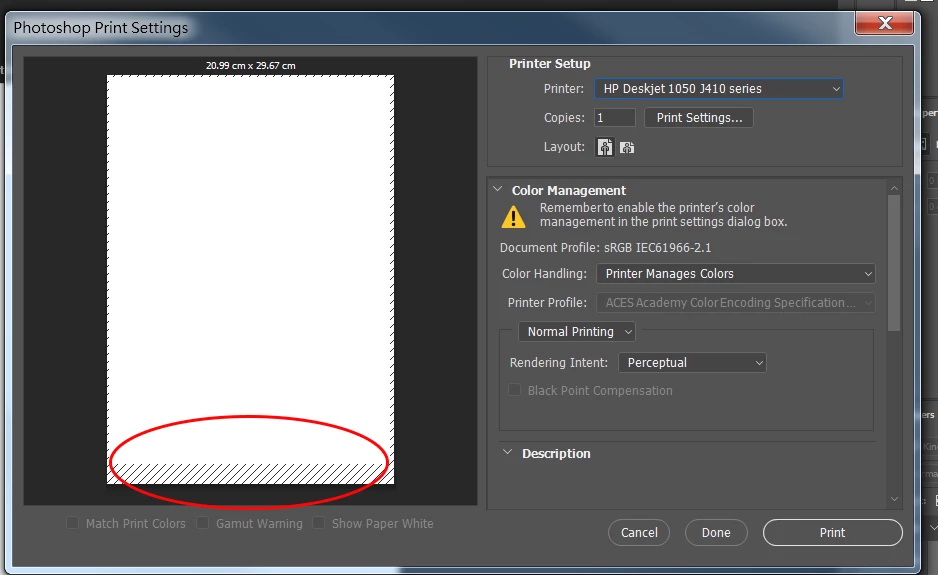
Recently I try to print some poster that i made, than I found out that was a problem. The A4 paper has not been fully cover , can anyone tells me how to remove the border?

This topic has been closed for replies.
Correct answer Derek Cross

Get a printer that prints to the edge.

4 replies

NB, colourmanagement
Community Expert
June 27, 2023

It's not a matter of 'deleting' the border - but, because many printers have to hold the end of the paper when printing, you get a small end border which is unavoidable. Even edge-to-edge printing may not solve it because your issue is at the "end" not the edge. 


I hope this helps
neil barstow, colourmanagement net - adobe forum volunteer - co-author: 'getting colour right'
google me "neil barstow colourmanagement" for lots of free articles on colour management

kluklu
Participating Frequently
June 25, 2023

I could not find this option when i pront directly from photoshop but using same printer as you when i pront from irfan view i have this BORDERLESS OPTION

davescm
Community Expert
January 7, 2017

Hi Harry

Borderless printing has to be set in the printer driver (via "Print Settings" on your screenshot)  if you printer supports borderless at that print size.

See example below for Epson

Dave

New Participant
January 8, 2017

I have try that before with my HP printer but I can't find the borderless function.Other than that the border still pops up when i change to Adobe PDF it shows 20.99x29.67 (The file I create is a 210x297mm A4 size)

Derek Cross
Community Expert
January 8, 2017

As I mentioned, if your printer doesn't have the feature to print to the edge of the sheet then you can't do it!

Derek Cross
Derek CrossCorrect answer
Community Expert
January 7, 2017

Get a printer that prints to the edge.