
Participating Frequently
February 4, 2020
Answered

PROBLEM PREVIEWS DISPLAYED IN THE FINDER

  • February 4, 2020
  • 4 replies
  • 6469 views

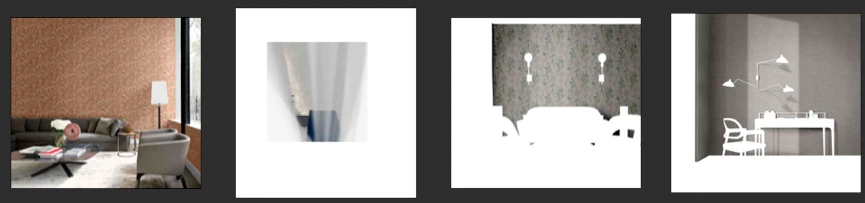
Hi everyone, I have a problem that concerns the generation of previews of .psd files on MacOs Catalina and PS CC 2020 (a problem that I still had with the previous I know and the previous versions of PS on another computer): in practice, as you can see from the attached screen, previews are generated without taking into account the content of the whole image, but often taking random levels.
Here you can clearly see:
these are four environments, the first has a correctly generated preview, the other three have previews generated by levels or masks ... unpleasant when you have to look for an image by looking for it "on the fly" just by looking at its preview.
What could be the cause? In PS the "generate preview" option is activated and it is practically everything by default ... how could I try to solve?
This topic has been closed for replies.
Correct answer Warren Heaton10841144

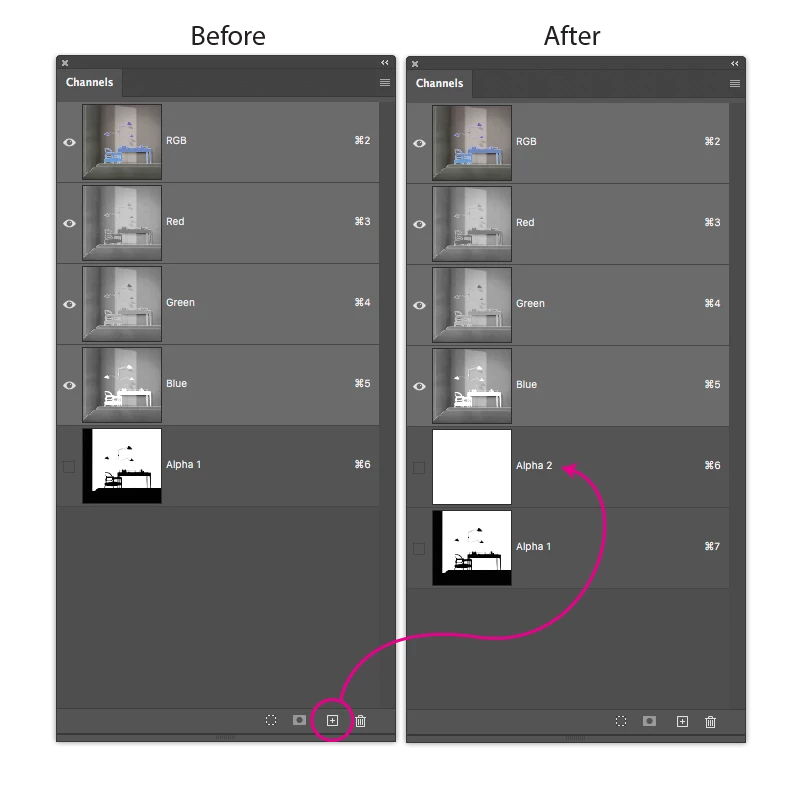
The macOS Preview sees the first Channel in some graphics file formats, revealing just the pixels within the white of the alpha channel (white reveals, black conseals).


Try adding a channel at the front of the Channels Stack in the Channels panel that's filled with white.  This should show your entire image as expected.


While I've experienced this with TIFF and Targa, I'm not sure that I've ever seen it happen with PSD.


4 replies

Participant
September 28, 2020

Open the file >> Save As >> Replace>> and its done!

Warren Heaton10841144Community ExpertCorrect answer
Community Expert
February 12, 2020

The macOS Preview sees the first Channel in some graphics file formats, revealing just the pixels within the white of the alpha channel (white reveals, black conseals).


Try adding a channel at the front of the Channels Stack in the Channels panel that's filled with white.  This should show your entire image as expected.


While I've experienced this with TIFF and Targa, I'm not sure that I've ever seen it happen with PSD.


Participating Frequently
February 12, 2020

I Will try, thanks for the advice 🤗

Participating Frequently
February 13, 2020

it works, also on psd files...thanks!!!

NB, colourmanagement
Community Expert
Community Expert
February 5, 2020

Are you viewing the layered PSD documents with masks in Apple's "Preview" application?

Or simply by highlighting a fikle icon and clicking the spoacebar(quick-view)?

It could be that Apple "Preview" (or quick-view) is not capable of flattening PSD's to display properly and it may not use the pre created preview you mention which was requested in Photoshop's settings?


Does the preview in Adobe Bridge fail also?


thanks

neil barstow, colourmanagement.net

[please do not use the reply button on a message in the thread, only use the one at the top of the page, to maintain chronological order]

Participating Frequently
February 5, 2020

Are you viewing the layered PSD documents with masks in Apple's "Preview" application?

No, in Finder (column or icon view). Same problem with Pathfinder and Forklift.

Or simply by highlighting a fikle icon and clicking the spoacebar(quick-view)?

In this case, preview is correctly viewed

It could be that Apple "Preview" (or quick-view) is not capable of flattening PSD's to display properly and it may not use the pre created preview you mention which was requested in Photoshop's settings?

Maybe. The strange thing is that these "corrupt" previews are then also used by cataloging software (NeoFinder or Disk Catalog Maker, for example).

I can't understand why some previews are generated correctly and some don't...


Does the preview in Adobe Bridge fail also?

In Adobe Bridge preview is correctly viewed

gener7
Community Expert
Community Expert
February 5, 2020

I used to have a problems with Finder thumbnails not generating properly, so I used cmd / on the Finder window to bring up a slider in the lower right side, then move the slider to the left until the thumbs became smaller, almost icons and then I'd let them rebuild and move the slider to the right to bring the thumbs back up.


Seems that problem went away sometime after Mojave, and never had to do that since.

gener7
Community Expert
Community Expert
February 4, 2020

Under Preferences > File Handling, set "Maximize Compatability of PSDs and PSBs" to Always.


What this does is creates a composite thumbnail of all the layers for display in other software such as the Finder.


Participating Frequently
February 4, 2020

Thanks for reply. But Photoshop is already set as you suggest...

gener7
Community Expert
Community Expert
February 4, 2020

Trial out PSB Quicklook and see if it solves the problem. As a bonus you get PSB Thumbnails.

http://www.johnrellis.com/photoshop/psbquicklook.htm