Epson printer profiles missing in Photoshop / mac
Epson printer profiles missing in Photoshop
To use "Photoshop Manages Color" properly (to make accurate prints) you need access to the printer manufacturer's paper specific profiles, since you need to select the relevant paper profile in that dialog.
Using "Printer Manages Color" should be OK, as long as the printer driver is correctly installed, because that process [based on the media type selected] calls upon ICC printer profiles from a different installed folder [usually a hidden one, so they don't get deleted inadvertently].
Epson ICC printer profiles are missing in Photoshop after updating to macOS Mojave.
To resolve this issue, reset the printing system in your Mac's system preferences and then add your Epson printer again.
- Reset the printing system.
For instructions, refer to Apple's support documentation: reset
- Add your Epson printer again.
For instructions, refer to Apple's macOS Mojave User Guide documentation: Add a printer on Mac
- Relaunch Photoshop.
Missing Epson profiles in Photoshop on Mac
Did you select Photoshop manages color in the “print” dialog?
this should provide you with a list of all the ICC printer profiles on your system
Epson puts them in some hidden folders, but normally Photoshop can "see" them.
You may be able to find the profile
Are you on Mac or PC?
If PC, sounds like you may need help from Epson's support team
Here's some Mac tips, just in case photoshop can't find the Epson profiles:
I had to search for these myself on a client site once, took me quite a while. It means I now know how to find them
basically they are in the
“hard disk name”/library/ printers/EPSON/InkjetPrinter2/ICCProfiles/ [inside a “package”]
Not the username/library/
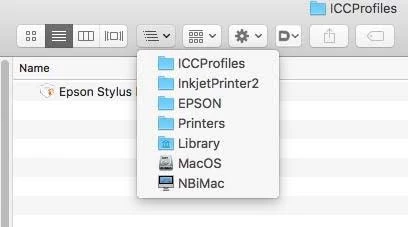
in ICCProfiles (see above) is a folder, e.g: Epson Stylus Pro 4900_4910.profiles
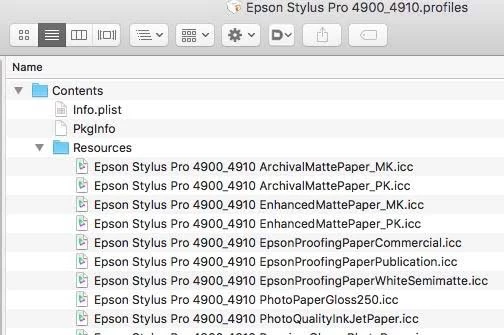
you right click on it [or control click] and select "show package contents"
A contents folder appears
Now look inside that in the ”resources" folder.
see screenshot below
they are the icc profiles used in the Epson driver [driver colourmanagement],
SO don't move them
but you can copy to your normal ICC profiles folder which is in the system library
[ computer name/hard disk name/Library/Colorsync/Profiles ]
can you see them in Photoshops print dialog under "Photoshop manages color" now
I hope this helps
if so, please "like" my reply and if you're OK now, please mark it as "correct", so that others who have similar issues can see the solution
thanks
neil barstow, colourmanagement.net :: adobe forum volunteer
[please do not use the reply button on a message within the thread, only use the blue reply button at the top of the page, this maintains the original thread title and chronological order of posts]



 AdChoices