


lm_cl
Participant
June 27, 2017
Answered

Problem with page size (letter 8x11 inches)

  • June 27, 2017
  • 1 reply
  • 4959 views

Hi. Recently, I discovered that the default page size for letter when you select "New --> Document Type: U.S.Paper  --> Size: Letter",   puts a value of 8 in the width field (8 inches instead of 8,5). I think this have to be a problem with the colon/dot. ¿How can I change the value without adding a custom size?

I use Photoshop 2017.1.1   20170425.r.252 x64 (english)  on Windows 7 (spanish)
    This topic has been closed for replies.
    Correct answer davescm

    Photoshop Family Customer Community  is where problems can be reported to Adobe Staff.


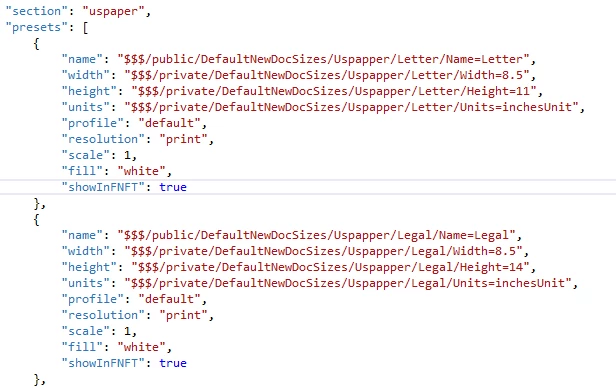
    The defaults are here  (Windows)

    C: Program Files > Adobe > Adobe Photoshop CC2017 > Required Default New Doc Sizes.json

    If you decide to edit the file then do so at your own risk and make a copy first !

    Dave

    1 reply

    davescm
    Community Expert
    Community Expert
    June 27, 2017

    Hi

    It is working correctly here on both the legacy and the "new" New Document dialogues. That is with Photoshop 2017.1.1 r.252 (English) on Windows 10 (English).

    Have you tried resetting preferences ?

    Dave

    lm_cl
    lm_clAuthor
    Participant
    June 27, 2017

    Thanks. I just did the preferences reset, but the problem persists. In the "new" new document the name of the preset says "Letter 8 x 11 in @ 300 ppi"  and "Legal 8 x 14 in @ 300 ppi". This must be 8,5, right?

    davescm
    Community Expert
    Community Expert
    June 27, 2017

    Here is what I see :

    Dave