


Inspiring
June 16, 2018
Answered

Problem with playing actions

  • June 16, 2018
  • 3 replies
  • 6474 views

Hi there,

I have a problem with playing actions in Photoshop 19.1.1. I have  "Space Action" & "Fairy Tale Photoshop Action", and followed all steps in the included "read me" & "before you run" & "how to use the action"  files, also wateched a youtube tutorial. The layers appear correctly: "Background layer", "Original" (middle) and (on top) "brush" layer, and while the "brush" layer was selected, I brushed over the area which I wanted to preserve. But whenever I press PLAY, it does load lots of effects into the layer window, however, there always appears a repeated warning "command SELECT is currently not

available",
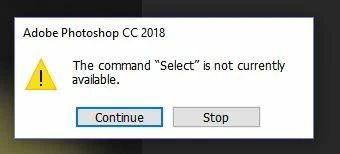
and I can only chose "coninue" or "stop"... I pressed "continue" at last it says something like "could not apply effect, as no pixels are selected". The brushed photo looks very weird and smudgy, and I cannot really make use any of the fx that were loaded in the layers window, as it just looks all odd... seems like an error, does anyone know this problem? It was unfortunately the same with "Fairytale Photoshop Action". Help would be very much appreciated, thanks!

PS: I am new to Photoshop actions and have not worked with these before.

    Correct answer chiara11

    Load Space Brushes.abr before playing action. Easiest way to load brushes is File > Open > navigate to Space Brushes.abr and double click on it.

    Same thing with Fairy Tale. Look for .abr file in package and load brushes before playing action.


    Hello, the spacebrushes had been loaded already, this was mentioned in the "how to use" file, and I had done that step correctly.

    JJMack wrote:

    "In the action palette expand the action. Highlight the select layer step. Click the record button. Then in the tools bar select the brush.  Click on the stop recording button. Save the Edited Action set."

    Thanks, I tried to record the step "select brush" after highlightiny "select layer" - do I have to select a certain single brush from "spacebrushes", or the whole spacebrushes folder? I tried  both, but in the actions menu, "save action set" was not selectable (sorry...)

    Thanks!

    3 replies

    Bojan Živković11378569
    Community Expert
    June 27, 2018

    So you have two sets with the exactly same name but different brushes? Photoshop should load them despite that both sets have same name. However, you can rename .abr file in explorer what will make things much easier for you.

    chiara11Author
    Inspiring
    June 27, 2018

    YES, exactly. The included (different!!) brush sets of the 2 different actions incidentally have the same name, and in addition, the actions themselves have a VERY similar name: "SPACE ACTION" & "SPACE PHOTOSHOP ACTION")  - I had totally forgotten about this other action, and logically thought all the time that "space brushes.abr" was already correctly loaded into brushes window, but it was "space brushes.abr" of this other (2nd) action (which I had not used for quite a while and therefore did not realize the mix-up).  Yes, I also thought yesterday it would be wise to rename one of the brush sets, but if it is renamed, will the action stil find the brushes if the brush folder is re-named?

    All 3 actions work now perfectly, I think with the other 2 ones (including "Fairy Tale" action) the problem for the warning "command select currently not available" was that the layer "brush" MUST be typed in lowercase/small letters (I am quite sure I had -by habit- typed "Brush" before)

    Many thanks again to ALL of you for your help!

    Ps: I cannot find the option "replace brushes" in the brush menu, where can I find/get this option? I thought this option should appear somewhere below "Preset Manager"? (--> Please see menu screenshot in my previous reply)

    Bojan Živković11378569
    Community Expert
    June 27, 2018

    Replace Brushes is not an available option anymore, it uses to be there in a couple of lists but not anymore. Step in action will work because it is looking for specific brush preset which is not tied to any particular group. The problem may occur when action is looking for something in particular set and that is always visible when you expand action step. It action step has recorded: Play action "Test" of set "Actions" then you must have an action named Test in a set named Actions. Whatever is in parenthesis must be present literally.

    Bojan Živković11378569
    Community Expert
    June 16, 2018

    It is not possible to explain what is really preventing action without seeing steps in the Actions panel or to play step by step in more complicated situations. From your description, it appears that step to select something is not possible what is followed by some other error because some of the previous steps is not executed. I cannot tell you what is the reason for this message without stopping action at that step with Layers panel visible what can solve mystery why something could not be selected.

    Play action and stop it at first error message what should expand step in the actions panel then capture a screenshot with Actions panel and Layers panel visible. Lastly, upload a screenshot so someone may be able to help you.

    chiara11Author
    Inspiring
    June 19, 2018

    Hi, Thanks for your replies! I have attached  somes screenshots. I had 3 Layers; Background, original (middle) and "Brush" on top. While the "brush" layer was selected, I brushed over the are to be preserved with a dark brush (the original shows a women in a white dress standing on a field in autumn), then I pressed "play action". Lots of fx were being loaded into the layers window, and during the loading process, the brushed area on the picture suddenly disappeared (the woman became visible again) and the background changed from the nature field into a neural creme gradient color (don't know if that is normal) I have made the screenshot when the warning "command select is currently not available" appeares for the first time:

    Here are all other layers: 1st from bottom,

    2nd from top:

    Hope this helps... thanks!

    chiara11Author
    Inspiring
    June 23, 2018

    Hello, the spacebrushes had been loaded already, this was mentioned in the "how to use" file, and I had done that step correctly.

    JJMack wrote:

    "In the action palette expand the action. Highlight the select layer step. Click the record button. Then in the tools bar select the brush.  Click on the stop recording button. Save the Edited Action set."

    Thanks, I tried to record the step "select brush" after highlightiny "select layer" - do I have to select a certain single brush from "spacebrushes", or the whole spacebrushes folder? I tried  both, but in the actions menu, "save action set" was not selectable (sorry...)

    Thanks!


    PS: At last SOME good news: the actions works now with FAIRY TALE ACTION (there was no brush included, just Fairytale.atn (it seems so be important to type "brush" without capital letters, with fairy tale action, it COULD be that this point was the problem... however, Space Action still does not work,  I just tried it again, it still always stops at this exact step "select brush bg_5"

    (I don't even know which brush that should be, the following ones were included with Space Acition:

    However, the "add select brush layer step" might help, IF I can find out how to manage to save this new recorded action set (please see previous post above).

    MANY THANKS!!

    JJMack
    Community Expert
    June 16, 2018

    What is the Action trying to select?  Does the document have what the Action is trying to select? Action have dependencies...

    JJMack