


Participating Frequently
April 25, 2022
Answered

Problem with quote marks (defaulting to non-English style)

  • April 25, 2022
  • 1 reply
  • 5635 views

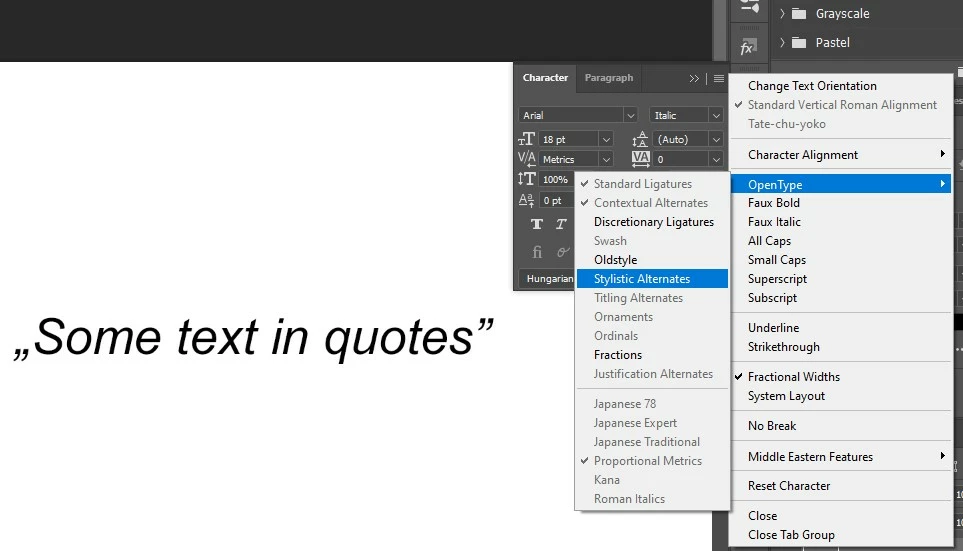
I'm not sure if this is a bug or just a mental block on my part -- or maybe I suddenly have an international version of the software -- but typing quotes now defaults to a European style (open quotes on the baseline), and for the life of me I don't know why or how to correct the issue short of inserting the proper glyph. Can anyone help me with this?


I should also note that I've switched fonts in the off chance that was the problem. I've also checked "About Photoshop...," but can't find any indication of the software's localization.
This topic has been closed for replies.
Correct answer jane-e

I don't seem to have the same options.


@robadams2 wrote:

I don't seem to have the same options.


Arial isn't an OpenType font, but your screen shot tells us what we need to know all the same. Select your text and change the language in the Character panel from Hungarian to English. 


Jane

1 reply

Kevin Stohlmeyer
Community Expert
Community Expert
May 2, 2022

What do you have set in Preferences/Type Use Smart Quotes?

Check the setting without a document open.

robadams2Author
Participating Frequently
May 2, 2022

"Use Smart Quotes" is checked. So is "Show Font Names in English," which makes me think I may have a non-English, or at least non-US, version of the software. Everything under every menu is in English, though, and appears to be the US-variety as far as I can tell.

Nancy OShea
Community Expert
Community Expert
May 3, 2022

US English uses both curly quotes and straight quotes depending on which you choose.


Most people use curly quotes with Serif fonts (Times Roman, Georgia) and straight quotes with Sans-Serif fonts (Arial, Helvetica). 


Nancy O'Shea— Product User & Community Expert