


JamesCrow
Participant
October 26, 2017
해결됨

Problem with Raw files being cropped

  • October 26, 2017
  • 5 답변들
  • 13250 조회

Dear all I'm having some problems importing some of my raw files into photoshop


When I preview them in finder they are 3840 x 5760 as CR2

but as jpeg they 3840 x 5120


i open them in camera raw 9.12 but the raw files suddenly become like the jpeg versions


I have seen advice of other forums of converting them to DNG, but when i open them as DNG they are the same.


I'd really like to restore the tops and bottoms of my photos in some pictures and don't know why i can't open them in the full aspect ratio


any help would be a life saver!


Thank you


EDIT: Photos were taken on mark iii 5d
이 주제는 답변이 닫혔습니다.
최고의 답변: Vanessza

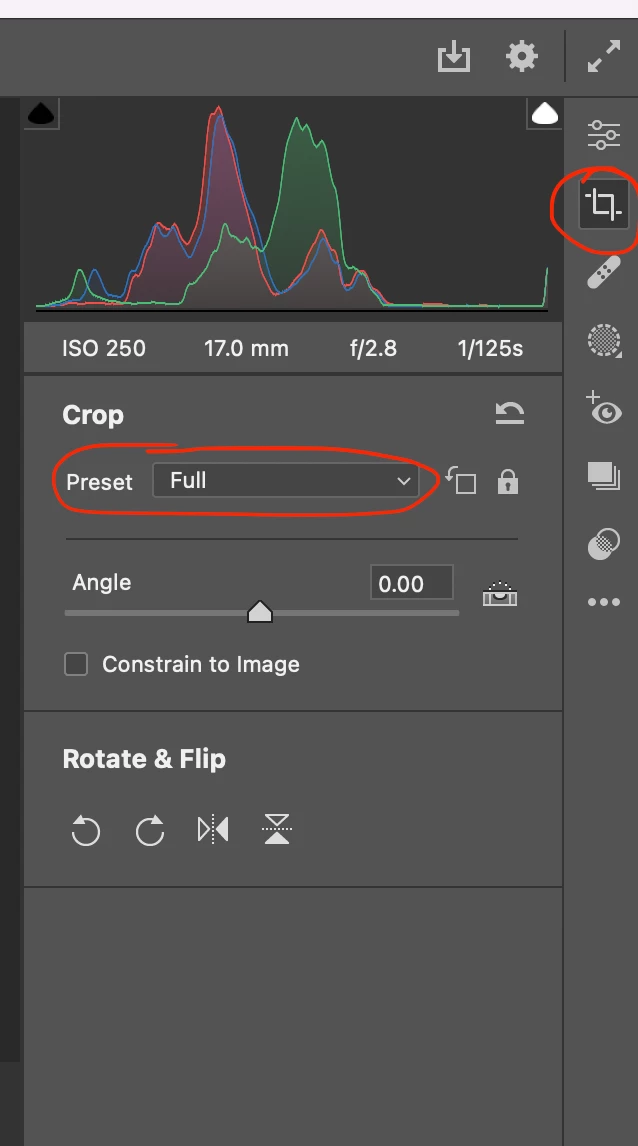
I ran into the same problem, and this is the solution I've found: After you open the raw file in Photshop Camera raw go to the Crop section on the right side and set the Preset to Full. 

5 답변

Participant
July 27, 2024

Hey James, 


Open preference dialog (CMD K) > Workflow > Image Resizing > Untick resize to fit > Change your height parameter from 5120 to 5760. 


josantgomez
Legend
August 22, 2023

Lamento no tener una respuesta para ti. Pero yo estoy con un problema por el cual cuando abro un archivo raw (ORF) Adobe Camera Raw recorta los márgenes. Tu hablas de abrir en "relación de aspecto completa". Deduzco que tienes problemas con los márgenes inferior y superior y yo los tengo con los márgenes laterales. El fabricante de la cámara me ha respondido que no tiene solución "debido al tamaño de las imágenes" ... obtenidas con las cámaras que ellos fabrican y con su propio software, Workspace. Mi problema está descrito en esta dirección de la comunidad

https://community.adobe.com/t5/photoshop-ecosystem-bugs/por-qu%C3%A9-fotos-windows-11-muestra-imagen-completa-de-archivo-orf-y-programas-de-adobe-la-recortan/idc-p/14028800#M89893

¿Cómo se puede abrir un archivo en la relación de aspecto completa?

Vanessza답변
Participant
September 19, 2022

I ran into the same problem, and this is the solution I've found: After you open the raw file in Photshop Camera raw go to the Crop section on the right side and set the Preset to Full. 

Participant
October 23, 2022

This cropping problem just started with me when the automatic PS version update happened a few days ago. JPEG files ooen fune, but raw files are cropped. My crop setting is at "full", but I still have to go in and adjust it manually for each image imported. I don't know how many version updates I've gone thru over the last 10+ years and this never happened with any of them. The Adobe help desk didn't or couldn't....

Stephen Marsh
Community Expert
Community Expert
October 24, 2022

Some cameras include proprietary crop metadata that can only be handled using OEM software.

davescm
Community Expert
Community Expert
October 26, 2017

Hi

The 5D Mk111 can set a crop in camera. From the drop down at the top of camera raw try "Clear crop"

The attached gives more info :

Images unexpectedly cropped in Lightroom

Dave

JJMack
Community Expert
Community Expert
October 26, 2017

Check your ACR worflow options.

JJMack
JamesCrow
JamesCrow작성자
Participant
October 26, 2017

I've tried going to here sadly. All I get is the default image option in sizing?

JJMack
Community Expert
Community Expert
October 26, 2017

Did you save any workflow presets?

JJMack