New Participant
May 5, 2019
Question

Problem with saving cmyk images

  • May 5, 2019
  • 7 replies
  • 6722 views

Hi,

I have a problem with converting from RGB to CMYK. I really hope for your help, because I find nothing on the internet.

When I convert an image from RGB to CMYK, I realize that the colors are changing.

But if I save the CMYK image once as JPG and once as PDS and open the images, the images have different colours, although in both cases it is the same CMYK image. How do I know which colors await me after printing?

Is it normal that the colors differ depending on the storage format ??

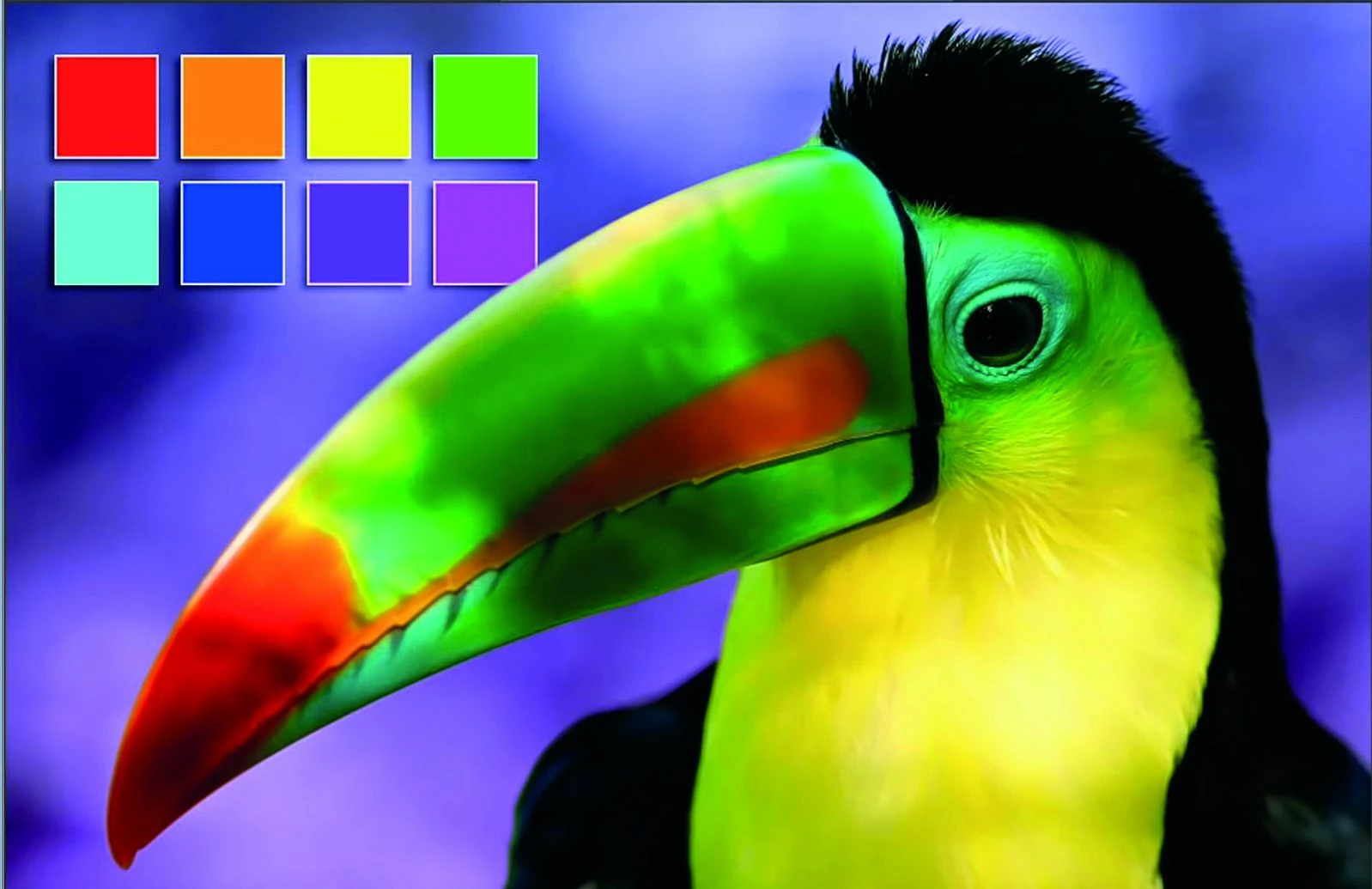
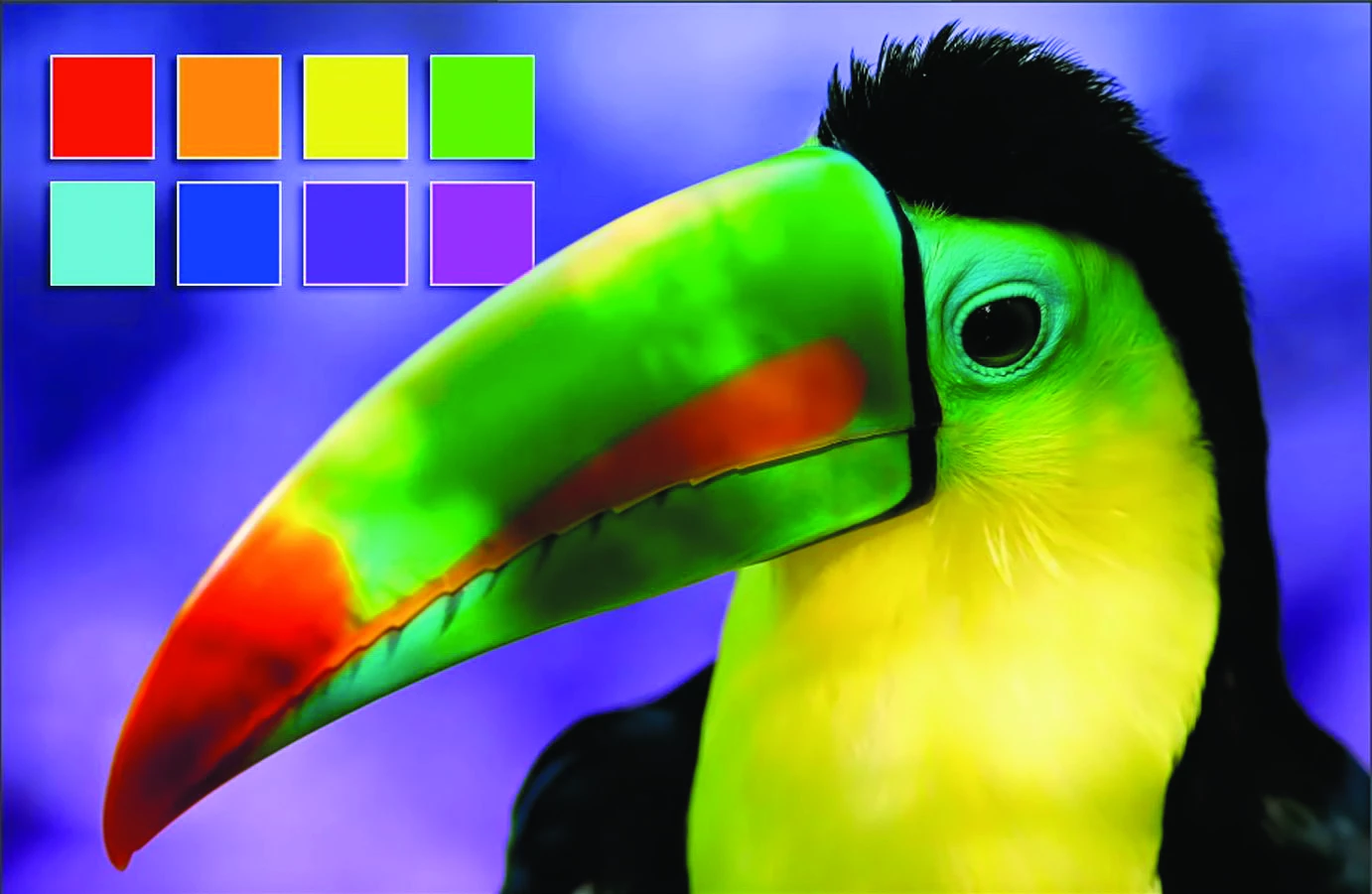
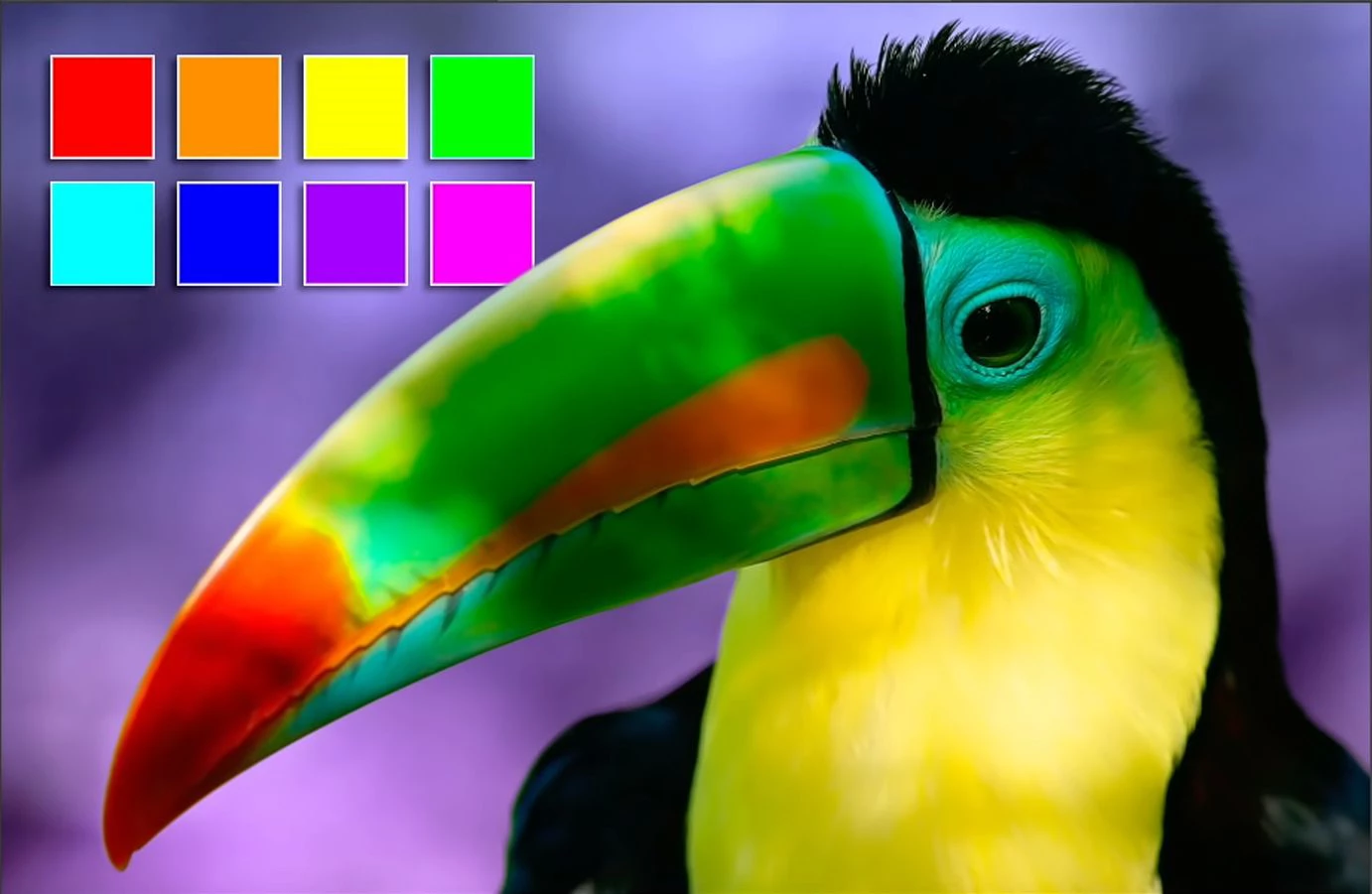
The first image is the original image, the second is converted to CMYK and saved as PSD and the third image is the same CMYK image saved as JPG only.

Best regards
This topic has been closed for replies.

7 replies

Legend
May 6, 2019

That's cool... some printing companies still ask for CMYK, though they are moving away from this for several reasons. Ok, a key question is: did they tell you WHICH CMYK to use? Or did they supply a profile of any kind for you to work with? This is needed because CMYK isn't a generic thing, it's a whole lot of similar but different mixes of inks.

Inspiring
May 6, 2019

My company for book-on-demand, an important one in Berlin, asks professionals

für CMYK-files, based on ISO-Coated-v2-eci. They are absolutely content with PDF/X1-a.

My toner printers (PostScript) are calibrated using CMYK targets.

My large format inkjets (now only one left) were and are calibrated using CMYK targets.

The inkjet is operated by a RIP.

Proof-printing of the mentioned PDF/X1-a files can be used to check the appearance

in advance and by comparison the result of the book printing. Proof printing itself is

controlled by printing and measuring the so called FOGRA-Medienkeil (media wedge).

If the measurements for the FOGRA pattern are in limits, then the proof is reliable.

The RIP generates internally a Device Link Profile, connecting ISO-Coated-v2-eci

and the printer space.

By this workflow any danger of corruption of my data is avoided and the result is

reliable – if the printing company had put their machines into a well calibrated state.

Best regards --Gernot Hoffmann

Derek Cross
Community Expert
Community Expert
May 6, 2019

PDF/X-1 is now considered obsolete, among other things, it doesn't support transparency.

Nancy OShea
Community Expert
Community Expert
May 5, 2019

The only time I use CMYK is for professional offsite printing.  I have a CMYK & PDF  preset that my print professional recommended. 

Nancy O'Shea— Product User & Community Expert
New Participant
May 6, 2019

Thanks - that's right, I want to print something. Which one is it that they recommend?

D Fosse
Community Expert
Community Expert
May 6, 2019

But print how, exactly? CMYK is only for commercial offset printing, book and magazine print in large volume. A profile recommendation from one printer is only valid for that printer and has no relevance elsewhere.

For inkjet printers you should not use CMYK at all. They expect (and will give best results with) RGB data.

Legend
May 5, 2019

Photoshop is the obvious choice for me. Not sure why you'd use anything else.

Derek Cross
Community Expert
Community Expert
May 5, 2019

D Fosse gave a good summary of this matter. There's an excellent online video tutorial on Lynda.com, you can get 30-day free access (it includes Photoshop as well as InDesign): InDesign: Color Management - Welcome | LinkedIn Learning

It's important to calibrate your monitor and, as mentioned, work in RGB color mode.

By the way, re your sample image, you can't reproduce bright green and bright orange in CMYK.

josephlavine
Community Expert
Community Expert
May 5, 2019

As others have mentioned, this is potentially a rather large discussion. First off, we are talking two different sets of hues so there will be changes (RGB vs CMYK), and second, the RGB color space is probably larger than the CMYK, which means colors will have to shift.  Without knowing the precise necessary CMYK profile you might be causing more harm. 

I suggest confirming what is necessary and after you convert to CMYK be prepared to make tonal adjustments. Keep in mind that RGB and CMYK are two different animals, so although you can get close, it is impossible to perfectly match.

Legend
May 5, 2019

Key point: Do not try to view the CMYK JPEG in any other app. That will mess you up even before colour management is involved.

D Fosse
Community Expert
Community Expert
May 5, 2019

Good point. Very few, if any, consumer-oriented image viewers/web browsers etc have CMYK support at all. Rely on Photoshop for this.

D Fosse
Community Expert
Community Expert
May 5, 2019

Yes, color management was invented to deal with precisely this.

If you know absolutely nothing about this, you're at the bottom of a pretty steep hill. The problem with that, is that you really shouldn't be working in CMYK at all without some basic color management understanding. In RGB you can basically get away with "stick to sRGB IEC 61966-2.1, and you'll be fine". But CMYK has some special considerations.

The thing is, RGB and CMYK are just generic color models. Color management deals not in generic color models, but in specific color spaces. A color space is described and defined by an icc profile.

In RGB there is sRGB, Adobe RGB, ProPhoto RGB and so on. These are pretty standardized. In CMYK it's a lot worse, because each CMYK profile describes a particular press/paper/ink combination. Standards for this vary around the world. Commonly used CMYK profiles are e.g. US Web Coated (SWOP) v2, ISO Coated v2 300% (ECI), and so on.

You cannot send files to offset press without knowing the exact CMYK profile used. You get this from the printer. There is no such thing as generic "CMYK".

If you're printing to an inkjet desktop printer, they are not CMYK devices. Don't use CMYK there. They expect RGB data, which are converted into whatever inks are used inside the printer driver.

Now - some color spaces are smaller than others. This is known as the color space gamut. The gamut defines the most saturated color reproducible in that color space. When going from a large color space to a smaller, you may get gamut clipping - some saturated colors are outside the smaller color space, and so get remapped to the nearest (duller) reproducible color.

This is just a basic outline of the things you need to consider. I'm leaving out the details.

New Participant
May 5, 2019

Hello,
Thank you very much for your detailed answers, michael bullo and D Fosse . Of course I'm basically informed about cmyk and rgb, but my question is not about the difference between rgb and cmyk.


My question is why one and the same cmyk image looks different as psd and jpg.

Michael Bullo
Community Expert
Community Expert
May 5, 2019

1. Have you checked whether you are consistently embedding the same color profile in your different files (see my first post)?

2. Are you viewing your different files in different software and does that software support a color managed environment?

Michael Bullo
Community Expert
Community Expert
May 5, 2019

Much of what you are referring to here involves Color Management which is potentially a massive topic. You may like to review pages such as the following and then post further specific questions...

As for some of your questions, are you embedding color profiles when you are saving your different types of files (look for a check box in the save dialog box)? You generally should do this and if you are not it may explain why your colours are looking different.