



FarhaanaBeato
Participant
October 24, 2017
Answered

Prompt to Rasterize EPS Files in CC 2018

  • October 24, 2017
  • 11 replies
  • 24106 views

I recently installed the Photoshop CC 2018 update and I’m having issues with placing EPS files. Unlike CC 2017, when I place an EPS file, I get a prompt to “Rasterize EPS Format” and select  pixel dimensions. If I don’t know what dimensions I need, I just have to guess and hope that it’s large enough to not be pixelated.
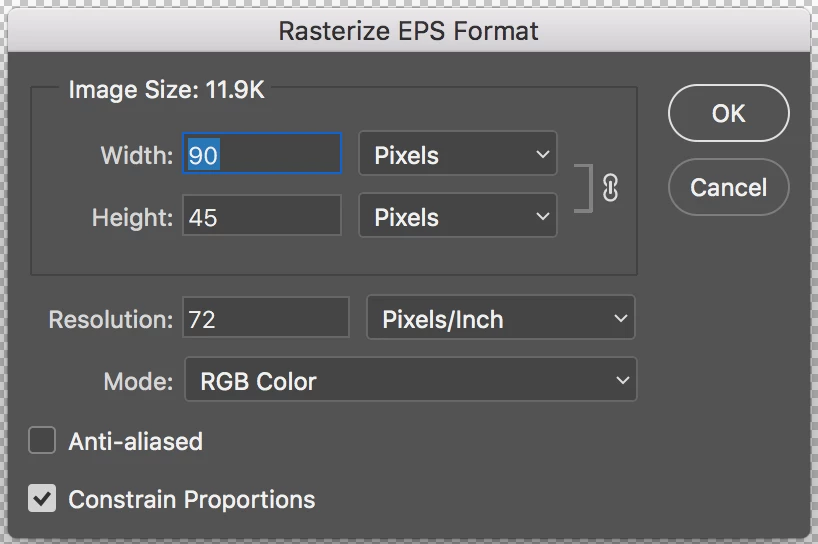


I use EPS files often because they’re vectors. There is no visible option to not rasterize the EPS and I’ve tried looking in the settings to see if maybe there was a new setting for placing images. This prompt does not happen with SVGs and PNGs. AI files seem to work but the prompt for the bounding box/media box makes the process slightly longer.


How can I place a file without having to rasterize, or stop this prompt from showing up?

This topic has been closed for replies.
Correct answer Nicollet

Hey Everyone!


I am happy to announce that this issue should be resolved in the release of Photoshop that just went live, 19.1. Please open your Creative Cloud desktop app, update Photoshop and try it out!


Thank you,

Hannah


Adobe Blog: Photoshop Releases Version 19.1 With Selections Improvements, Advanced Support for Windows High-Density Monitors and More

What's new: What's new in Photoshop

What's fixed: Fixed issues in Photoshop

Instructions for updating: Update Creative Cloud apps

11 replies

Participant
July 21, 2021

Ok this is BS Adobe; opening EPS files is definately screwed up on the latest version for MacOS, 22.4.3; macOS version 11.4; 2019 MacPro.


Does not give the prompt to rasterize to a specific resolution, and it also opens them as indexed color which looks like crap.


Please fix this ASAP, as I am sure there are a ton of people asking WTF right now.

Participating Frequently
July 23, 2021

I'm having the same problem. Just upgraded to 22.4.3 yesterday and now I do not get that prompt. EMERGENCY!!


Participating Frequently
July 23, 2021

FYI for others having this same problem, we opened a ticket with Adobe. Awaiting it to be assigned. Everyone on the team that updaed to 22.4.3 is experiencing the same thing.

Participant
March 11, 2020

I never had this problem until a recent update to both Photoshop v20.0.8 and Photoshop 21.1. Now EPS files which were created in Photoshop AS Photoshop EPS files -- not vector -- ask me this every time I open one that hasn't been opened in the most recent update version yet. (Not my choice to use EPS files in Photoshop, my predecessor created thousands of them and I don't have the time change them all to .psd files.)

Participant
May 30, 2020

Hi, I'm having this issue as well. An EPS file opened fine with vector path when I updated to PS 20 until today after the update to 21.1.3.  The PS update deleted my previous app so anyway to get this to work as it's supposed to? My client isn't happy and I'm not to pleased either 😞

Participant
July 21, 2021

Hmm, it seems the latest version 22.4.3 may have re-introduced this issue.  This very frustrating.

Participant
January 28, 2018

I followed the update instructions exactly however I am still unable to open my .ai file in photoshop. I get this message "Could not complete your request because Photoshop was unable to parse the PostScript.". I have the lastest OS system, updated my Photoshop CC 2018. Any ideas? Thanks!

Jeff Arola
Community Expert
Community Expert
January 28, 2018

Sounds like a different issue from what is being discussed here.

What operating system are you using?

Have you tried different ai files?

Do you have Adobe Illustrator?

Nicollet
Adobe Employee
NicolletCorrect answer
Adobe Employee
January 23, 2018

Hey Everyone!


I am happy to announce that this issue should be resolved in the release of Photoshop that just went live, 19.1. Please open your Creative Cloud desktop app, update Photoshop and try it out!


Thank you,

Hannah


Adobe Blog: Photoshop Releases Version 19.1 With Selections Improvements, Advanced Support for Windows High-Density Monitors and More

What's new: What's new in Photoshop

What's fixed: Fixed issues in Photoshop

Instructions for updating: Update Creative Cloud apps

Jeff Arola
Community Expert
Community Expert
January 25, 2018

Yes, it appears to be fixed.

Good job and thanks.

Participant
January 12, 2018

Same thing is happening to me after the last update - looks like the problem is only EPS files - AI and other files can be placed as smart objects ok.  You definitely could place eps files prior to the update - I did it all the time.

FYI - Also lost live text updates after the last update as well. 

endirico
Participant
December 20, 2017

Same issue! Hope this will be fixed soon!!!

By the way: I found a workaround (though its rather clumsy). After placing the EPS becomes a smart object. When you edit this in Illustrator it becomes vector again in Photoshop. This might indicate that the whole issue is really a bug ...

Participating Frequently
December 8, 2017

Yes me too -- very frustrating.  I hope this is a bug and not some weird decision that was made!  I'm on Mac and CC2018

Participant
May 30, 2020

Hi, I'm having this issue as well. An EPS file opened fine with vector path I updated to PS 20 until today when after the update to 21.1.3. 🙂 The PS update deleted my previous app so anyway to get this to work as it's supposed to?


austinw36517548
Participant
November 21, 2017

I am having the same issue!

Participant
November 30, 2017

Same issue. (like the original poster - a frequent workflow from previous versions; quite frustrating to have this issue now) The preferences would imply some way to have it behave properly: "Skip transform when Placing", "Resize image during place", but no combination of those seems to remove the rasterize prompt and allow me to scale the image by hand before I commit to a rasterization.

ignite_mike
Inspiring
November 6, 2017

Im having the same issue as well. Also on Mac, running OS 10.12.6.

Jeff Arola
Community Expert
Community Expert
October 24, 2017

That must a bug on the mac version of photoshop cc 2018, since it happens to me on a mac but not on windows both using photoshop cc 2018 and the same eps file.

SG...
Adobe Employee
Adobe Employee
October 24, 2017

Hi,

Which version of macOS are you using?

regards,

steve

Jeff Arola
Community Expert
Community Expert
October 24, 2017

I tried on both mac os x 10.11.6 El Capitan and macOS High sierra 10.13, both running photoshop cc 2018.

I tested eps files created in both illustrator and inkscape and both present the Rasterize EPS Format when using File>Place Embedded or Place Linked commands.

The op doesn't say what operating system their using, but looks like a mac judging from the Rasterize EPS dialog.