


Exit
  • Global community
    • Language:
      • Deutsch
      • English
      • Español
      • Français
      • Português
  • 日本語コミュニティ
  • 한국 커뮤니티
0

PS CS6 Font cursor and typing issues

Explorer ,
Dec 30, 2012 Dec 30, 2012

I haven't seen any other posts about this.

The cursor, when typing or editing text is not in the correct position. If I begin typing, it stays a the first column, instead of progressing with the typing.

I am unable to insert spaces at the beginning of a line.

Sometimes the cursor will appear at the end of a line, but be inserting characters at the beginning of the line.

Is this an update fix?
29.1K
Translate
Report
Community guidelines
Be kind and respectful, give credit to the original source of content, and search for duplicates before posting. Learn more
community guidelines

correct answers 1 Correct answer

Community Expert , Dec 30, 2012 Dec 30, 2012

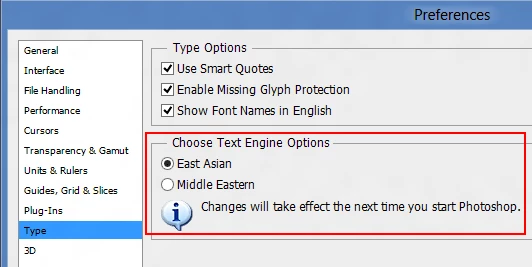
It sounds like you might have the text engine set to Middle Eastern instead of East Asian.

Photoshop (Edit)>Preferences>Type

Untitled-2.png

Translate
Adobe
Community Expert ,
Dec 30, 2012 Dec 30, 2012

Which version of photoshop cs6 are you using and operating system?

Did you try resetting the type tool or resetting the photoshop cs6 preferences?

Right click on the Big T on the tool options bar and click Reset Tool

Untitled-3.png

reset preferences:

http://forums.adobe.com/thread/375776?tstart=0

Translate
Report
Community guidelines
Be kind and respectful, give credit to the original source of content, and search for duplicates before posting. Learn more
community guidelines
Explorer ,
Dec 30, 2012 Dec 30, 2012

Thanks for the reply R_Kelly.

I'm using a new install of Photoshop CS6.0.1- so I haven't reset preferences. I tried resetting the tool, with no results.

Does the cursor not stay at the first line when you type?

Translate
Report
Community guidelines
Be kind and respectful, give credit to the original source of content, and search for duplicates before posting. Learn more
community guidelines
Community Expert ,
Dec 30, 2012 Dec 30, 2012

It sounds like you might have the text engine set to Middle Eastern instead of East Asian.

Photoshop (Edit)>Preferences>Type

Untitled-2.png

Translate
Report
Community guidelines
Be kind and respectful, give credit to the original source of content, and search for duplicates before posting. Learn more
community guidelines
Explorer ,
Dec 30, 2012 Dec 30, 2012

Ahhh! That did it! Thanks so much.

Translate
Report
Community guidelines
Be kind and respectful, give credit to the original source of content, and search for duplicates before posting. Learn more
community guidelines
New Here ,
Jul 28, 2015 Jul 28, 2015

Smart Pacoan!!! Thanks a lot had the same problem fixed!!!

Translate
Report
Community guidelines
Be kind and respectful, give credit to the original source of content, and search for duplicates before posting. Learn more
community guidelines
New Here ,
Jul 28, 2015 Jul 28, 2015

oops sorry I meant R-Kelly ! anyway that made both myself and Pacoan happy

Translate
Report
Community guidelines
Be kind and respectful, give credit to the original source of content, and search for duplicates before posting. Learn more
community guidelines
New Here ,
Sep 13, 2017 Sep 13, 2017

still doesn't work for me

Translate
Report
Community guidelines
Be kind and respectful, give credit to the original source of content, and search for duplicates before posting. Learn more
community guidelines
Community Expert ,
Sep 13, 2017 Sep 13, 2017
LATEST

What version of photoshop and operating system are you using?

You restarted photoshop after changing the Text Engine?

Translate
Report
Community guidelines
Be kind and respectful, give credit to the original source of content, and search for duplicates before posting. Learn more
community guidelines