


Inspiring
May 16, 2022
Answered

PS freezes in when creating a new file

  • May 16, 2022
  • 1 reply
  • 1171 views

Hi! I'm using PS Version 23.3.2 on a Win 10 PC. When I open PS and just after that creating a new file my  PS screen freezes! When I open PS with a randomly choosen  file from Lightroom and then create a new file, PS does not freeze in. What ist the cause for this? Thanks!
This topic has been closed for replies.
Correct answer Trevor.Dennis

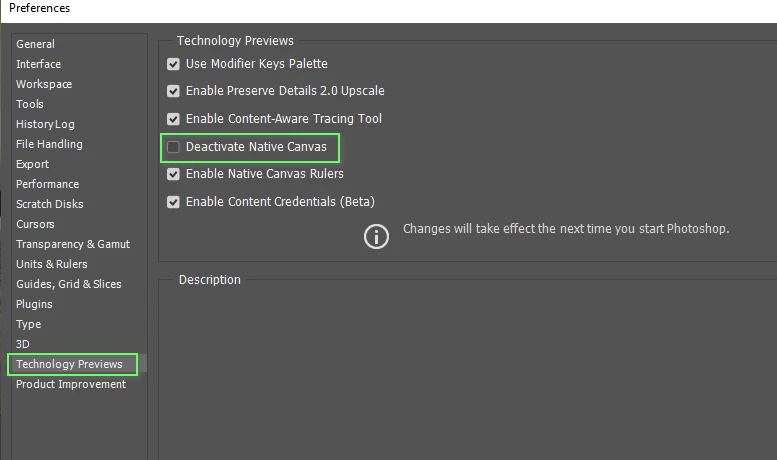
It might be worth trying Decativate Native Canvas in that case.  I've not come across instances where it has fixed that particular issue, but it does seem to clear up all sorts of UI issues.  Note you need to restart Photoshop for it to take effect.  Good luck.

1 reply

Stephen Marsh
Community Expert
Community Expert
May 16, 2022

Is there any difference switching between the new/legacy new doc settings in preferences?

HaraldAuthor
Inspiring
May 16, 2022

yes. it works when I switch back to the legacy (old) new doc settings...

Trevor.Dennis
Community Expert
Trevor.DennisCommunity ExpertCorrect answer
Community Expert
May 16, 2022

It might be worth trying Decativate Native Canvas in that case.  I've not come across instances where it has fixed that particular issue, but it does seem to clear up all sorts of UI issues.  Note you need to restart Photoshop for it to take effect.  Good luck.