


Inspiring
January 19, 2025
Question

Pshop26 not backwards compatible to CS6 on text

  • January 19, 2025
  • 4 replies
  • 468 views

Hi, having created a psd file with text arial regular in 26.2 when I open it inti CS6 it warns me the text engine is different, havent a clue what to do next.

I always use arial regular, in CS6 and now 26.2

As 26.2 has issues I am trying to resolve I can get work done quicker in CS6, so need to go between the two.

tells me to go to prefs and switch the text engine restart pshop and start again.

I dont want to not be able to open all my work this last 10 years with then a warning it uses different text engine switch it back to what I have been using, I have a bad feeling over this.

warning is :-
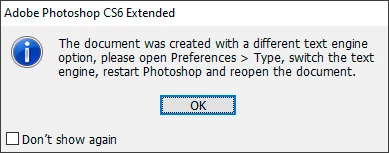
 

Also forwards compatibility !  If I have text on a CS6 or earlier, file, it warns some text layers need to be updated before they can be used for vector based output .,  no - update - learn more.  so if I do that then opening it again in CS6 is going to complain when it started life there and was ok there.


Merlin3

4 replies

Jeff Arola
Community Expert
Community Expert
January 20, 2025

For me when saving the text file as a psd from Photoshop 2025 (ps 26.2), with the default settings as shown in the first screenshot, both Standard Ligatures and Contextual Alternates at the bottom of the Character Panel are enabled.


upon opening the file in Photoshop CS6 it has the text engine message and is also asking to update the text layers

After clicking okay to update the text layers is when the loop between the s and t appears


In Photoshop CS6 disabling Standard Ligatures makes the loop go away


jane-e
Community Expert
Community Expert
January 20, 2025

Wow! Very nice Jeff!


May I ask what happens when you reopen it in CC2025? I don't have CS6 and can't test

Jeff Arola
Community Expert
Community Expert
January 21, 2025

Hi jane-e,


The file seems to be fine opening in Photoshop 2025 after saving it from Photoshop CS6.


No warnings or anything.

Jeff Arola
Community Expert
Community Expert
January 20, 2025

I would just see if you have any issues editing the text without switching to Middle Eastern.

You can always turn off the warning by checking Don't show again


That weird symbol can be turned off by disabling Standard Ligatures in the Character panel


jane-e
Community Expert
Community Expert
January 20, 2025


Try both ligature icons one at a time @Merlin3. Standard ligatures are typographically correct, but some folks decide they don't like them and disable them anyway.


  • Standard ligatures (first icon) correctly combine specific letter pairs such as the "ff"in "efficient". (The forum app does it, too.) 


  • Discretionary ligatures (third icon) put the funky loop on specific letter pairs such "st". Is that what you are calling a weird symbol?


Jane


jane-e
Community Expert
Community Expert
January 19, 2025


quote

Hi, having created a psd file with text arial regular in 26.2

I always use arial regular, in CS6 and now 26.2

By @Merlin3


Are you making edits to text or to other layers?


I don't know if this will work, as I no longer have CS6 installed, but what happens if you don't switch the text engine? Is it just that you cannot edit type layers or does it stop you from editing pixel layers too? If you ignore the alert, is everything okay when you reopen in the other version?


This is just a thought, but might be worth trying.


Jane


Merlin3Author
Inspiring
January 20, 2025

hi Jane,

Doing a test, it opens from 26.2 to CS6 with warning, I go ok, I am able to alter the text. a raster layer is still editable.

There are a myriad of different text things one can normally do, so whether any of those are not possible I dont know without further testing to se if everything is where I last put it, effects same. cdrop shadows and other things the same.  and I have lost a whole week so far to trying to set up 26.2 so just havent time...  no time to do aything opening previous work just now. Will have to saty in CS6 to be sure all is ok.

I made some edits, saved it , also made a new file in CS6, both opened without a warning into 26.2


I am uneasy after a lifetime of setting everything to English UK to choose Middle EAST. Dont know what issues that may cause, further down the line.


Adobe causing enough grief as it is.


Merlin3

Merlin3Author
Inspiring
January 20, 2025

Here is what happens when I alter text engine in CS6 to the other option there, that of Middle Eastern.

Immediately I get a wierd symbol in my text.

and if I leave it as that, and open a file from 26.2 made with arial regular (my go to font in recent years) I dont get the engine warning but an update warning and clicking update I get a wierd symbol !

Jeff Arola
Community Expert
Community Expert
January 19, 2025


In Photoshop CS6 go to Edit>Preferences>Type, click Middle Eastern then restart Photoshop CS6.


You won't see the message although i can't say if it really makes a difference or not when it comes to actually editing the text.