


[QUESTION] How to make the "SATURATION" of certain pixel to MAXIMUM??
Hi.
I want to change certain pixels in my pictures to maximum saturation(=100%), for personal comparison-work.
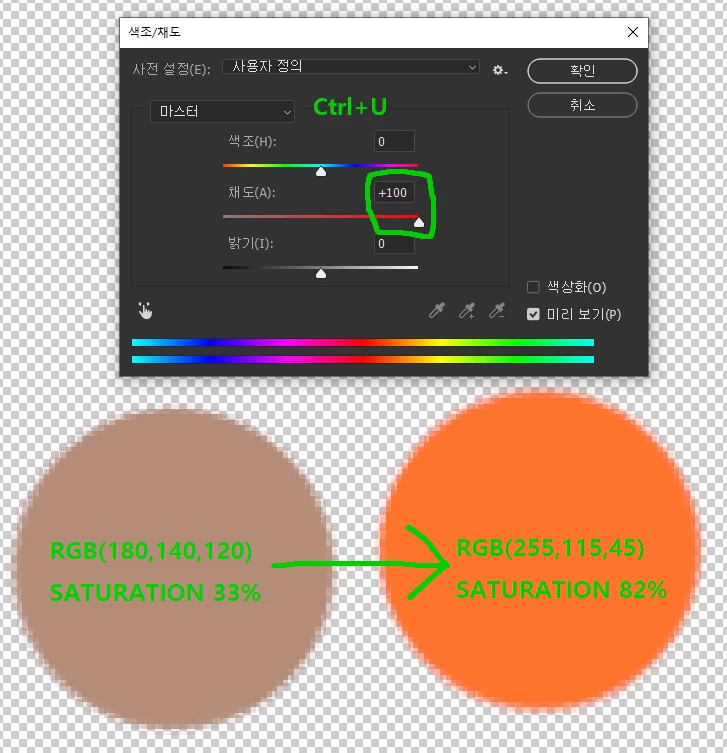
To do this, I turned on
"Image(on the menu bar) - Adjustment - Hue/Saturation(Ctrl+U)".
(**my Photoshop is not English-version, so the function-name might be incorrect)
And I moved the saturation slider to the rightmost position(+100), expecting all pixels have their max saturation.
But when I pick the color(using Alt+LMB) of some pixels, their saturation didn't reached 100%.
Saying that again, some pixels got 100% saturation but others not (70~80% saturation).
For example, if you make a circle filled with RGB(180,140,120) (which has 33% saturation),
then adjust the saturation slider (using Ctrl+U) to the rightmost,
the color finally becomes RGB(255,115,45) (which has 82% saturation).
How can I solve this issue? I think the function(Ctrl+U) was originally designed to be so.
How can I force all pixel(or certain pixel) to have 100% saturation?
Thanks!
 AdChoices