


Participant
January 2, 2023
Answered

[QUESTION] How to make the "SATURATION" of certain pixel to MAXIMUM??

  • January 2, 2023
  • 2 replies
  • 612 views

Hi.


I want to change certain pixels in my pictures to maximum saturation(=100%), for personal comparison-work.


To do this, I turned on

"Image(on the menu bar) - Adjustment - Hue/Saturation(Ctrl+U)".

(**my Photoshop is not English-version, so the function-name might be incorrect)


And I moved the saturation slider to the rightmost position(+100), expecting all pixels have their max saturation.


But when I pick the color(using Alt+LMB) of some pixels, their saturation didn't reached 100%.

Saying that again, some pixels got 100% saturation but others not (70~80% saturation).


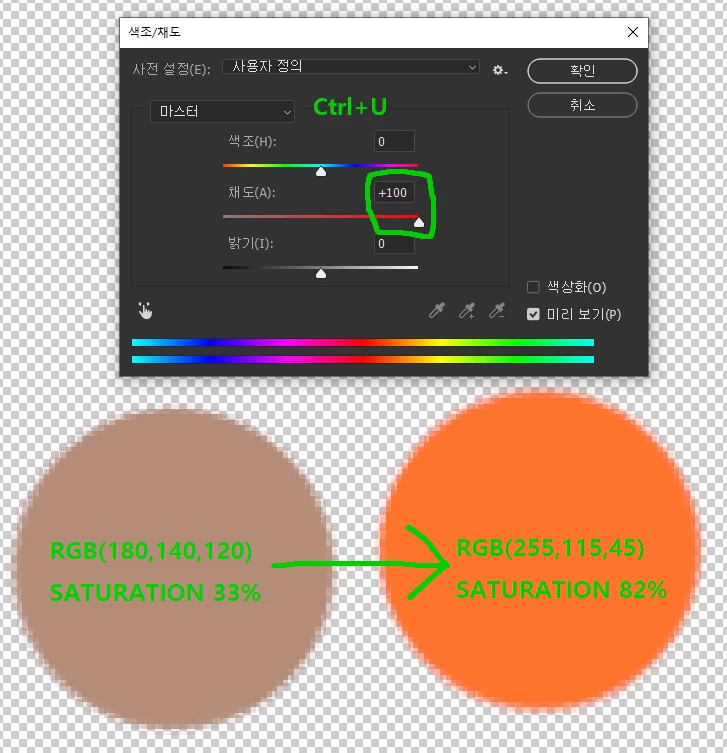
For example, if you make a circle filled with RGB(180,140,120) (which has 33% saturation),

then adjust the saturation slider (using Ctrl+U) to the rightmost,

the color finally becomes RGB(255,115,45) (which has 82% saturation).
 

How can I solve this issue? I think the function(Ctrl+U) was originally designed to be so.

How can I force all pixel(or certain pixel) to have 100% saturation?

Thanks!


This topic has been closed for replies.
Correct answer TheDigitalDog

In your screen capture, R moved from 180 to 255; that is max saturation for that color value/channel. 

2 replies

vpd2003Author
Participant
January 2, 2023

As "thedigitaldog" thankfully mentioned below, the "SATURATION" might means R/G/B channel separately.

But what I originally intended in the text above was the saturation in "HSV color mode".

Sorry for the confusion.

TheDigitalDog
TheDigitalDogCorrect answer
Inspiring
January 2, 2023

In your screen capture, R moved from 180 to 255; that is max saturation for that color value/channel. 

Author “Color Management for Photographers" & "Photoshop CC Color Management/pluralsight"
vpd2003Author
Participant
January 2, 2023

Oh, so the "saturation" in Hue/Saturation means R/G/B separately?

I've never thought about that! Thanks.

But what I expected for the "saturation" was that of HSV-color mode.

Could you recommend me some options to achieve that, sir?

TheDigitalDog
Inspiring
January 2, 2023

Once the on channel reaches the max value, there is no farther the other two can go without changing the relationship of the three. If all moved to 255, you would have white. 

You can view this in Lab, HSV, LCH, whatever but you have an RGB document in some RGB color space. That is the data.  So if view HSV, its still RGB, three channels with (in 8 both) Zero to 255 values.

quote

Oh, so the "saturation" in Hue/Saturation means R/G/B separately?

I've never thought about that! Thanks.

But what I expected for the "saturation" was that of HSV-color mode.

Could you recommend me some options to achieve that, sir?


By @vpd2003


Author “Color Management for Photographers" & "Photoshop CC Color Management/pluralsight"