Andy Emmett
Participant
November 15, 2016
Answered

"Could not update smart object files because of a disk error."

  • November 15, 2016
  • 6 replies
  • 19114 views

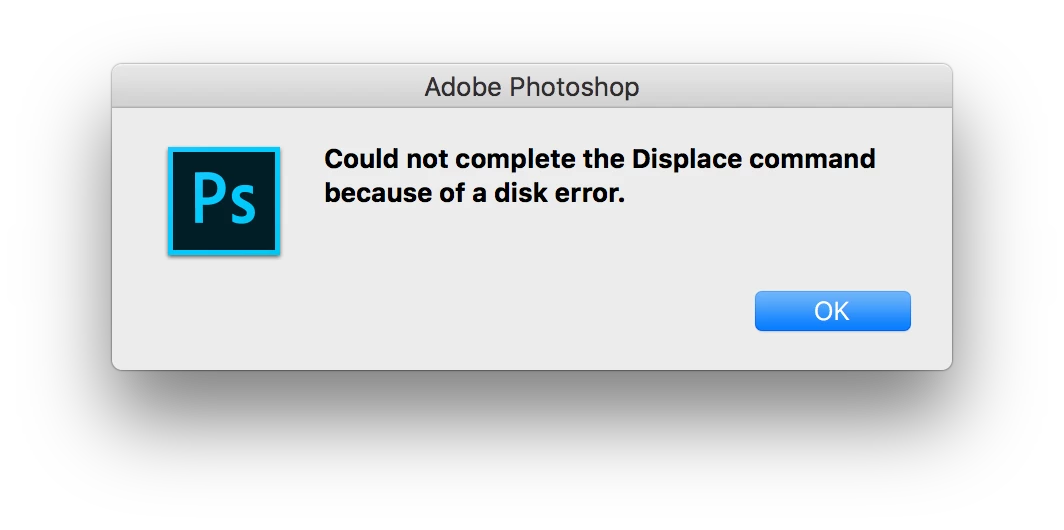
PS CC 2017 gives me the error "Could not update smart object files because of a disk error." The layer in has the displacement effect enabled. I tried deleting the layer and creating a new smart filter later, then when adding the the displacement effect I get "Could not complete the Displace command because of a disk error." I then uninstalled and reinstalled PS, but that didn't help me. Can anyone help me ?

This topic has been closed for replies.
Correct answer benjamin_weiler

Bug seems to be fixed, I'll link you to the thread in the bug forum, I had some residing problems with my files, but those can be fixed.

Photoshop CC 2017 Displacement Bug (Could Not Complete Request Because of Disc Error) | Photoshop Family Customer Commun…

If your files give you saving trouble, even after the update, try these steps, that's what I did:

Turns out, this has something to with the old file names.

If I save said Smart Objects under different names and then place them anew, everything works again, as it should

If you have a delicate placement of your object, like when it is skewed or warped into perspective and you run into this problem, this worked for me:

I saved the old, embedded Smart Object as a PSB (they already were PSBs, since this is the only format that allows transformations to be allowed on the Smart Objects, just wanted to make a note of that potential pitfall)

I switched the old smart Object from embedded to Linked with the Convert to Linked.. command (right click on the layer, NOT on the thumbnail to get the layer menu)

I relinked to the file I had saved in step 1 (right click on the layer again, chose  Relink to File...)


You now have a Smart object linked to the new file that will save normally.
If you want to embed it again, right click the layer and chose Embed Linked...

And that should put things as they were before. Maybe not ideal, but certainly workable.

6 replies

benjamin_weilerCorrect answer
Inspiring
December 13, 2016

Bug seems to be fixed, I'll link you to the thread in the bug forum, I had some residing problems with my files, but those can be fixed.

Photoshop CC 2017 Displacement Bug (Could Not Complete Request Because of Disc Error) | Photoshop Family Customer Commun…

If your files give you saving trouble, even after the update, try these steps, that's what I did:

Turns out, this has something to with the old file names.

If I save said Smart Objects under different names and then place them anew, everything works again, as it should

If you have a delicate placement of your object, like when it is skewed or warped into perspective and you run into this problem, this worked for me:

I saved the old, embedded Smart Object as a PSB (they already were PSBs, since this is the only format that allows transformations to be allowed on the Smart Objects, just wanted to make a note of that potential pitfall)

I switched the old smart Object from embedded to Linked with the Convert to Linked.. command (right click on the layer, NOT on the thumbnail to get the layer menu)

I relinked to the file I had saved in step 1 (right click on the layer again, chose  Relink to File...)


You now have a Smart object linked to the new file that will save normally.
If you want to embed it again, right click the layer and chose Embed Linked...

And that should put things as they were before. Maybe not ideal, but certainly workable.

DYNAMICLINKMANAGER
Participant
December 3, 2016

Just wanted to chime in that I'm having the exact same problem, and will check back here for updates.

Inspiring
November 23, 2016

I have submitted a bug report.

Photoshop CC 2017 Displacement Bug (Could Not Complete Request Because of Disc Error) | Photoshop Family Customer Commun…

tl/dr

They say, the case has been reported before and that they would look into it. I guess that is as much as we can do. Now it's hope for the best.

oitent
Participating Frequently
November 23, 2016

Seems to be an issue with the latest update of Adobe Photoshop CC17. I can't tell you if Sierra has anything to do with it though.

I used to run OSX 10.9.5 until I needed to update today to Sierra for Adobe purposes. I know my files and smart objects within them used to work just fine as I was editing them on my previous version of Photoshop and OSX less then 5 hours ago. But now, after the update, they are not.

Thankfully I have kept Photoshop 2015.5, so I'll keep using it until they figure out what have Adobe done to mess this up… For people who depend on Displacement and Smart Objects, this is NOT great news… I'm building mockups here and already lost hours trying to understand whats wrong, without any luck.

My Smart Objects do have Displacement applied. Photoshop Version 2017.0.0. OSX 10.12.1.

Just adding to the pile here!

Participant
November 20, 2016

Any progress on this? I'm experiencing the same error on CC '17/Sierra 10.12.1...

Thanks!

-a

Sahil.Chawla
Adobe Employee
Adobe Employee
November 15, 2016

Hi Andy Emmett,

Could you please try changing the scratch disks by following the steps mentioned below :-

    • Click the Edit (Win) or Photoshop (Mac) menu, point to Preferences, and then click Scratch Disks.
    • Select the check box next to the scratch disk you want to use or clear the check box to remove it.
    • Click OK.

Regards,

Sahil

Inspiring
November 16, 2016

Oh yeah, in case you are still reading, Sahil, here is a line from the PSErrorLog.txt:

2016:11:05 15:15:54 : e:\ps17\ps_18_win_x64_daily_retail\20161012.r.53\photoshop\main\photoshop\interfaces\UTrackResourceImp.h : 137 : REQUIRE failed

2016:11:05 15:15:54 : 0000000000000370 of type struct _ALst * __ptr64 not found : 1 : REQUIRE failed

2016:11:05 15:15:54 : e:\ps17\ps_18_win_x64_daily_retail\20161012.r.53\photoshop\main\photoshop\interfaces\UTrackResourceImp.h : 137 : REQUIRE failed

2016:11:05 15:15:54 : 000000000002E120 of type struct _ADsc * __ptr64 not found : 1 : REQUIRE failed

It calls this about 50 times in one second, then terminates. I am not sure what that could mean.

Andy Emmett
Participant
November 16, 2016

@benjamin_weiler, thank you for you more detailed recreation of this problem.. Unfortunately Sahil method of solving the problem did not work for me either.

For reference to any Sahil or any adobe staff, my specs are as follows:

Mac OS Sierra

iMac (Retina 5K, 27-inch, Late 2014)

4 GHz Intel Core i7

8 GB 1600 MHz DDR3

Internal Fusion Drive 3TB (Default Scratch Disk)

AMD Radeon R9 M295X 4096 MB