


Mayqmay
Participant
October 13, 2017
Question

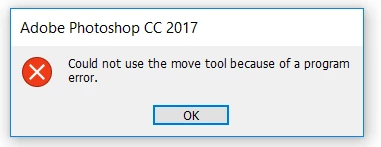
"Could not use the move tool because of a program error" HELP!

  • October 13, 2017
  • 3 replies
  • 19048 views

Suddenly while I was using photoshop the layers stuck and didn't move anymore. I tried to open other files - same problem.

I shut down the photoshop and open again and it still doesn't work.
Please help me!!!!

[Here is the list of all Adobe forums... https://forums.adobe.com/welcome]

[Moved from generic Cloud/Setup forum to specific Program forum... Mod]

3 replies

Participant
January 6, 2024
Participating Frequently
January 8, 2024

A new Photoshop Beta version was released today and the problem is solved. Thanks.

Participant
January 8, 2024

You're right! Finally. I don't know now though- I got quite used to using copy/paste throughout the past week... bah.

Participant
November 27, 2018

When this has happened to me, it's been a text layer. To fix, I select the text tool, click in the text to activate the edit bounding box. Then click enter (no changes) and select the move tool and it should now be able to be moved.

It's like it becomes locked, so by editing it, it seems to unlock it. I hope this helps.

Participant
July 14, 2021

You are awesome! I was so frustrated and this fixed it!! Thank you!

gener7
Community Expert
Community Expert
October 14, 2017

Try resetting All Tools:

If that fails, Reset Preferences:

Participant
July 2, 2020

I'm using Photoshop  cs6 version.
Could not use the move tool because of a program error keeps popping up. How do I fix this?

Participant
January 15, 2021

This same error started happening to me today. I've updated the app, I keep restarting the program and it works for a few moves and then stops and gives me the program error message. This never happened with CS6!