


SamuelPaulSkillington
Participating Frequently
March 15, 2024
Answered

"selected font failed during last operation. If problem persists, please disable the font." PSD will

  • March 15, 2024
  • 5 replies
  • 6984 views

I have a PSD file with multiple artboards on. In each artboard is a duplicated smart object that is on all the other artboards. It's for quickly creating product mock ups with new designs. I have made dozens of similar PSD files using the same techniques. All was well until I tried to open the file recently and got this message...
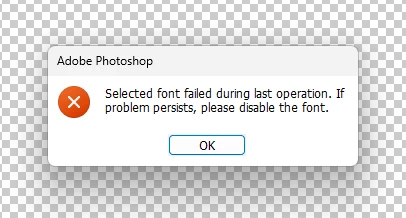
"selected font failed during last operation. If problem persists, please disable the font."


I got someone else to open the file on their PC and it worked fine. They identified the fonts that were in the PSD file and I uninstalled them in the CC desktop app on my pc. The PSD file will still not open and I get the same message. Also all the fonts in that file are on many other PSD files and have no problem opening or editing those.


Literally days of work gone unless I can fix this. I NEED help.
 

5 replies

Participant
October 18, 2024

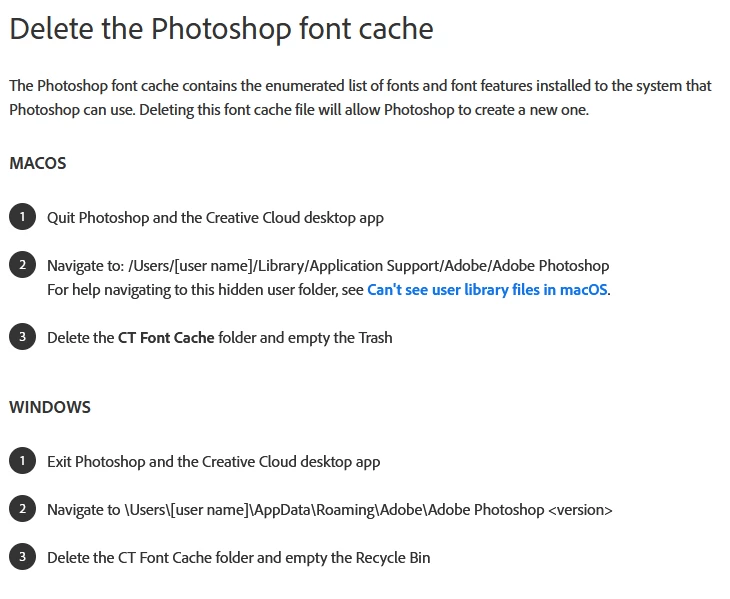
Deleting the Font Cache did work but in my case, I didn't save my file before I got that error.


So restarting wasn't an option so I created a new document and copied my designs into it. It helped me identify the font that was having issues and correcting it in the main design and I was able to save/export.


Thanks to @Ged_Traynor for the original idea.

SamuelPaulSkillington
Participating Frequently
March 15, 2024

I'm in the UK it's 10.30am here so you would be all good. Thanks again though for that, really saved me some ball ache.

Ged_Traynor
Community Expert
Community Expert
March 15, 2024

@SamuelPaulSkillington glad you got it sorted, it's a bit early for a beer though 😄

SamuelPaulSkillington
Participating Frequently
March 15, 2024

Sweet bouncing baby Jeebus that worked. Thankyou so much, not only a working solution but also in ridiculously speedy time!


Get this man a huge pint of crisp cold beer!

Ged_Traynor
Community Expert
Ged_TraynorCommunity ExpertCorrect answer
Community Expert
March 15, 2024
Participant
February 1, 2025

Thanks a million times. 


NB: If this didn't work for you, please don't be like me, be sure you exit and restart Photoshop. You can exit before or after deleting the CT Font Cache folder.