ag1010
Known Participant
July 21, 2018
Answered

recent files not showing

  • July 21, 2018
  • 1 reply
  • 2145 views

When I open PS the recent files thumbnails are not coming up.

But it happens only when I open PS with my custom workspace.

If it opens with the default workspace I can see the thumbnails.

Is it a bug?

Or this is the way how PS works with custom workspace?

This topic has been closed for replies.
Correct answer Trevor.Dennis

You'll be aware that you can save custom toolbar, shortcuts and menus with a custom workspace, but I was not aware that Preference settings could be included. 
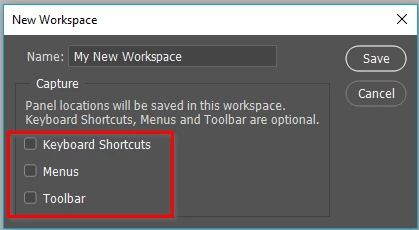
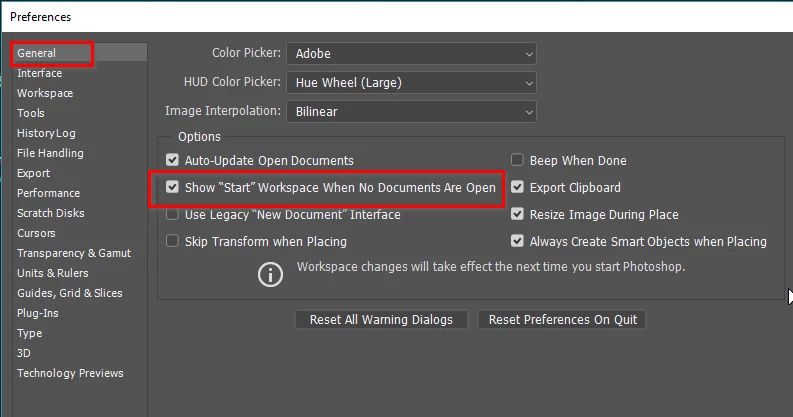
One thing that does happen is that if you are in the Start workspace with no documents open, and hit the Escape key, that takes you back to whatever workspace you have set.  You can test this by opening a new document (anything will do) and closing it.  That should take you back to the Start workspace, so long as that is how it is set in Preferences.

Note: I have just tried different workspaces, and always see the Start workspace in all of them when no documents are open.

1 reply

Trevor.Dennis
Trevor.DennisCorrect answer
Community Expert
July 22, 2018

You'll be aware that you can save custom toolbar, shortcuts and menus with a custom workspace, but I was not aware that Preference settings could be included. 

One thing that does happen is that if you are in the Start workspace with no documents open, and hit the Escape key, that takes you back to whatever workspace you have set.  You can test this by opening a new document (anything will do) and closing it.  That should take you back to the Start workspace, so long as that is how it is set in Preferences.

Note: I have just tried different workspaces, and always see the Start workspace in all of them when no documents are open.

ag1010
ag1010Author
Known Participant
July 22, 2018

Thanks.

Now having that box checked I can see the thumbnails and when I click on the one I want to open I'll also have the custom workspace.