


Participant
March 28, 2017
Answered

Recovery after crash - no files, but still missing disk space.

  • March 28, 2017
  • 1 reply
  • 2112 views

Hi,
After whole night of working with ~20 .DNG files opened in Ps CC 2017 I switched my computer to "sleep mode" (Win7). I also went to sleep without saving my work...
At some point computer crashed, and when I woke up I was able just to turn it on (received "blue screen" report).

None of files I was working on shows in 'recent files' Ps window.

I tried to find any solution. Now I know that there's no autosaving option and probably recovery won't be possible
But....
Ps was using ~10GB of my C:/ drive while I was working. This disk space is still missing!

Is it possible that my temporary files are stored somewhere?!

I tried to find those files. No idea where they are hiding. Of course .../Appdata/Roaming/.../AutoRecover folder  is empty.

Logs (crash time):
Request failed due to client error. Trying to request a new access token...

"Request failed due to client error. Trying to request a new access token...", source: file:///C:/Program%20Files/Adobe/Adobe%20Photoshop%20CC%202017/Required/www-universal-search/build/main.js
    This topic has been closed for replies.
    Correct answer Akash Sharma

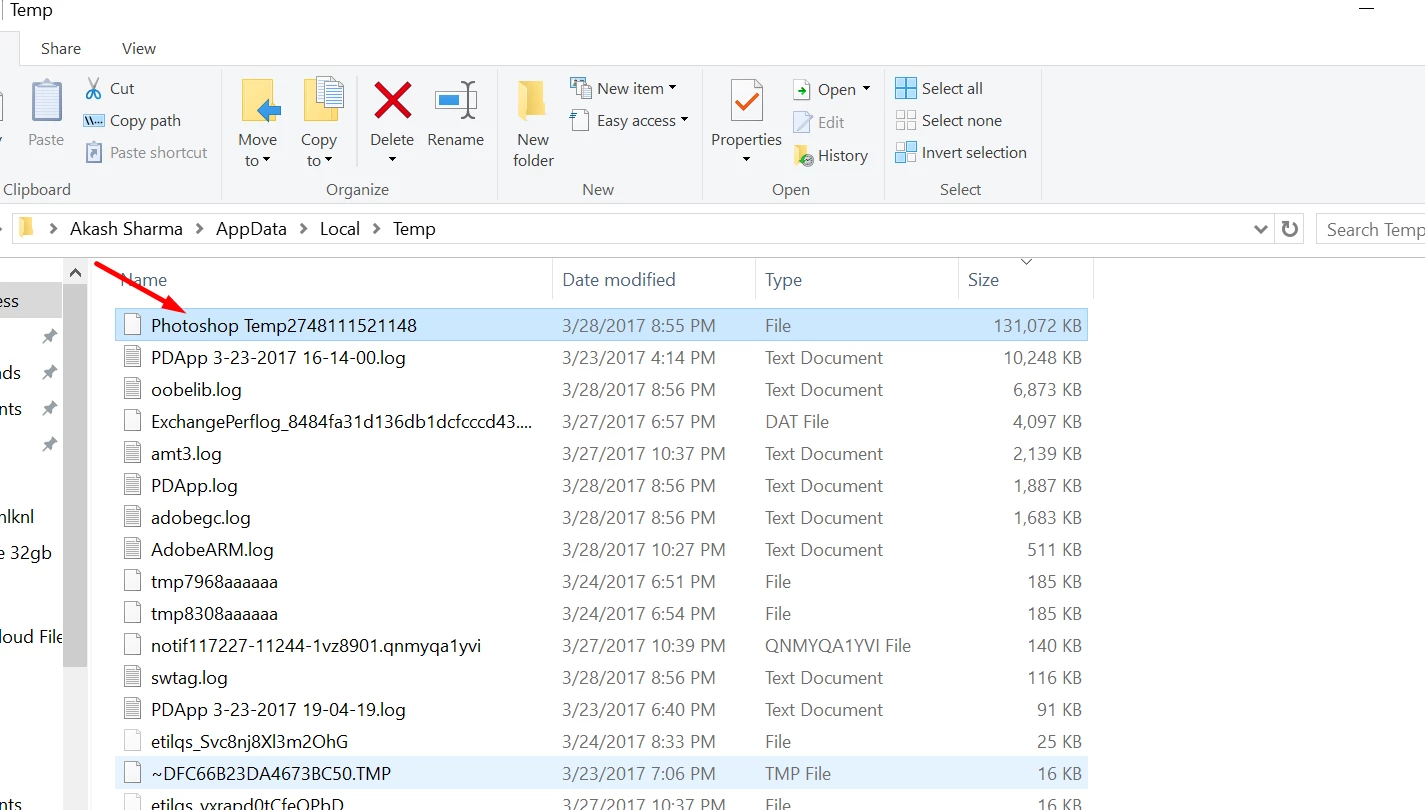
    You can reclaim the disk space trashing the temporary Photoshop files.

    • Press Win+R(Run command)
    • Type %LocalAppData%\Temp in the type field.
    • Look for files named "Photoshop Temp.."
    • Delete it to free up some space.

    You will not lose any data and you can even delete temp data for other programs.

    Hope that helps.

    ~Akash

    1 reply

    Akash Sharma
    Akash SharmaCorrect answer
    Legend
    March 28, 2017

    You can reclaim the disk space trashing the temporary Photoshop files.

    • Press Win+R(Run command)
    • Type %LocalAppData%\Temp in the type field.
    • Look for files named "Photoshop Temp.."
    • Delete it to free up some space.

    You will not lose any data and you can even delete temp data for other programs.

    Hope that helps.

    ~Akash

    Participant
    March 28, 2017

    Thanks! Found it!
    >15 GB file, saved right before crash.
    And now I've got one last, probably quite stupid question:

    Can this file somehow help in recovering lost data (lost night...)?

    Akash Sharma
    Legend
    March 28, 2017

    The Photoshop auto recovery works when Photoshop crashes and that depends on the frequency of the data being saved, This can be checked in Preferences>File handling.

    From the screenshots of your previous post, it seems Photoshop has been reset. If there is nothing in the Autorecover folder located C:\Users\usernam\AppData\Roaming\Adobe\Adobe Photoshop CC 2017\AutoRecover, It's not possible to recover lost data.

    Thanks,

    Akash