


New Participant
February 3, 2021
Answered

Rectangle tool not appearing

  • February 3, 2021
  • 2 replies
  • 6063 views

The rectangle tool and related, rounded, etc. are not appearing in my toolbar (PS CC, release 20.0.10, Mac OS Sierra). It's not hiding in the Extras panel when I choose Edit >> Toolbar. I can't Reset Defaults. Resetting the workspace doesn't help, either. Any thoughts? Thank you.
This topic has been closed for replies.
Correct answer jane-e

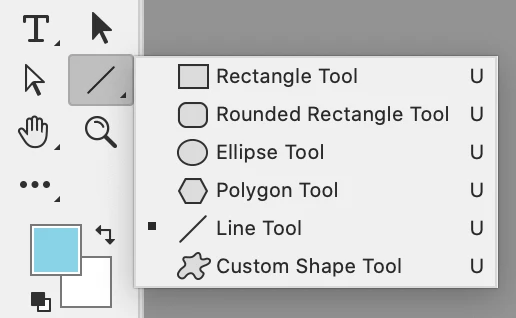
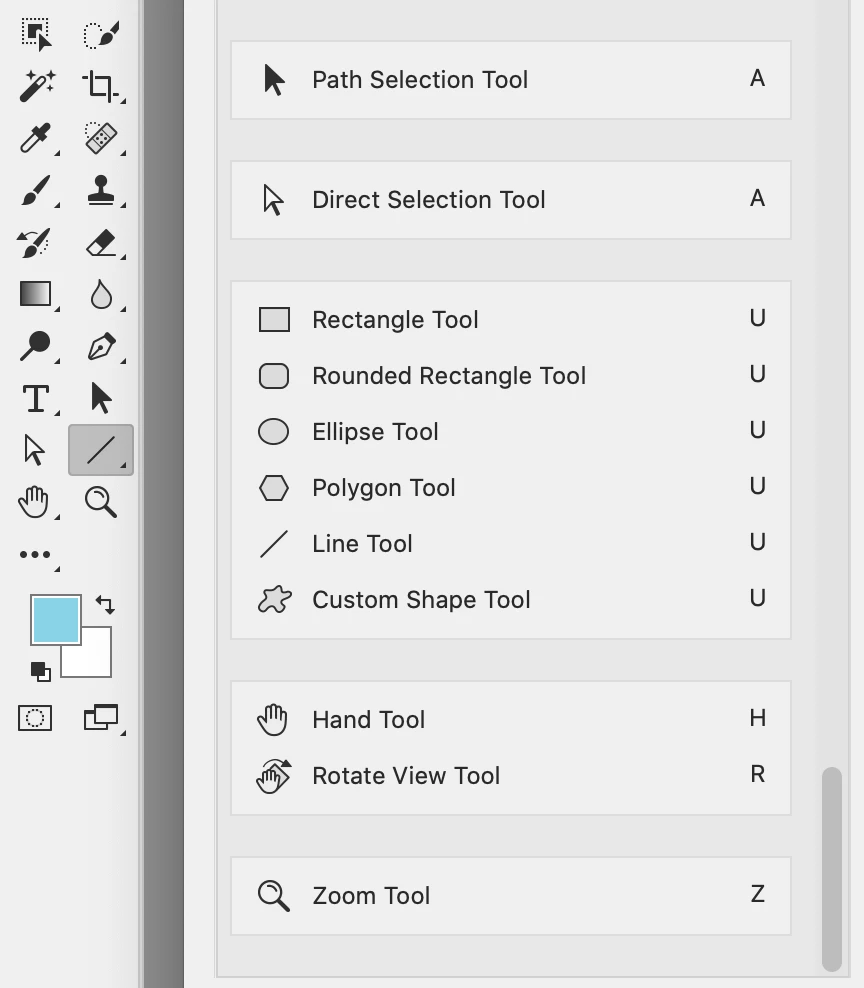
Right click the line tool and see if the Rectangle tool is there. If not, scroll to the bottom of your Edit > Toolbar dialog.

~ Jane


2 replies

Peru Bob
Community Expert
February 4, 2021

...and please do it this way:


New Participant
February 4, 2021

New Participant
February 4, 2021

Right click the line tool and see if the Rectangle tool is there. If not, scroll to the bottom of your Edit > Toolbar dialog.

~ Jane


Thanks, Jane! There it was. Have a good day.

jane-e
Community Expert
February 3, 2021

Hi @lizd63733721 

Please show a screen shot of the Edit > Toolbar window so we can see what you are seeing.


~ Jane