


Participating Frequently
March 14, 2024
Question

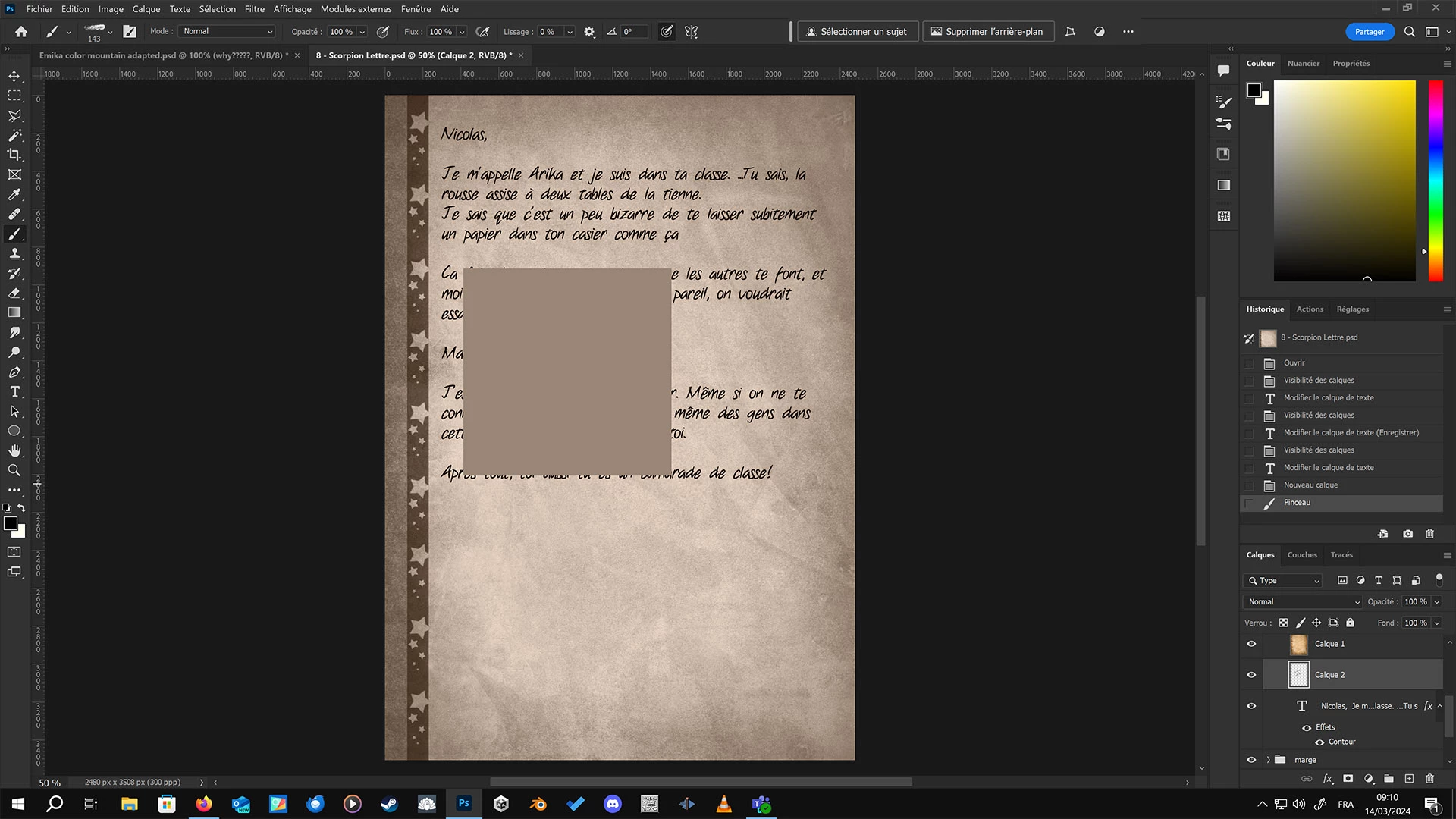
Rectangles appearing when drawing under a layer
  • March 14, 2024
  • 2 replies
  • 200 views

I have this file in which a normal layer in "color" mode on top creates the sepia tone. Recently, when I modify any layer below that color layer, rectangle artifacts like this appear. This also happens when modifying the text, and if I shift the mode of the layer to anything else that "modifies the color of what's below" (soft light, etc...)

If I disable the "top" layer, I can edit text and draw fine without such artifacts forming.

Artifacts don't stay forever, as they clearly disappear when photoshop does a redraw/refresh. But they are a nuisance for my work. Please look into this bug. Thank you.

This topic has been closed for replies.

2 replies

c.pfaffenbichler
Community Expert
Community Expert
March 25, 2024

Does turning off »Use Graphics Processor« in the Performance Preferences (Photoshop > Preferences > Performance > Graphic Processor Settings) and restarting Photoshop have any bearing on the issue? 
Does turning on »Deactivate Native Canvas« (Photoshop > Preferences > Technology Previews) and restarting Photoshop have any bearing on the issue?

Ares Hovhannesyan
Community Expert
Community Expert
March 25, 2024

What is your OS and GPU? Try to update drivers and then reinstall Ps

Sameer K
Community Manager
Community Manager
March 25, 2024

Hey, @Hyakkidouran. Welcome to the Photoshop Community. I'll need more info to help you figure this out. Please share the system info from Photoshop Help > System info > Copy & paste into a text document > upload & attach here. 


I'll move this to discussions for now. Try this:
Go to Edit > Preferences (CTRL + K) > Performance > Advanced Settings > Disable 'GPU Compositing' & restart Photoshop & check if it helps.


Awaiting to hear from you. Let me know how it goes. Thanks!
Sameer K