


Exit
  • Global community
    • Language:
      • Deutsch
      • English
      • Español
      • Français
      • Português
  • 日本語コミュニティ
  • 한국 커뮤니티
0

Rectangular Marquee Tool

Community Beginner ,
Nov 19, 2019 Nov 19, 2019

I have problems dragging the rectangular marquee tool. When I try to make a selection as soon as I click on my mouse it creates a selection that is a row.  I have tried to change the selection and other settings but I cannot drag the marque tool in any way. All help is appreciated. Thanks.
2.4K
Translate
Report
Community guidelines
Be kind and respectful, give credit to the original source of content, and search for duplicates before posting. Learn more
community guidelines

correct answers 1 Correct answer

Deleted User
Nov 20, 2019 Nov 20, 2019

Hi

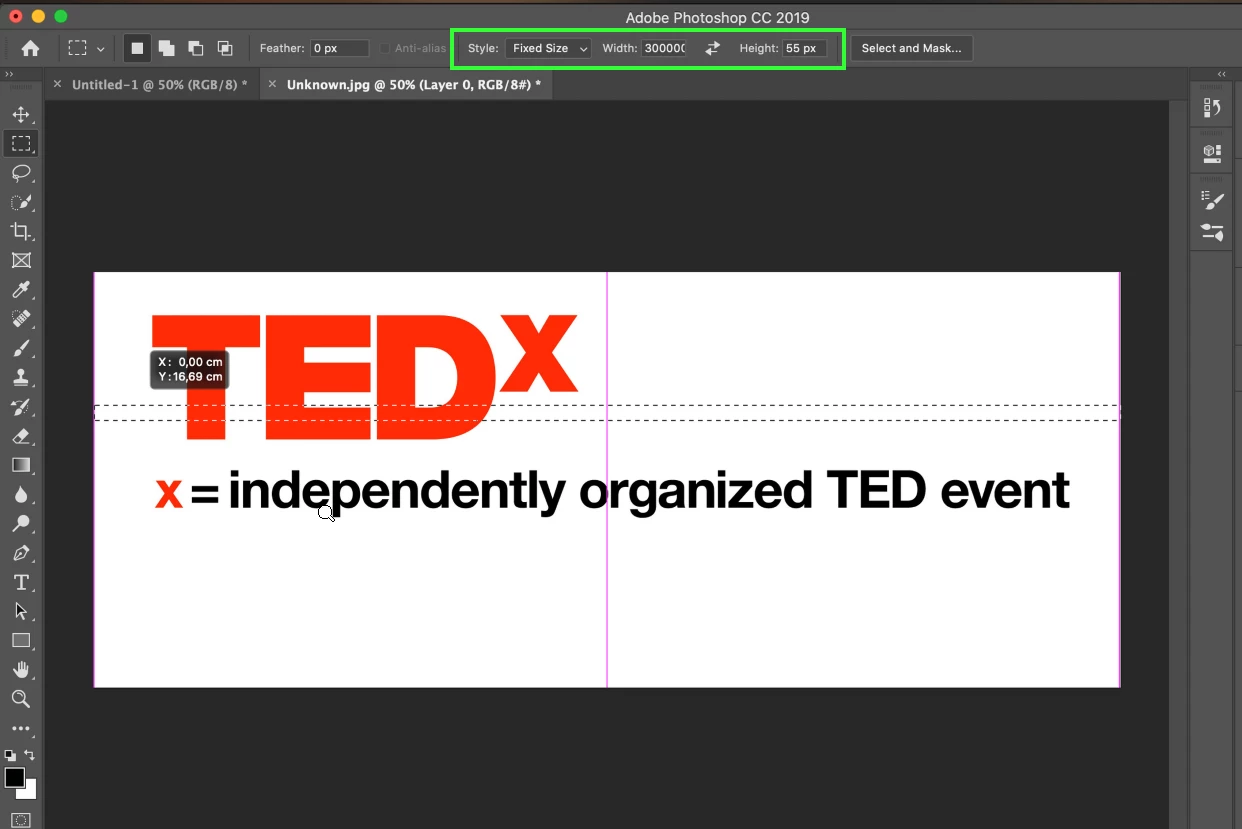
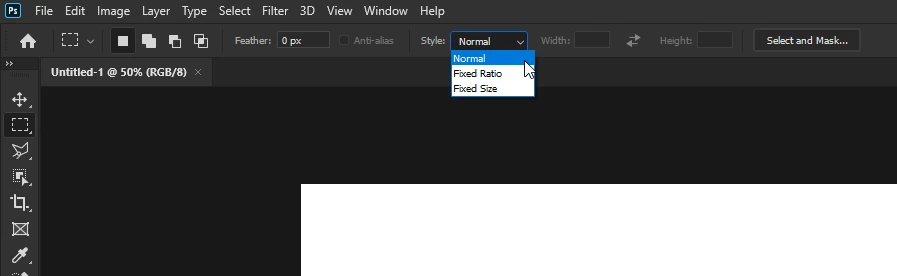
Check the options bar, you have a Fixed Size set

fixed size.png

Change it to normal

normal size.png

Translate
Adobe
Community Expert ,
Nov 19, 2019 Nov 19, 2019

Can you share a screen shot of your entire screen? That might help us find your issue quicker. 

Translate
Report
Community guidelines
Be kind and respectful, give credit to the original source of content, and search for duplicates before posting. Learn more
community guidelines
Community Beginner ,
Nov 20, 2019 Nov 20, 2019

Hello,

I am linking the screen shot below. I recorded a screen capture but I cant link it. Hope this helps.Ekran Resmi 2019-11-20 12.19.16.png


Translate
Report
Community guidelines
Be kind and respectful, give credit to the original source of content, and search for duplicates before posting. Learn more
community guidelines
Guest
Nov 20, 2019 Nov 20, 2019

Hi

Check the options bar, you have a Fixed Size set

fixed size.png

Change it to normal

normal size.png

Translate
Report
Community guidelines
Be kind and respectful, give credit to the original source of content, and search for duplicates before posting. Learn more
community guidelines
Community Beginner ,
Nov 20, 2019 Nov 20, 2019
LATEST

Thank you. I was too tired to notice that 🙂

Translate
Report
Community guidelines
Be kind and respectful, give credit to the original source of content, and search for duplicates before posting. Learn more
community guidelines
Guide ,
Nov 19, 2019 Nov 19, 2019

It would appear that you have the tool set to single row...


Hold down the left mouse button over the marquee tool.  From the menu fly-out you can choose which type of selection you want. 


Annotation 2019-11-20 072113.png

Translate
Report
Community guidelines
Be kind and respectful, give credit to the original source of content, and search for duplicates before posting. Learn more
community guidelines
Community Beginner ,
Nov 20, 2019 Nov 20, 2019

Hello, I have checked several times that I am using the right one (rectangular marquee). Thanks for the reply anyways.

Translate
Report
Community guidelines
Be kind and respectful, give credit to the original source of content, and search for duplicates before posting. Learn more
community guidelines