


Inspiring
October 16, 2024
Answered

Reference images icon not showing in generativ fill

  • October 16, 2024
  • 7 replies
  • 5478 views

Just installed the newest Photoshop 2025 (version 26.0.0) And the icon for adding reference image to generativ fill doesnt show up in the Contextual taskbar. So how do i add a referens image to the generativ fill ?

Correct answer Trevor.Dennis

Guys, at the moment, the Reference Image option is only available in the beta version.  With a selection in place, go Edit > Generative Fill
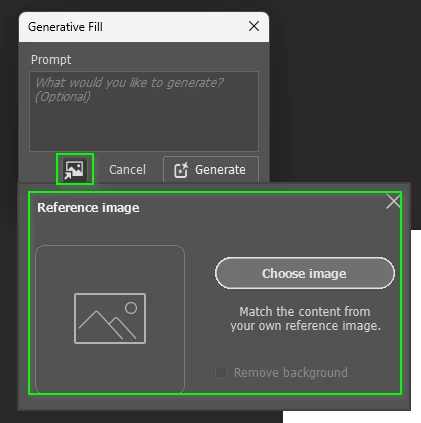
 

If you are using the Contextual Task Bar, click on Generate and the Reference Image button will be there in the next panel.

I am sure the Release version will have the same options in a future release.

7 replies

Inspiring
July 10, 2025

Half a year later and version 26.8.1 still lacks of this button, but the Adobe Help says exactly to use the reference object button in the task bar... 

Inspiring
February 3, 2025

i cant see the reference image icon either and there is no beta version available anymore
So you cant select then generate with a reference image to replace what is in the original anymore?
seems like we have gone backwards here
for context i need to update packaging in an old photo to new packaging without having to reshoot

Trevor.Dennis
Community Expert
Trevor.DennisCommunity ExpertCorrect answer
Community Expert
February 3, 2025

Guys, at the moment, the Reference Image option is only available in the beta version.  With a selection in place, go Edit > Generative Fill


If you are using the Contextual Task Bar, click on Generate and the Reference Image button will be there in the next panel.

I am sure the Release version will have the same options in a future release.

Inspiring
February 3, 2025

but Beta version no longer appears in my CC apps - how do i get access to it?

Inspiring
January 15, 2025

It only works now when generating a full image, but if you want to use generative fill, it's not there anymore. And it looks like there is no beta for photoshop anymore. I wonder if it there's a way to get around it. It was very helpful!

Thank you Adobe for adding these features and looking forward to using it in a more efficient manner.

Participant
December 19, 2024

I am also having this problem, I can't find it!

Participant
December 11, 2024

I'm having the same issue. The Reference image icon is not showing up in the contextual task bar when using generative fill with a selection. Tried this in Photoshop 2024 and 2025.

Participant
October 22, 2024

I have, the same problem. I don't understand where to look for this button

Participant
November 5, 2024

Same here .... and still the first person  here ask help no adobe support ..... 

sthammarAuthor
Inspiring
November 5, 2024

Yea no one seems to know the answer. Gotten a few emails with the same answer as Ged told me earlier. But still no answer about the fill. And Ged:s answer doest work for fill.

Ged_Traynor
Community Expert
Community Expert
October 16, 2024

@sthammar you can access it from the toolbar

sthammarAuthor
Inspiring
October 16, 2024

aha ok thank you very much.
But thats only to generate a new image. It doesnt work on fill when i have selected a certain part of the image that i want to generate a fill in or am i doing it wrong?