

Tom Goodman
Inspiring
October 13, 2021
Answered

Refine Edge Bug

  • October 13, 2021
  • 12 replies
  • 489 views

Using PS Ver 25.1.1


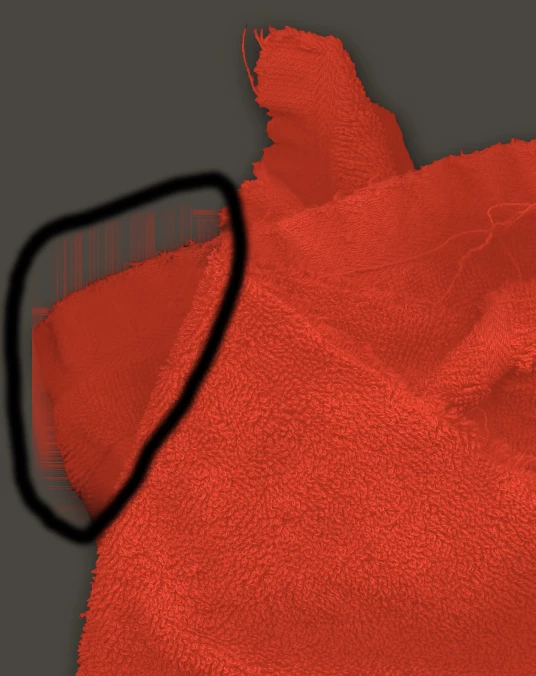
Lately, whenever I use the Refine Edge tool I am getting strange and random streaking lines and hard edges well outside the edge I am editing.  See picture

This topic has been closed for replies.
Correct answer Tom Goodman

The issues is resolved.  There is NO bug.  I was forgetting to sample all layers.  Thanks to all of the Adobe team members for your help.

12 replies

Nicollet
Adobe Employee
Adobe Employee
October 19, 2021

Thanks Tom! Good talking with you 🙂

Hannah

Tom Goodman
Tom GoodmanAuthorCorrect answer
Inspiring
October 19, 2021

The issues is resolved.  There is NO bug.  I was forgetting to sample all layers.  Thanks to all of the Adobe team members for your help.

Tom Goodman
Inspiring
October 19, 2021

I am happy to screen share.

[PII removed by moderator - do not post your personal information on the site]

Nicollet
Adobe Employee
Adobe Employee
October 19, 2021

Hi Tom,


I tried reproducing what you're seeing with your files but I didn't see it. I might be misunderstanding your steps though. Would you be able to do a screenshare with me? Jeff has sent you a direct message with my email address.


Thank you!
Hannah Nicollet

Legend
October 15, 2021

Thanks Tom, sent you an email directly.

Tom Goodman
Inspiring
October 15, 2021

Link was sent directly to @J453.  

Tom Goodman
Inspiring
October 15, 2021

I'll need some email address to which I can send the file to share them.
Thanks.

Legend
October 15, 2021

A link to a psd that reproduces the problem would be great.

Tom Goodman
Inspiring
October 14, 2021

I now how better data to share.  The problem appears in the preview window of Select and Mask only if I am working on a layer separate from the background, and one which has been previously outlined and saved as a separate layer..  In that case the problem always occurs and does bake in.  However, if I flatten the same entire file and then Select and Mask the problem does not occur.  If you can provide me a means of uploading a large Tiff you should be able to reproduce the problem.  BTW, I have updated my display driver and am running an NVIDIA Geforce GTX 1060 6GB

Legend
October 14, 2021

Hi Tom, once you commit the changes, are those streaks baked into the mask? or just during the preview when you're adjusting the mask?