danielw12180899
New Participant
June 7, 2019
Answered

Replacing text in image realistically

  • June 7, 2019
  • 1 reply
  • 1165 views

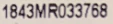
I was wondering how you replace text on a flat product while keeping the same font and "blurriness" (when I try to replace the text the text is too sharp and not realistic) to make it look like authentic text.

Example: (I need to replace this text with a different set of numbers and letters while making it look realistically replaced.
    This topic has been closed for replies.
    Correct answer Trevor.Dennis

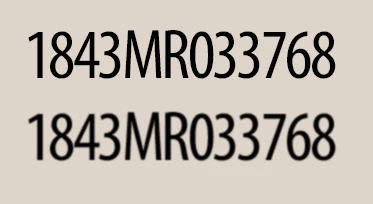
    All I did here was make the type layer a Smart Object, and apply a tiny amount of Gaussian blur (original on top).

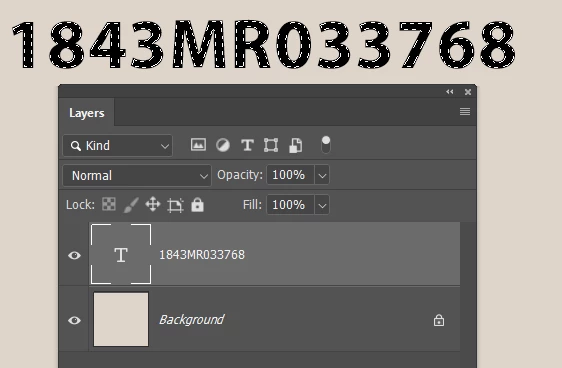
    With thicker text you can Ctrl click to select, and Modify > Contract one pixel

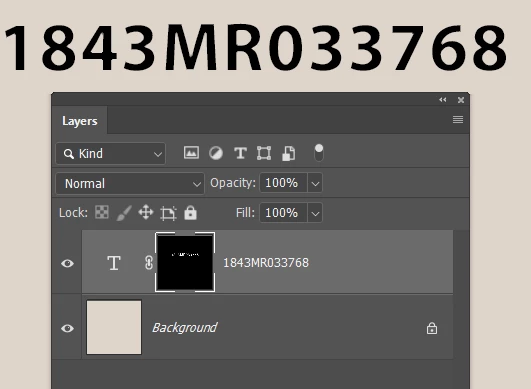
    ...and add a layer mask.  This hides the outside edge of the characters.

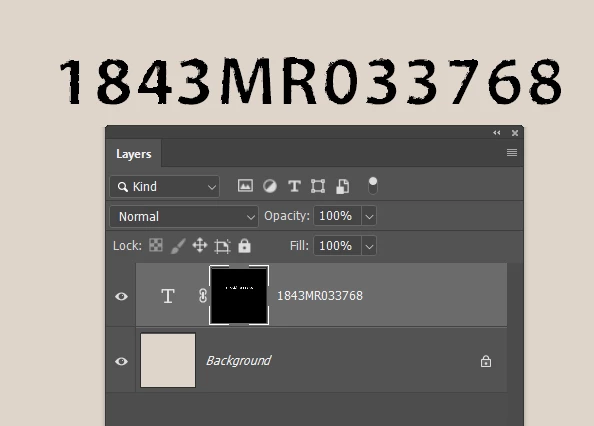
    You can then apply a distorting filter to the layer mask to break up the outline.  This is Ocean Ripple

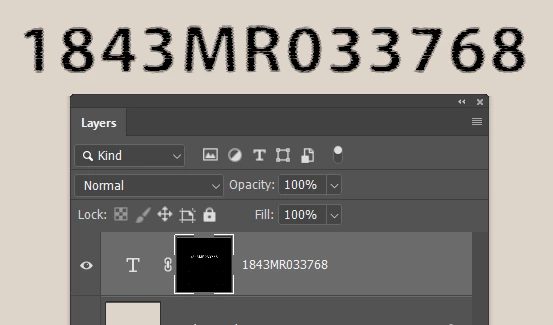
    A bit more subtle with Crayon.  Make it a Smart Object and you can experiment all day.

    1 reply

    Trevor.Dennis
    Community Expert
    Trevor.DennisCommunity ExpertCorrect answer
    Community Expert
    June 7, 2019

    All I did here was make the type layer a Smart Object, and apply a tiny amount of Gaussian blur (original on top).

    With thicker text you can Ctrl click to select, and Modify > Contract one pixel

    ...and add a layer mask.  This hides the outside edge of the characters.

    You can then apply a distorting filter to the layer mask to break up the outline.  This is Ocean Ripple

    A bit more subtle with Crayon.  Make it a Smart Object and you can experiment all day.