


Participating Frequently
June 30, 2021
Answered

Resolution Problem with png placed in indesign file

  • June 30, 2021
  • 4 replies
  • 4568 views

Hey all, 

I have encountered a weird problem, I just cannot seem to find the answer to. I have a raw-photo imported into photoshop, cut out the background and exported as a png. With an origianl file size of 3384px x 5256 px. Let's call this "good.png". Then I have an indesign document for cropping all cut outs (of people) to the same size. The indesign file has the dimension: 1024 x 1024. However when I import good.png into indesign and export it again in the smaller size, the exported png, let's call it "bad.png", pixelats. I use the same export settings as usual. That I also used for a lot of other pictures, where I did not have this problem. These are the settings:
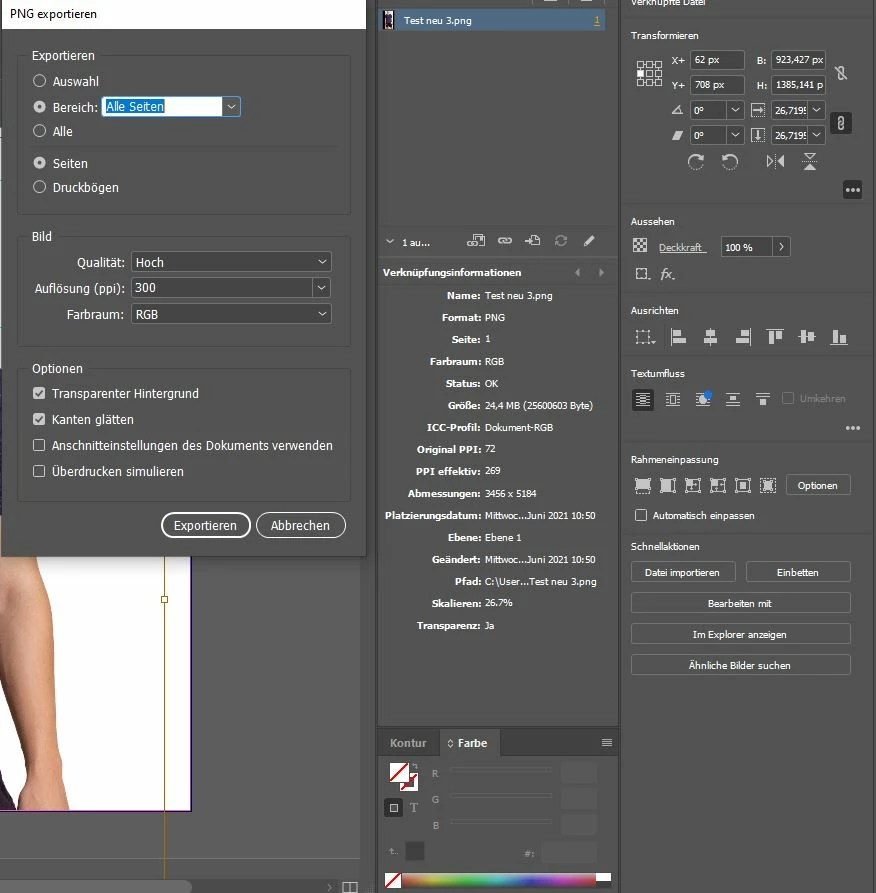
 

I don't really understand how there can be a quality differnce between good.png and bad.png in terms of resolution like that. Feels like I am having a little brainfart though, any guesses? 

This topic has been closed for replies.
Correct answer c.pfaffenbichler

The one image is roughly 111% the size of the other – that corresponds roughly to a 300:269 relation. 

So the image was upsampled and then »Hoch« jpg-compression was inflicted on it (which is not the highest) so the degredation does not seem completely surprising. 

4 replies

Mohit Goyal
Community Manager
Community Manager
July 18, 2022

Hi all,


I know it's an old discussion but I just wanted to share a knowledge base article that addresses common issues such as resolution/pixelation, import, and color mismatch issues while moving files from Photoshop to InDesign: https://helpx.adobe.com/photoshop/using/photoshop-assets-in-indesign.html


I hope it helps.

Thanks,

Mohit

Legend
June 30, 2021

Why are you cropping in InDesign? Photoshop has a crop feature.

mksfc4Author
Participating Frequently
July 1, 2021

Yes but there were lots of different pictures in all sizes and forms and the task was to get every picture in the exact same pixel format, so I figured I am faster by using an indesign document, and just press control + D. I've also had no problems over the last year with it. Cropping is part of it, but not the whole task. 

Legend
July 1, 2021

InDesign documents are not sized in pixels. Really not, even though it offers the choice. You are working in inches or mm, never in pixels. This is confusing, but once faced, you may have a better understanding of what can go wrong and how to control quality. 

JJMack
Community Expert
Community Expert
June 30, 2021

I do not use InDesign.   You stated you imported a Large 18MP 2:3 Aspect Ratio Png into a small Square 1:1  1024px by 1024px indesign file.  How was that done. 18MP  2:3 AR into 1MP 1:1 AR? What is bad about the Bad  png file you exported.

JJMack
mksfc4Author
Participating Frequently
June 30, 2021

Well I use a preset indesign file with an image container in the exact sice of the document and place the picture by pressing contrl + D. As the pictures always contain literally empy space as they are cut outs, I've never had problems with it as the proportions are not altered. The picture itself still has a 2:3 AR the empty space just gets "cut down" to 1:1. I'll post a screenshot of it. The brown window is the picture itself and it is just fit into the blue one, that is exactly the size of the document. I hope this is understandable. 

JJMack
Community Expert
Community Expert
June 30, 2021

What are you doing the image you posted will not fit within  a 1024x1024 canvas and they have been interpolated to different 4:3 aspect ratio sizes? The head area in InDesign look like is a 350px by 200px area.  

JJMack
c.pfaffenbichler
Community Expert
Community Expert
June 30, 2021

»cut out the background and exported as a png.«

Why png and not a less problematic pixel image format with transparency like psd? 


Please post the pngs and a screenshots of the »bad png« opened in Photoshop at View > 100%. 


As the Links Panel indicates the image has slightly less than 300ppi effective resolution. 

mksfc4Author
Participating Frequently
June 30, 2021

Here is a screenshot of both opened in photoshop at view> 100% 

The resolution of good.png would be sufficent enough. I'll try using a psd, thanks for the idea. Could the slightly less than 300 ppi make that much of a difference? 

c.pfaffenbichler
Community Expert
c.pfaffenbichlerCommunity ExpertCorrect answer
Community Expert
June 30, 2021

The one image is roughly 111% the size of the other – that corresponds roughly to a 300:269 relation. 

So the image was upsampled and then »Hoch« jpg-compression was inflicted on it (which is not the highest) so the degredation does not seem completely surprising.