

Known Participant
August 16, 2023
Answered

RGB/16# meaning

  • August 16, 2023
  • 4 replies
  • 1292 views

Hello, should I worry if my images are saved as RGB/16# instead of RGB/16*? Thank you for your help

This topic has been closed for replies.
Correct answer D Fosse

The hashtag # means the document is untagged; there is no embedded document icc profile (sRGB, Adobe RGB, ProPhoto).


That's a problem you should correct right away. Every file should always have an embedded color profile.
 

4 replies

RoyBoySolorio
Inspiring
August 16, 2023

I guess I would ask why 16 bit?  Ok here we go!

~Roy
c.pfaffenbichler
Community Expert
Community Expert
August 17, 2023

Minimising quantification effects. 

Per Berntsen
Community Expert
Community Expert
August 16, 2023

RGB/16#

The # indicates that the image is untagged, i.e. it does not have an embedded color profile.

Never work with untagged images, it's a recipe for disaster.

Use Edit > Assign profile to associate a profile with the image. Turn on the preview to see what effect different profiles have. In most cases, sRGB will be correct, but it could also be Adobe RGB, or even ProPhoto. One of these profiles should make the image look right.

If you create images from scratch, make sure to assign a color profile in the New dialog.


RGB/16*

The * indicates that the image is in a different color space than the RGB working space.

This is nothing to worry about, color management will make sure that the image displays correctly.

Marie ElAuthor
Known Participant
August 16, 2023

Thank you so much for your quick reply, I really appreciate it! I will do as you say straight away. Have a nice day

D Fosse
Community Expert
D FosseCommunity ExpertCorrect answer
Community Expert
August 16, 2023

The hashtag # means the document is untagged; there is no embedded document icc profile (sRGB, Adobe RGB, ProPhoto).


That's a problem you should correct right away. Every file should always have an embedded color profile.


c.pfaffenbichler
Community Expert
Community Expert
August 16, 2023

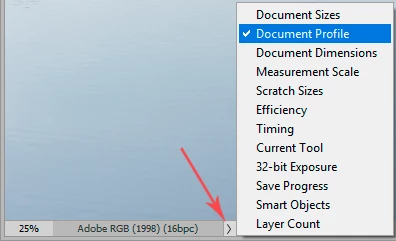
Hurray for »Document Profile« in the Status Bar! 

c.pfaffenbichler
Community Expert
Community Expert
August 16, 2023

Could you please post screenshots with the pertinent Panels (Toolbar, Layers, Options Bar, …) visible?