


Participant
July 16, 2021
Answered

Run a specific batch action with a keyboard shortcut?

  • July 16, 2021
  • 2 replies
  • 2306 views

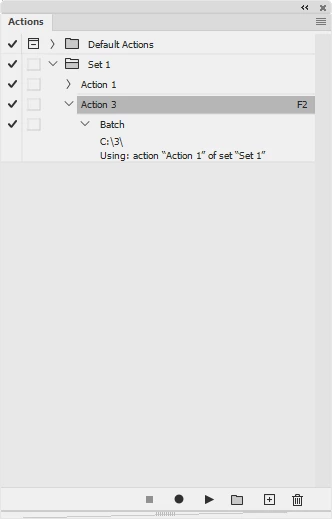
Is there any way to make a keyboard shortcut initiate a specific batch action? I periodically run the same action on all of my open files and it would be great to be able to trigger a batch with just one keyboard shortcut instead of using a keyboard shortcut to open the batch dialog and then having to locate the action from my library each time. I know that the fastest way without what I'm proposing is to just run the action once and then open the batch dialog so it's pre-loaded, but it would be easier to just do the whole thing in one go.
This topic has been closed for replies.
Correct answer r-bin

Record the batch call in action. Assign a key, that's all.


2 replies

r-binCorrect answer
Legend
July 16, 2021

Record the batch call in action. Assign a key, that's all.


Participant
July 21, 2021

Thank you! I had tried this before but kept aborting because I just saw it adding the "Select document [X]"  steps. I didn't have faith that it would add the batch action at the end!

Myra Ferguson
Community Expert
Community Expert
July 16, 2021

You can assign a function key as a keyboard shortcut to an action. If you've already created the action, double-click on it or go to the Actions panel menu and select Action Options. Select the function key and add Shift and/or Control (PC) or Command (macOS) if needed.


You might also want to consider creating a droplet. Then whenever you have a folder of images to process, you can drag and drop it on the droplet to process them. Here's more info on droplets:

Create a droplet from an action

Participant
July 16, 2021

Right, I already have the action set to a keyboard shortcut. The issue is that I usually have a set of images open together to compare color and then I want to run that finishing action on all of them at once. My current workflow is to hit they keyboard shortcut for the action (which runs it once) and then hit the keyboard shortcut I have assigned to File > Automate > Batch, and then hit OK to run the action as a batch. Ideally, I would want to be able to just run the action as a batch with a single keyboard shortcut. Droplets won't work for my use case because these images are often just a portion of the images I might have in a folder.

JJMack
Community Expert
Community Expert
July 16, 2021

Are the Open document new  unsaved documents or  have the all been saved or opened from files.   If they all have backing files on your system you should be able  to  record an action the use the Plug-in script Image Processor  Pro  to Process your Open Document play your action and save files.  It is a Photoshop Plug-In when you record it in an Action the Plug-in will record the settings you used in its dialog  into the Action step.  When the Action is played. The Action processor will pass the recorded settings to the Plug-in and the plug-in will bypass displaying.  It will see you want to  process to open  documents with your action and do it. You must has several documents open to be able the record the step you want.  It will be a one step action and the action step will look like it has no steps....


JJMack