


Answered
Save As does not save in original folder
This is one of those "has this ALWAYS been this way" questions.
Photoshop 22.5 on a PC.
In the Preferences I have the following file handling settings:
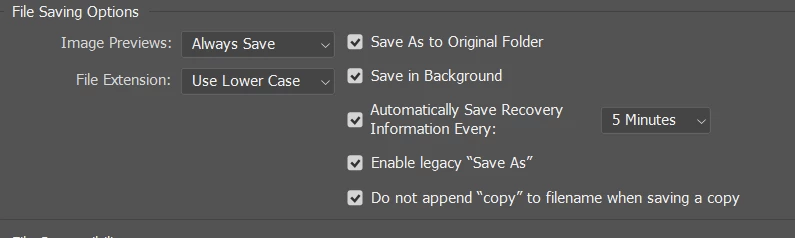
I open an image from Lightroom, fiddle with it, hit Save As, and it wants to save the output in some place that has NOTHING to do with where the image was when it got to Photoshop...
Yes, I've played with the prefs. Didn't seem to matter. Yes, I've updated Photoshop. Didn't matter. Yes, I've rebooted the system. Didn't matter.
Is there a preference I need to change?
Am I crazy or before this NEW, screwy "Save As" and "legacy Save As" change something?
 AdChoices