



PNog
Inspiring
June 15, 2022
Answered

Save for cloud pop up window persists to appear

  • June 15, 2022
  • 2 replies
  • 650 views

Hello,
Since the last Photoshop update (23.4.0) I cheked the "Do not show again" checkbox for the save to cloud option but I still have this annoying window poping up.
How can I get rid of this?
Thank you so much.

This topic has been closed for replies.
Correct answer gener7

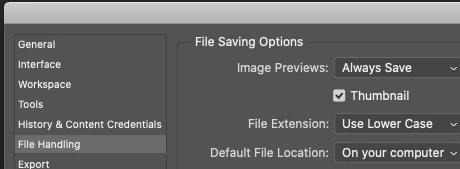
Have you set the Default File Location in Preferences? Seems to work in 23.4.0, MacOS 10.15.7

I no longer get a reminder, my computer is set as the default. Try it before you rollback.
2 replies

gener7
Community Expert
gener7Community ExpertCorrect answer
Community Expert
June 15, 2022

Have you set the Default File Location in Preferences? Seems to work in 23.4.0, MacOS 10.15.7

I no longer get a reminder, my computer is set as the default. Try it before you rollback.

PNog
PNogAuthor
Inspiring
June 15, 2022

Thank you so much.
It worked. I don't know why but Photoshop had changed this to ‘Creative Cloud’ and it didn't even occur to me to check it again.
Best regards.

gener7
Community Expert
Community Expert
June 16, 2022

Yes, that unexpected change blindsided a lot of users. Thanks to D.Fosse for catching it.

Ged_Traynor
Community Expert
Community Expert
June 15, 2022

Hi

Not related to your issue but Adobe recommends reverting back to version 23.3.2, more info

https://community.adobe.com/t5/photoshop-ecosystem-bugs/roll-back-photoshop-23-4-to-23-3-2/idi-p/13005573

PNog
PNogAuthor
Inspiring
June 15, 2022

Hi,
Thank you so much.