


phoebe-m
New Participant
March 23, 2017
Answered

Save for Web Error? [PS 2014]

  • March 23, 2017
  • 12 replies
  • 182802 views

I am currently trying to export a GIF from Photoshop CC 2014 but I keep encountering this error message:
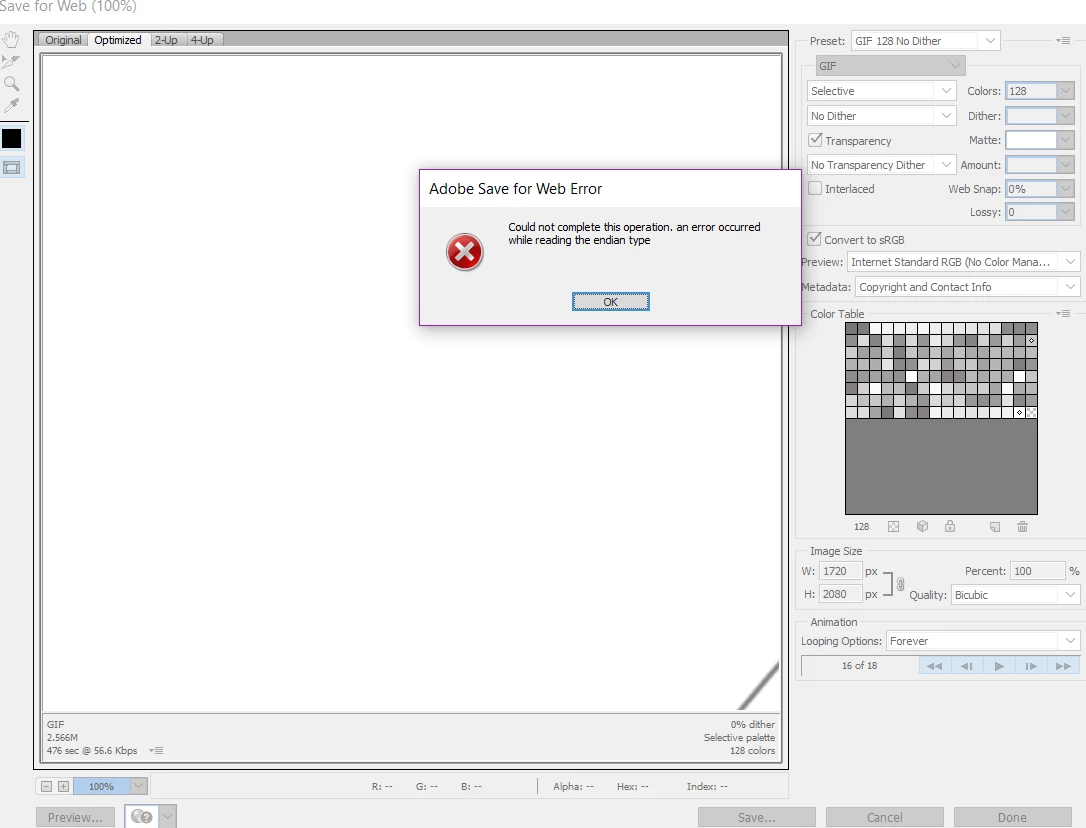
I have read previous forum post saying to delete Adobe Save For Web 12.0 Prefs but I cannot navigate to the

file's location, nor does it come up in a search. I have also tried changing the image/canvas size of the gif too.

It was exporting GIFs perfectly 24 hours ago. Any help or tips would be greatly appreciated.


I am using Windows 10.

Correct answer bzareenk

If this issue persists, try checking the image size to compare to the canvas size. I had the same issue and found this to help. Make sure the image size is not something like 20,000 inches. Try making it smaller or changing the measurement to pixels, if it is not already. Next, make sure the canvas size is not smaller than the image size, nor bigger than it. If so, change it to the same size with the same measurement of pixels or whatever the image's is. Try saving for web, again. This should work, if not then try removing the profile files (Users/[Username]/Library/Preferences/Adobe Save For Web 12.0 Prefs). Then restart your Mac and relaunch photoshop. Hope this helped!

12 replies

New Participant
August 17, 2024

Hi everyone,

I have tried to read through the thread and test various solutions - without success. I am very new to the program, but before I updated Photoshop and my macOS, I have exported several animated GIFs directly from Photoshop. However, it says there is an operating system error. Additionally, it used to say Export > Save for web (legacy), but now it says Export > Save for web (older). I don't understand this at all, since everything is updated and new. I can't find a solution, and I was wondering if any of you have experienced something similar. I also have the brand new MacBook Pro with the M3 chip and 18 GB.

Thank you!

jane-e
Brainiac
August 17, 2024

@Bella4054 


You've jumped in on a seven-year-old thread from 2017. 


Save for Web was created on or about the time of CS2 and things have changed since then. Adobe has kept it with all of its limitations (including file size) because some folks insist on using it. Newer options are in File > Export.


Adobe has kept access to other very old features, such as the old shortcuts for Channels, for those who prefer the old way. It uses "legacy" to indicate these, and you will see them throughout the application. You don't have to use them.


I haven't seen "older" instead of "legacy", but it might just be a translation issue. 


Jane


New Participant
August 19, 2024
Hi Jane,

Thank you very much for your response. Sorry that I wrote in an old thread;
I just noticed that the last updates in the thread were from 2021.

The problem is that I don't know how to save my animated GIFs from
Photoshop... I don't know if there are other ways to do this besides File >
Export > Save for Web. As I mentioned, this option is not available for me.

Bella
New Participant
May 13, 2021

Hello, I had the same problem and I reduced my image size and it worked! 

Sam B+
Inspiring
May 11, 2022

MAY 2022: I have this same problem using 23.3.2 release of PS on macOS monterey with the M1 chip. I tried many of the suggestions above but none of them worked for me. some of the settings mentioned no longer exist for me. This is the first time I have tried to make a gif on the new M1 chip machine 


I opened the exact same file on an older Mac with intel chip running PS 23.3.1 release and it worked  fine. 

EmilyOLove
New Participant
March 4, 2021

I had to clear out a bunch of Temp files as well as the Recycling Bin to solve this issue.

Inspiring
March 15, 2021

Hello, I have the same problem.

With the new 22.3 release I got the export error (Removed competely all cache files, checked all sizes, ... ) nothing helped

I rollback to 22.2 and every thing is OK with the same file !!!!! 

Is it possible to get a new release with only SOLVED bugs and NO ADDED bugs

Thanks a lot

New Participant
March 20, 2021

I'm having the same problem with the 22.3 release, I've done everything to try and fix it and I'm still getting the error "The operation could not be completed" when I do file > export > save for web. I uninstalled it, installed 22.2 and it works fine, I uninstalled 22.2 and then reinstalled 22.3 for about the 3rd time I think and it gives me the error again. There must be a bug in the new 22.3, I'm just going to use 22.2 for now.


Cinne
New Participant
October 27, 2020

I experienced this problem too with Photoshop 2020 & 2021. But I tried the following, and it worked for me. I was able to export to web again by doing this: Preferences > Performance > Increase 'Memory Usage'. 


I hope this fix will work for others as well. 

New Participant
October 29, 2020

My OS is Catalina 10.15.7 and I'm using Photoshop 2021 (22.0.0)

I tried doing:  Preferences > Performance > Increase 'Memory Usage' as well as Photoshop added to "System Preferences / Security & Privacy / Full Disc access" and it did not work.

What worked for me so far: My file name had a date so I was using a (backslash) /. When I saved it for web legacy, I replaced the backslash with a period.

New Participant
November 8, 2020

Hi guys i too have been having major issues with the save for web legacy saga so i took someones advice on page one and went to  export as: but when i post them  to various websites, mainly tumblr facebook etc. they don't Animate is there something i'm not doing right and i absolutely lol refuse to go with save for web legacy i'm loving the quickness with the export as.


help please:D!!

New Participant
January 15, 2020

Having the same issue. None of the suggestions that I have seen on these forums has worked for me. Latest Photoshop 2020 on macOS Catalina 10.15.2

New Participant
January 22, 2020

Upgrading to Photoshop 2020 on macOS Catalina 10.15.2 worked for me and was able to Export for Web Legacy successfully.

New Participant
February 8, 2020

Upgrading photoshop worked for me too!

New Participant
December 16, 2019

Same error here! I need to export this ASAP!

I've tryed the save as but that only gives me a static Gif image not a animated one.

And I only have for frames in between 30-100k so it is not any big images.

Mjollnir Switzerland
New Participant
December 16, 2019

I tried to escalate this case to a moderator: "I want you to know that PS is causing a severe error. I can't use the program without the export for web function. If this is not fixed, I am afraid that PS is obsolete for me."


I hope they see it and generate an update 

New Participant
December 16, 2019

Let's hope! I had to go for a web based gif generator to solve this.

Mjollnir Switzerland
New Participant
December 16, 2019

Same error here... changed everything that was recommended. Nothing worked... I tried other JPEG and used the export to web, same error. Then I tried making a screenshot of the picture and imported it to PS... export still does not work. In my humble opinion there is an error in the software... until it's fixed I use the SAVE AS function. Of course, it's not as good because you cannot scale but at least you can change the format and quality. 

sash13
Participating Frequently
January 30, 2020

same problem same eror -

Adobe Photoshop CC 2019   version 20. 0. 4

Mac Os Catalina 10.15.2


it realy kills all work pleasure - how to fix it? anyone helps  Please!

New Participant
June 19, 2020

Hi there -- wondering if you ever figured out this enigma??? 


I've been frustrated by this issue for about 6 months now! And I'm running 

Photoshop CC 2019 20.0.5 

on Catalina 10.15.4

so thinking our solutions would've been similar ones! It seems to be such a common problem I wish Adobe staff would chime in and offer a solution 🤔 🤔

Participating Frequently
December 14, 2019

Yes really killing productivity. Deleted the prefs and also updated to the latest version. Annoying help

New Participant
January 2, 2020

Same here. It just started. Any solutions yet? I tried all of those that I've read about, but nothing is working. This is very frustrating. Here's the message I'm getting...


CC Version:

Participating Frequently
January 3, 2020

I have been using export as... until it is resolved. I saw people chat about them working on a fix.

theVezs
Participating Frequently
August 19, 2019

I'm having the same problem and no matter what I do it doesn't allow me to "Save For Web".

Cannot find Adobe Save For Web 12.0 Prefs.

Adobe Save For Web 12.0 Pref

This is frustrating. I just updated Photoshop thinking that might help and it doesn't. Please help!!!

zo21511446
New Participant
December 14, 2019

Same issue here just since the last couple of days.  What's going on????

Nice Angel
New Participant
April 3, 2019

I was able to save a GIF two days ago since then Photoshop has taken for ever to even go through save for web dialogue and then errors out. I am making a double exposure gif for my website. The suggestion to delete Adobe Save For Web 12.0 Prefs, I have not been able to find this folder anywhere. Could really use some help? I've increased cache to max under performance which is 6431mb to save a 50mb gif...

lycastahl
New Participant
June 15, 2019

Hi!

I'm having the exact same problem and can't figure it out...have to finish a presentation in 2 days and tried everything to save the GIF with no success...I would aprecciante any help!

Thanks!