


Participant
February 24, 2021
Answered

Save/Open preferences - list by name not date

  • February 24, 2021
  • 3 replies
  • 585 views

I feel like this is a stupid question, but I can't figure it out. 

When I save or open a file out of my adobe programs since the last update, files are listed by date (Today/Previous 30 Days etc) PLEASE help me change this back to listing my files alphabetically by name!


THANKS!
This topic has been closed for replies.
Correct answer Akash Sharma

Hi there,


Sorry that your images in Photoshop Open/Save as menu are arranged and grouped by date.


This is an operating system feature that you might've changed by mistake or an operating system update modified it.


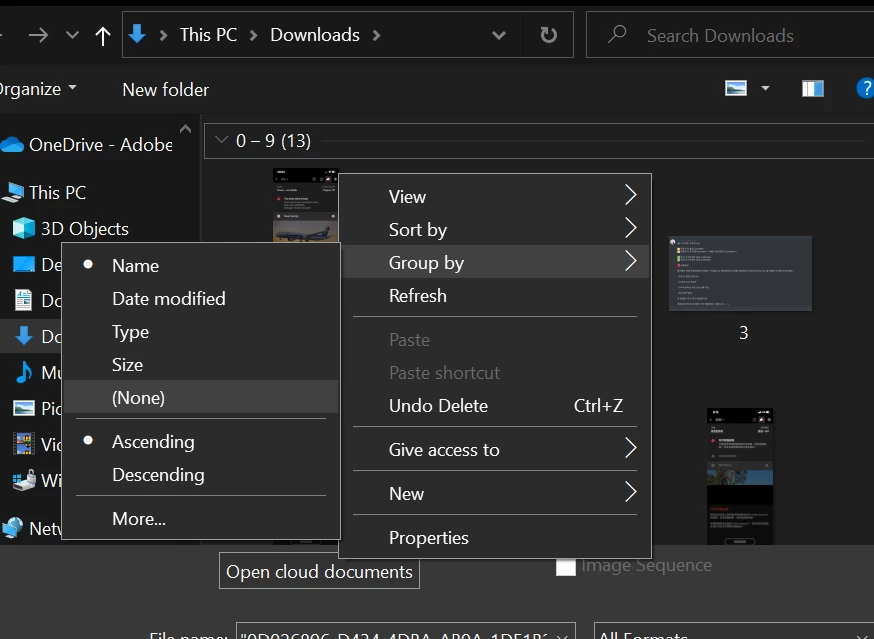
To change it back to default, simply right click on an empty space near the image thumbnail to bring the window as below and change the "Group by" to None and "Sort by" to Name.


Hope that helps!


Thanks,

Akash

3 replies

Akash Sharma
Akash SharmaCorrect answer
Legend
February 24, 2021

Hi there,


Sorry that your images in Photoshop Open/Save as menu are arranged and grouped by date.


This is an operating system feature that you might've changed by mistake or an operating system update modified it.


To change it back to default, simply right click on an empty space near the image thumbnail to bring the window as below and change the "Group by" to None and "Sort by" to Name.


Hope that helps!


Thanks,

Akash

JLIAuthor
Participant
February 24, 2021

Thank you! I knew it was something simple 🙂 

Dan Rodney
Community Expert
Community Expert
February 24, 2021

If @jane-e 's response didn't answer your question, let us know if you're on Mac or PC, and whether you're opening local files or cloud documents.

— Adobe Certified Expert & Instructor at Noble Desktop | Web Developer, Designer, InDesign Scriptor
JLIAuthor
Participant
February 24, 2021

I'm on a Mac and openign local files. Thank you!!

JLIAuthor
Participant
February 24, 2021

Also, I should have mentioned I am working in InDesign, Photoshop and illustrator primarily.

jane-e
Community Expert
Community Expert
February 24, 2021

Hi @JLI 

If you are looking at the Welcome Screen, click the dropdown for the Sort options and choose Name. The default is Recent.

~ Jane