


Gibson Editions
Inspiring
November 19, 2021
Answered

Saving Curve Preset as ACV

  • November 19, 2021
  • 3 replies
  • 4185 views

Looking for someone who has any idea how to debug the following script by Mike Hale. Any ideas or even method of were to start would be great, this script is a little beyond my knowledge base....


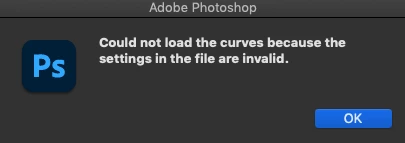
The Script follows through and saves a ACV file, but it flags the following warning when you try and load the curve. Presumable something has changed in the syntax of the curve preset since CS4 when this script was written. 


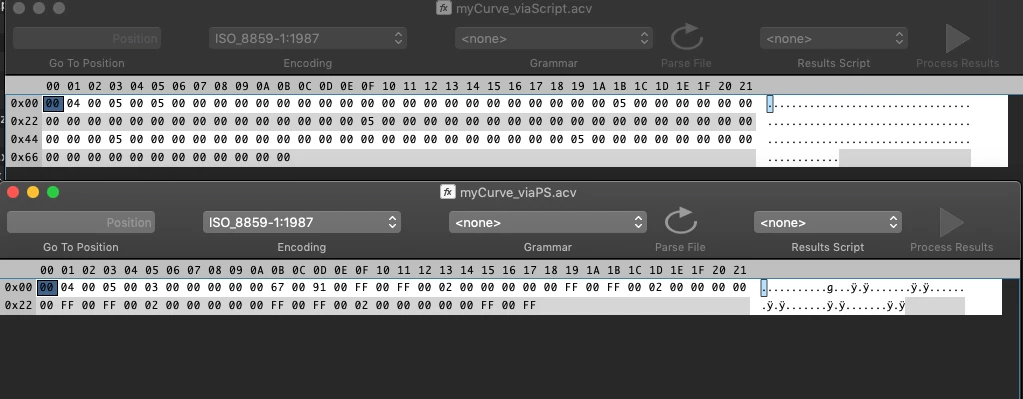
I opened an . acv of the same curve saved both via photoshop and via the script see below the difference in binary via Synalze pro, i dont really understand how to interpret this data though... 


// Works with RGB or CMYK images. 
// Does not work at all with greyscale, or indexColor
// Does not work correctly with Lab
File.prototype.writeByte = function(b) {
  this.write(String.fromCharCode(b));
};
File.prototype.writeShort = function(ET,s) {
  var self = this;
if(ET == "BE"){
  self.writeByte(s & 0xFF);
  self.writeByte((s >> 😎 & 0xFF);
}else{
  self.writeByte((s >> 😎 & 0xFF);
  self.writeByte(s & 0xFF);
}
  return self;
};
function convertBCD( num ){
    var res = new Array;
    if(num > 16 ){
        res.unshift(1);
        num = num - 16;
    }else{
        res.unshift(0);
    }
    if(num > 8 ){
        res.unshift(1);
        num = num - 8;
    }else{
        res.unshift(0);
    }
    if(num > 4 ){
        res.unshift(1);
        num = num - 4;
    }else{
        res.unshift(0);
    }
    if(num > 2 ){
        res.unshift(1);
        num = num - 2;
    }else{
        res.unshift(0);
    }
    if(num == 1 ){
        res.unshift(1);
    }else{
        res.unshift(0);
    }
    return res;
};
function getCurve( numberOfPoints ){
    this.getPoints = function(){
        this.tempArray = new Array;
        this.tempArray.push( rawDesc.charCodeAt( pointer ) );
        pointer = pointer + 2;// set pointer to next point
        this.tempArray.push( rawDesc.charCodeAt( pointer ) );
        return this.tempArray;
    }
    
    this.pointsArray = new Array;
    for( var i = 0; i < numberOfPoints; i++ ){
        pointer = pointer + 2;// next point
        this.pointsArray.push( this.getPoints() );
    }
    pointer = pointer + 2;// next curve
    return this.pointsArray;
};
var ref = new ActionReference();
ref.putEnumerated( charIDToTypeID( 'Lyr ' ), charIDToTypeID( 'Ordn' ), charIDToTypeID( 'Trgt' ) ); 
var rawDesc = executeActionGet( ref ).getList( stringIDToTypeID( 'adjustment' ) ).getObjectValue( 0 ).getData( stringIDToTypeID( 'legacyContentData' ) );
var pointer = 2;// used to read rawData similar to reading a file
var flag = rawDesc.charCodeAt( pointer );// char at offset 2 always == 1 so use to validate data
if( flag != 1 ) forceError;// unknown problem with rawData
    pointer = 6;// update pointer to BCD byte
    var bcd = rawDesc.charCodeAt( pointer );
    if( bcd < 0 || bcd > 31 ) forceError;// check for valid value
    if( bcd == 0 ) forceError;// an empty adjustment - no curves to process
    var bcdArray = convertBCD( bcd );
    var numberOfCurves = bcdArray.toString().match(/(1)/g).length;
    var curvesArray = new Array;
    pointer = 8;// set pointer to start of curve data
    for(var i = 0; i < numberOfCurves; i++ ){
        var numberOfPoints = rawDesc.charCodeAt( pointer );
        curvesArray.push( getCurve( numberOfPoints ) );
    }
// now need to map rawData curves in curvesArray to known channel curves
var acvArray = new Array;
if( bcdArray[0] == 1 ) {
    acvArray.push( curvesArray.shift() );
} else {
    acvArray.push( [ [0,0],[255,255] ] );
}
if( bcdArray[1] == 1 ) {
    acvArray.push( curvesArray.shift() );
} else {
    acvArray.push( [ [0,0],[255,255] ] );
}
if( bcdArray[2] == 1 ) {
    acvArray.push( curvesArray.shift() );
} else {
    acvArray.push( [ [0,0],[255,255] ] );
}
if( bcdArray[3] == 1 ) {
    acvArray.push( curvesArray.shift() );
} else {
    acvArray.push( [ [0,0],[255,255] ] );
}
if( bcdArray[4] == 1 ) {
    acvArray.push( curvesArray.shift() );
} else {
    acvArray.push( [ [0,0],[255,255] ] );
}
var myACV = new File('~/desktop/myCurve.acv');
myACV.open('w');
myACV.writeShort( 'LE','4' );// acv header
myACV.writeShort( 'LE','5' );// acv header
for( var i = 0; i< 5; i++ ) {
    var numberOfPoints = acvArray.length;
    myACV.writeShort( 'LE', numberOfPoints.toString() );
    for( var p = 0; p < numberOfPoints; p++ ){
        myACV.writeShort( 'LE', acvArray
[0].toString() );
        myACV.writeShort( 'LE', acvArray
[1].toString() );
    }
}
myACV.close();


This topic has been closed for replies.
Correct answer Kukurykus

I found a post on PS Scripts in which @DBarranca posted speaking about how curves with 5 curves... Perhaps @DBarranca can shed some light on this conundrum. From my debugging, it seems the data is being passed correctly to the writing part of the script. individual values are passed, but it seems like the way they are being written is not correct, and that is as far as i have got to ... 


In theory the data should be pushed to the writing part of the script as follows, as individual input ouput numbers for each point on each curve sequentially, however this somehow mucks up the structure in the script and saves the wrong number of points. 

var myACV = new File('~/Desktop/curveScriptMH.acv');
myACV.open('w');
myACV.writeShort( 'LE','4' );// acv header WORKS
myACV.writeShort( 'LE','5' );// acv header WORKS
for( var i = 0; i< 5; i++ ) {
   var numberOfPoints = acvArray[i].length;
   myACV.writeShort( 'LE', numberOfPoints.toString() ); //WORKS
   //myACV.writeByte( 0 );
debugger
   
   for( var p = 0; p < numberOfPoints; p++ ){
      myACV.writeShort( 'LE', acvArray[i][p][0].toString() ); 
      myACV.writeShort( 'LE', acvArray[i][p][1].toString() );
  }
}


When i change the script to pass the values as pairs not individual values it maintains a perfect structure with the correct number of points. 

var myACV = new File('~/Desktop/curveScript.acv');
myACV.open('w');
myACV.writeShort( 'LE','4' );// acv header
myACV.writeShort( 'LE','5' );// acv header


for( var i = 0; i< 5; i++ ) {
   var numberOfPoints = acvArray[i].length;
   myACV.writeShort( 'LE', numberOfPoints.toString() );
   //myACV.writeByte( 0 );
   
debugger

   for( var p =0 ; p < numberOfPoints; p++ ){


      myACV.writeShort( 'LE', acvArray[i][p].toString() );
      myACV.writeShort( 'LE', acvArray[i][p].toString() );
   }


In both cases the acv headers are perfectly written and in both cases none of the point values are written correctly to the file.... 


I am still sure that there is some sort of bug on this part of the code.... (I just dont understand how those functions work) 


File.prototype.writeByte = function(b) {
  this.write(String.fromCharCode(b));
};
File.prototype.writeShort = function(ET,s) {
  var self = this;
if(ET == "BE"){
  self.writeByte(s & 0xFF);
  self.writeByte((s >> 😎 & 0xFF);
}else{
  self.writeByte((s >> 😎 & 0xFF);
  self.writeByte(s & 0xFF);
}
  return self;
};


I thought there might be lack of myACV.encoding = 'binary', but that doesn't help as well. You may try with 'destructive' Curves you're going to call by script and set to some values manually. Then use fromStream() method on actionDescriptor and write the file to the disk, which you're going to compare with .acv you make from Adjustement Layer to find differences. There's also toStream() method you can read how to use on this forum.

3 replies

Tom Winkelmann
Inspiring
November 20, 2021

Maybe this works for you...

File.prototype.writeByte = function(b) {
    this.write(String.fromCharCode(b));
};
File.prototype.writeShort = function(ET,s) {
    var self = this;
if(ET == "BE"){
    self.writeByte(s & 0xFF);
    self.writeByte((s >> 😎 & 0xFF);
}else{
    self.writeByte((s >> 😎 & 0xFF);
    self.writeByte(s & 0xFF);
}  return self;
};
function convertBCD( num ){
    var res = new Array;
    if(num > 16 ){
        res.unshift(1);
        num = num - 16;
        }else{
            res.unshift(0);
            }
        if(num > 8 ){
            res.unshift(1);
            num = num - 8;
            }else{
                res.unshift(0);
                }
            if(num > 4 ){
                res.unshift(1);
                num = num - 4;
                }else{
                    res.unshift(0);
                    }
                if(num > 2 ){
                    res.unshift(1);
                    num = num - 2;
                    }else{
                        res.unshift(0);
                        }
                    if(num == 1 ){
                        res.unshift(1);
                        }else{
                            res.unshift(0);
                            }
                        return res;
};
function getCurve( numberOfPoints ){
    this.getPoints = function(){
        this.tempArray = new Array;
        this.tempArray.push( rawDesc.charCodeAt( pointer ) );
        pointer = pointer + 2;// set pointer to next point
        this.tempArray.push( rawDesc.charCodeAt( pointer ) );
        return this.tempArray;
        }
    
    this.pointsArray = new Array;
    for( var i = 0; i < numberOfPoints; i++ ){
        pointer = pointer + 2;// next point
        this.pointsArray.push( this.getPoints() );
        }
    pointer = pointer + 2;// next curve
    return this.pointsArray;
};

var ref = new ActionReference();
ref.putEnumerated( charIDToTypeID( 'Lyr ' ), charIDToTypeID( 'Ordn' ), charIDToTypeID( 'Trgt' ) ); 
var rawDesc = executeActionGet( ref ).getList( stringIDToTypeID( 'adjustment' ) ).getObjectValue( 0 ).getData( stringIDToTypeID( 'legacyContentData' ) );

var pointer = 2;// used to read rawData similar to reading a file
var flag = rawDesc.charCodeAt( pointer );// char at offset 2 always == 1 so use to validate data
if( flag != 1 ) forceError;// unknown problem with rawData
    pointer = 6;// update pointer to BCD byte
    var bcd = rawDesc.charCodeAt( pointer );
    if( bcd < 0 || bcd > 31 ) forceError;// check for valid value
    if( bcd == 0 ) forceError;// an empty adjustment - no curves to process
    var bcdArray = convertBCD( bcd );
    var numberOfCurves = bcdArray.toString().match(/(1)/g).length;
    var curvesArray = new Array;
    pointer = 8;// set pointer to start of curve data
    for(var i = 0; i < numberOfCurves; i++ ){
        var numberOfPoints = rawDesc.charCodeAt( pointer );
        curvesArray.push( getCurve( numberOfPoints ) );
        }
// now need to map rawData curves in curvesArray to known channel curves
var acvArray = new Array;
if( bcdArray[0] == 1 ) {
    acvArray.push( curvesArray.shift() );
} else {
    acvArray.push( [ [0,0],[255,255] ] );
}
if( bcdArray[1] == 1 ) {
    acvArray.push( curvesArray.shift() );
} else {
    acvArray.push( [ [0,0],[255,255] ] );
}
if( bcdArray[2] == 1 ) {
    acvArray.push( curvesArray.shift() );
} else {
    acvArray.push( [ [0,0],[255,255] ] );
}
if( bcdArray[3] == 1 ) {
    acvArray.push( curvesArray.shift() );
} else {
    acvArray.push( [ [0,0],[255,255] ] );
}
if( bcdArray[4] == 1 ) {
    acvArray.push( curvesArray.shift() );
} else {
    acvArray.push( [ [0,0],[255,255] ] );
}
var myACV = new File('~/desktop/myCurve.acv');
myACV.open('w');
myACV.writeShort( 'LE','4' );// acv header
myACV.writeShort( 'LE','5' );// acv header
for( var i = 0; i< 5; i++ ) {
    var numberOfPoints = acvArray[i].length;
    myACV.writeShort( 'LE', numberOfPoints.toString() );
    for( var p = 0; p < numberOfPoints; p++ ){
        myACV.writeShort( 'LE', acvArray[i][p][0].toString() );
        myACV.writeShort( 'LE', acvArray[i][p][1].toString() );
        }
}
myACV.close();
Kukurykus
Legend
November 20, 2021

It doesn't work too. Have you tried it on your own, and how you knew what to change?

Kukurykus
Legend
November 19, 2021
Gibson Editions
Inspiring
November 19, 2021

thanks for that,  


for some reason it fails on the first line, how should that be corrected... 

Code: Select allFile.prototype.writeByte = function(b) {
  this.write(String.fromCharCode(b));
};


Kukurykus
Legend
November 19, 2021

Remove 'Code: Select '?

Gibson Editions
Inspiring
November 19, 2021

Thought id try an alternative method via Action Manager code from script listener, but this doesnt even save a file for some reason


var idset = stringIDToTypeID( "set" );
    var desc236 = new ActionDescriptor();
    var idnull = stringIDToTypeID( "null" );
        var ref12 = new ActionReference();
        var idadjustmentLayer = stringIDToTypeID( "adjustmentLayer" );
        var idordinal = stringIDToTypeID( "ordinal" );
        var idtargetEnum = stringIDToTypeID( "targetEnum" );
        ref12.putEnumerated( idadjustmentLayer, idordinal, idtargetEnum );
    desc236.putReference( idnull, ref12 );
    var idto = stringIDToTypeID( "to" );
        var desc237 = new ActionDescriptor();
        var idpresetKind = stringIDToTypeID( "presetKind" );
        var idpresetKindType = stringIDToTypeID( "presetKindType" );
        var idpresetKindUserDefined = stringIDToTypeID( "presetKindUserDefined" );
        desc237.putEnumerated( idpresetKind, idpresetKindType, idpresetKindUserDefined );
        var idusing = stringIDToTypeID( "using" );
        desc237.putPath( idusing, new File( "~/Desktop/new.acv" ) );
    var idcurves = stringIDToTypeID( "curves" );
    desc236.putObject( idto, idcurves, desc237 );
executeAction( idset, desc236, DialogModes.NO );


Gibson Editions
Inspiring
November 19, 2021

I have just realised all the action manager code does is sets the curve not saves it.... will keep going with Mike Hales script...

Inspiring
November 19, 2021

For sure, the last part of the script is missing some arrays reference.

Try with :

for( var i = 0; i< 5; i++ ) {
    var numberOfPoints = acvArray[i].length;
    myACV.writeShort( 'LE', numberOfPoints.toString() );
    for( var p = 0; p < numberOfPoints; p++ ){
        myACV.writeShort( 'LE', acvArray[i][p][0].toString() );          
        myACV.writeShort( 'LE', acvArray[i][p][1].toString() );               
    }
}