


Inspiring
April 13, 2019
Question

Saving Files does not work anymore - Files cannot be found

  • April 13, 2019
  • 3 replies
  • 1193 views

Hi there,

I have serious issuses with saving files in Photoshop CC, here is some info on the Photoshop CC version & Windows system:

Adobe Photoshop Version: 20.0.4 20190227.r.76 2019/02/27: 1205725  x64

Operating System: Windows 10 64-bit

I cannot save ANY files at all anymore... I can open & edit them, but I can neither save them via "save", "save as" or "export -> save for web", and it also does not change anything if I if I keep the name of the file or if I rename it... the following warning appears all the time:
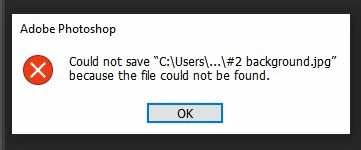
s this a recent bug, or is it something which is not even caused by Photoshop, but by another pc or Windows releated error?

Any help would be very much appreciated... thanks!!

C.

    This topic has been closed for replies.

    3 replies

    JJMack
    Community Expert
    April 13, 2019

    Is the ... in your User Id data space.  If the first part  of the ... is not \your user ID\ I would expect windows to prevent your access even if you are an administrator unless you have taken control of the users space.  If it is \your user ID\ check your permissions for the rest of the ... path.

    JJMack
    chiara11Author
    Inspiring
    April 13, 2019

    Yes, I was also wondering why my user name does not appear in this path, but I have just checked Windows Defender and Dave was right: "protected folders" was acitvated, and my Adobe pictures are in the "picture" folder, which is one of the protected folders, so that explains the issue. I never had any problems with protected folders when using Bitdefender, so I did not think of that... I now permitted the Photoshop app in Windows Defender "monitored folder access", and I can finally SAVE my files again... great, many many thanks to all of you!!

    Best wishes,

    C.

    April 13, 2019
    davescm
    Community Expert
    April 13, 2019

    Hi

    Have you any security software that might prevent an application saving to the folder location. Examples would be Windows Defender  controlled folder access  or a similar setting in a 3rd party antivirus application.

    Dave

    chiara11Author
    Inspiring
    April 13, 2019

    Hi Dave,

    Thanks for your quick reply! I had used Bitdefender until the April 12 but due to some other issues (problems with viewing some webpages correctly ) I wanted to reinstall Bitdefender, but it kept on "saying server connection to Bitdefender cannot be established", so I wrote a message to Bitdefender and temporarily activated Windows Defender.... and it really seems as if I cannot to save files anymore since I started using Windows Defender... I also installed Malewarebytes free version yesterday afternoon, as I wanted to see if there are malware results, but the malware & rootkits scan did not show any results.

    Thanks,

    C.

    davescm
    Community Expert
    April 13, 2019

    Hi

    That change to Defender would do it. Follow the link given by Ged

    Dave