


Kbirch
Participant
October 15, 2018
Answered

Scaling Images with shift no longer works after update (20.0)

  • October 15, 2018
  • 75 replies
  • 264276 views

After updating to CC 2019, I am not longer able to scale images evenly simply by holding shift.

I went to keyboard shortcuts and found a "scale" shortcut that was unassigned, so i assigned it to "S" as it simply wouldn't let me assign shift:
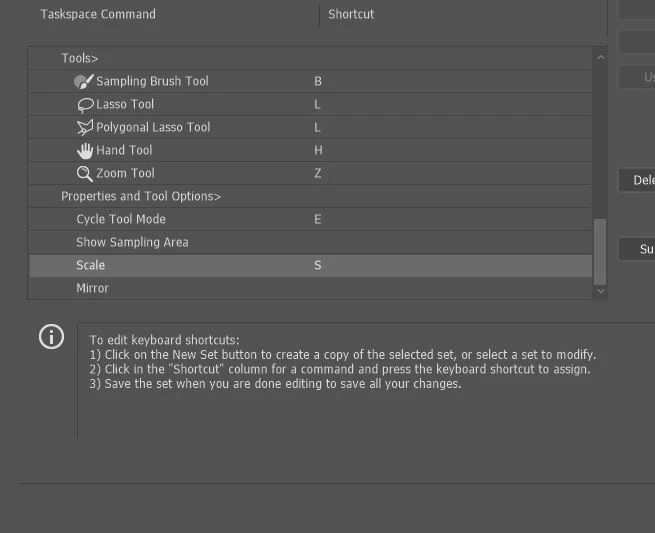
Now it seems to only want to scale evenly and won't let me scale however I want simply by dragging the corner of the image. Sometimes it doesn't go evenly when I transform with Ctrl+T and scales evenly after I press S, but wont let me go back to scaling unevenly.

Any Ideas?

Correct answer John Waller

It's a new feature. The old behaviour has been reversed. Default = proportional (constrain). Shift for non-proportional. Few people see any logic in this change.

Plenty of forum posts on this

Scaling Images with shift no longer works after update (20.0)

CC20 transform tool: Shift doesn't keep Aspect ratio

The new behaviour can be disabled.

To revert to the legacy transform behavior, do the following:

  1. Use Notepad (Windows) or a text editor on Mac OS to create a plain text file (.txt).
  2. Type the text below in the text file:

    TransformProportionalScale 0

  3. Save the file as "PSUserConfig.txt" to your Photoshop settings folder:
    • Windows: [Installation Drive]:\Users\[User Name]\AppData\Roaming\Adobe\Adobe Photoshop CC 2019\Adobe Photoshop CC 2019 Settings\
    • macOS: //Users/[User Name]/Library/Preferences/Adobe Photoshop CC 2019 Settings/

75 replies

kdnon
Known Participant
May 1, 2024

I normally don't respond, but this is the dumbest change ever. Inconsistent with other apps, ignores decades of precedent, and for what gain. Nothing. At the least Adobe make it an easy toggle on or off in preferences please. Sign me bewildered. I haven't noticed this till the 2023 version, so I don't know how I got lucky to only be dealing with this now.


Conrad_C
Community Expert
Community Expert
May 1, 2024

You asked for an “easy toggle on or off in preferences please.” Adobe gave us not one, but two of those. You might have missed them because this is a very long thread to read through, but after the initial complaints Adobe addressed it in later updates.


The first preference is, of course, in Preferences (Settings in later versions of macOS). Use Legacy Free Transform lets you do it the old way.


The other is a setting in the options bar, so you don’t even have to open a dialog box. Clicking the link icon (it links horizontal and vertical scaling) toggles between scaling proportionally and not proportionally.


quote

Inconsistent with other apps, ignores decades of precedent…

By @kdnon


That is becoming less true by the day, and that is why Adobe had to act.


Many new graphics apps no longer require holding down Shift to scale proportionally. Yes, holding Shift is a historical precedent that goes back around 40 years or more…but people increasingly realized that although it’s a tradition, it’s kind of a weird tradition when you stop and think about it: Why do we have to press a modifier key for the way we want to use it most of the time, which is proportional? The less frequent exception — non-proportional scaling — is what should require the extra step of a modifier key. So, many newer apps do it that way: You just drag a handle and you get normal proportional scaling without also having to hold down a key.


And there is one more thing. The most popular computing device is now the smartphone and smartphones don’t have a Shift key you can press while editing graphics with a touch interface, so forcing people to hold Shift to proportionally scale made no more sense for the device that most people use. So mobile graphics apps are designed to scale proportionally by default.


These widespread and cross-platform changes mean it now makes more sense for an app developer to proportionally scale by default, and override with a modifier, especially for desktop and mobile versions of the same app to be consistent. Photoshop now follows that, but you do still have the option to do it the old way.


Because this is an industry-wide change, if for example someone said “This is dumb, I’m abandoning Photoshop out of protest” they would find it difficult to switch to something “better” because many of the popular competing image editing apps also scale proportionally without the Shift key…and some of them made the move before Photoshop did.


There is one big problem: Although Photoshop is now more consistent with other modern image editing programs, other older Adobe desktop apps have not yet adapted, such as Illustrator and InDesign. They still require the Shift key to scale proportionally, and this is very annoying for anyone who frequently switches among those apps and Photoshop.

Participant
February 21, 2020

why the need to change something that is universal throughout all applications?


Conrad_C
Community Expert
Community Expert
February 21, 2020

Because it is not “universal throughout all applications.”


There’s been a change in philosophy recently where developers are asking: If what we mostly want when scaling is to preserve proportions, why do we need to hold down a modifier to do what we want most of the time? This reasoning has caused many developers to swap the default so that proportional scaling is the default. They’re basically saying, do we need to maintain a precedent when it’s probably not the right thing to do? Should the way it was done in 1990 be unchangeable for any reason?


For example, let’s suppose someone gets so angry about this change that they decide to leave Photoshop and put their financial support behind a competitor instead. They delete Photoshop and pay just $50 for Affinity Photo, one of the most powerful and widely praised Photoshop competitors. The second they decide to scale something by dragging, they will find out that…Affinity Photo scales proportionally by default too! Pressing Shift scales non-proportionally. Just like Photoshop does now.


In exasperation, let’s suppose they try Pixelmator, another popular Photoshop competitor. Guess what, it scales proportionally by default too. Those are just two of the examples. These days, the applications that require the Shift key are mostly older ones such as GIMP.


Affinity Photo and Pixelmator are some of the most modern code bases out there, with the most current UI thinking. They represent where photo editing software design is going, when the big picture is considered.


Part of the big picture is that not using the Shift key is also more consistent for applications that have versions that need to work on touchscreens, because modifiers are more of a hassle on touchscreens, especially when no keyboard is attached. If no Shift key is required to scale proportionally, the same uniform gesture works across all platforms. This wasn’t an issue in 1992, 2005, 2010…but today, with Photoshop on Surface tablets and on the iPad…


I’m not saying the situation is perfect. It’s actually a big hassle if you use multiple Adobe applications, because the others still use the old way of scaling. You can easily get mixed up when switching between Photoshop, InDesign, Illustrator, etc. I guess that’s part of the reason they provide a preference that lets you turn off the new behavior in Photoshop.

Participating Frequently
November 29, 2019

Please Adobe, slow down with the "upgrades". It seems like you are bombarding me with an endless stream of hand grenades designed to make my life miserable.

Participant
September 20, 2019

What a boneheaded change. It wouldn't be so bad if Adobe had at least changed it globally across all CC apps.

Just restore this to the old setting and fire the idiot who came up with the idea to change it.

brandonl8911795
Inspiring
August 6, 2019

Looks like the newest install of Photoshop has the option to use "Legacy Free Transform" if you look under Edit > Preferences > General.

Thank heavens! Why they didn't do that when releasing an interface-changing feature is beyond me, but hey.

Kukurykus
Legend
August 7, 2019

It seems you people often don't read latest posts: Re: Scaling Images with shift no longer works after update (20.0)

obieblu
Inspiring
August 6, 2019

I got a new computer at work, so I had to Google this to see where to undo the new changes, AGAIN. Looks like I'll be doing this for the rest of my life...

Why, Adobe. Why?

Kukurykus
Legend
August 6, 2019

You mean undo new changes or using new scaling for the rest of your life?

obieblu
Inspiring
August 7, 2019

Set the Scaling property back to what it's been for 20 years (and is still on almost every other graphics-based software) every time I get on a new version of Photoshop. It's out of Mental Model. It's out of habit. It's now a statistical outlier in the industry.

I find big companies can trend towards really bad UX decisions out of arrogance. Which is especially ironic as Adobe wants to dominate the UX design industry. I've pinged the XD team on Twitter about how their 'upgrades' are examples of bad UX.

So, as per your second comment about 'us people', looks more like you didn't read my post when I said 'AGAIN'...

Inspiring
July 8, 2019

The fix no-longer works, has anyone found a new workaround to this annoying useless feature?

Known Participant
July 8, 2019

With the most recent update they have made that fix a checkbox—the way it should have been from the beginning. Go to Preferences>General and check the box for "Use Legacy Free Transform."

caitlinr2449128
Participant
June 26, 2019

I tried the fix for macs (creating the PSUserConfig.txt file), but it didn't work. I've used this fix on two Windows computers and it worked, so I think I'm doing something wrong for the mac, or it's not working with the OS for some reason.

It's weird because sometimes when I hold shift, it will maintain the aspect ratio, but 80% of the time it won't. If I hold down the 'option' key, it'll maintain the aspect ratio, but it does it from the center.

Am I missing something?

macOS Mojave

Version 10.14.5

Using Photoshop CC 2019. No updates available, so I should be on the latest.

Kukurykus
Legend
June 26, 2019

If you've got version 20.0.5 complay with linked content in my post No. 143:

Re: Scaling Images with shift no longer works after update (20.0)

caitlinr2449128
Participant
June 26, 2019

You're brilliant, thank you!

Participant
June 18, 2019

Very Useless update from Adobe

andrijam35869990
Participant
May 1, 2019

do you guys not have ipads?

Inspiring
May 1, 2019

For what purpose? To use Photoshop with even less screen real estate and no keyboard commands whatsoever?