Participating Frequently
March 14, 2024
Answered

Script automatically remove extra spaces at the beginning and end of a selected text layer.

  • March 14, 2024
  • 3 replies
  • 1561 views

Hello everyone!

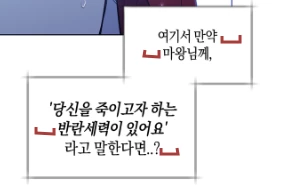
I'm currently working on typesetting dialogue for a comic. When I type, I often have extra spaces at the beginning and end of each line when I press enter, because we have to manually line break. For each extra space, we are penalized and lose points. Is there a script that can automatically remove the extra spaces at the beginning and end of the selected text layer?
This topic has been closed for replies.
Correct answer Stephen Marsh

Thanks, I had misunderstood. 


Does the Script @Stephen Marsh posted work for you? 

Is the Type Layers’ content always homogenous, so without variability in font, size, tracking, …? 


@c.pfaffenbichler wrote:

Thanks, I had misunderstood. 


Does the Script @Stephen Marsh posted work for you? 


No it doesn't, as I didn't have the document to test on...


This simple one-liner should adjust the active text layer. The code could be extended to process all text layers in the active document or all text layers in all open documents:


app.activeDocument.activeLayer.textItem.contents = app.activeDocument.activeLayer.textItem.contents.replace(/^\s+|\s+$/gm, "");


3 replies

c.pfaffenbichler
Community Expert
Community Expert
March 19, 2024

@Kathyyyy , please remember to mark the correct answer as such. 

c.pfaffenbichler
Community Expert
Community Expert
March 14, 2024
quote

When I type, I often have extra spaces at the beginning and end of each line when I press enter, because we have to manually line break.

Why would that cause spaces to manifest? 

Is that a peculiarity of the used font/language?


Could you provide a file as is and the corresponding one as it should be? 

KathyyyyAuthor
Participating Frequently
March 14, 2024

The extra spaces are not caused by the language itself.

In any language, there should be a space between each word. However, when typesetting dialogue, we are required to remove spaces at the beginning and end of sentences when we break lines. This means that after breaking a line, we need to remove the inherent space between words to prevent them from shifting the dialogue slightly and making it uneven.

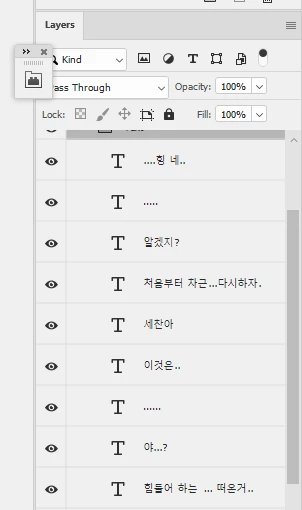
I have attached a sample file below. The dialogues highlighted in red are those with extra spaces at the beginning and end of sentences, some with up to two extra spaces. I am looking for a way to quickly remove these spaces.


c.pfaffenbichler
Community Expert
Community Expert
March 14, 2024

Thanks, I had misunderstood. 


Does the Script @Stephen Marsh posted work for you? 

Is the Type Layers’ content always homogenous, so without variability in font, size, tracking, …? 

Stephen Marsh
Community Expert
Community Expert
March 14, 2024

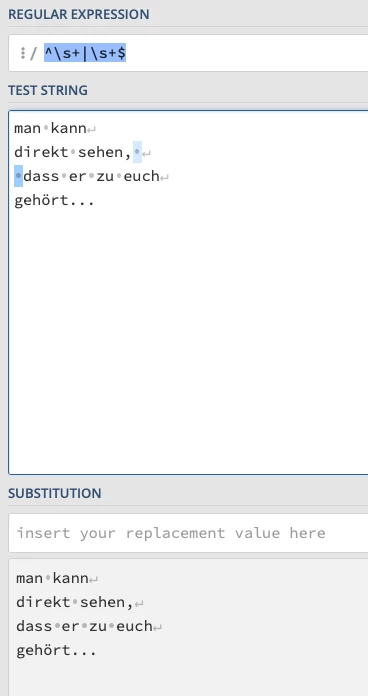
You should be able to use a regular expression with a global flag and multi-line flag, replacing the white space with nothing:


^\s+|\s+$


Perhaps like this (script code courtesy of @Lumigraphics)


/*
Utility PS Scripts created by David M. Converse ©2018-21

This script is a demo of replacing text

Last modified 6/2/2021

Licensed under the Apache License, Version 2.0 (the "License");
you may not use this file except in compliance with the License.
You may obtain a copy of the License at

    http://www.apache.org/licenses/LICENSE-2.0

Unless required by applicable law or agreed to in writing, software
distributed under the License is distributed on an "AS IS" BASIS,
WITHOUT WARRANTIES OR CONDITIONS OF ANY KIND, either express or implied.
See the License for the specific language governing permissions and
limitations under the License.
*/
#target photoshop

layerUpdate();

function layerUpdate(){
    if(documents.length > 0){
        var originalDialogMode = app.displayDialogs;
        app.displayDialogs = DialogModes.ERROR;
        var originalRulerUnits = preferences.rulerUnits;
        try{
            var docRef = activeDocument;
            preferences.rulerUnits = Units.POINTS;
            for(var i = 0; i < docRef.artLayers.length; i++){
                var LayerRef = docRef.artLayers[i];
                if(LayerRef.kind == LayerKind.TEXT){
                    var TextRef = LayerRef.textItem;
                    var layerText = TextRef.contents;
                    var newText = layerText.replace(/^\s+|\s+$/gm, "");
                    TextRef.contents= newText;
                    }
                }
            preferences.rulerUnits = originalRulerUnits;
            app.displayDialogs = originalDialogMode;
            }
        catch(e){
            }
        }
    }