

Script for manipulating images in a folder and saving with background watermark
I've been trying to make a script (using javascript) to automate a task that might take days to complete manually, although I have very basic knowledge of javascript.
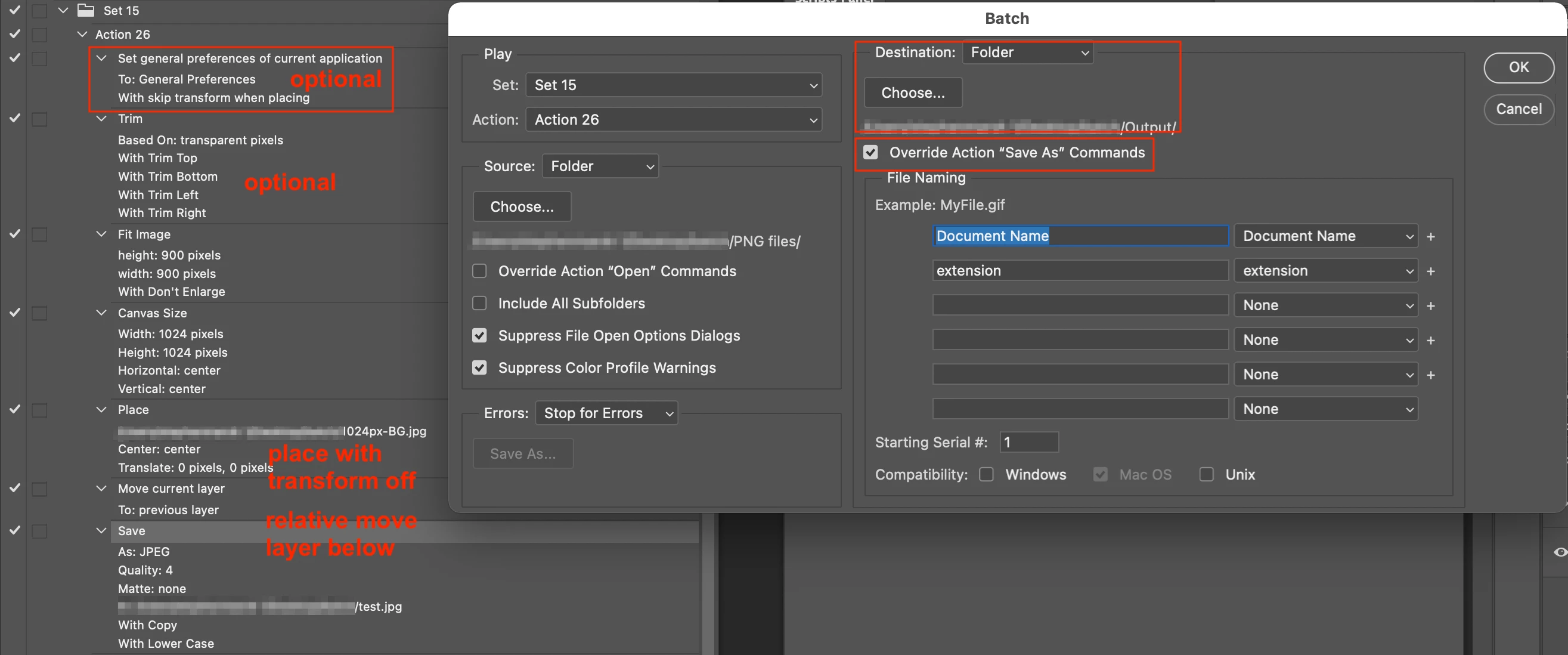
I am creating the images which will be in a website. What I have is a 1024px x 1024px background image and a folder with many (2000+) .png images which I need to put over the background, adjust to fit the it's size, align with the center vertically and horizontally and save as .jpeg at quality 4 in another folder. The thing is that those .png images have different heights and widths. I think the most efficient way to resize each image would be to set the longest side (height or width) to around 900px (I want to keep a little margin) and the other side to adjust proportionally, but I definitely don't know how to do it. A list of the actions in a loop should be like this (having the background image already opened):
1 - open current image from the folder
2 - resize image
3 - copy image (or layer) and paste on the background file
4 - align image to the center vertically and horizontally
5 - save as jpeg (quality 4) in another folder
6 - delete image layer and close image file (discarding changes)
I know it's a lot and I'm not sure if I made it clear enough (not native english speaker here), but any help is appreciated. I'm using Photoshop 2021.
 AdChoices