


Participating Frequently
April 11, 2019
Question

Script help: Crop based on select subject

  • April 11, 2019
  • 4 replies
  • 14359 views

I have been trying to create an action, but think it's going to take a little more than that to accomplish what I am trying to do.  Please let me know if for some reason it would not be possible.

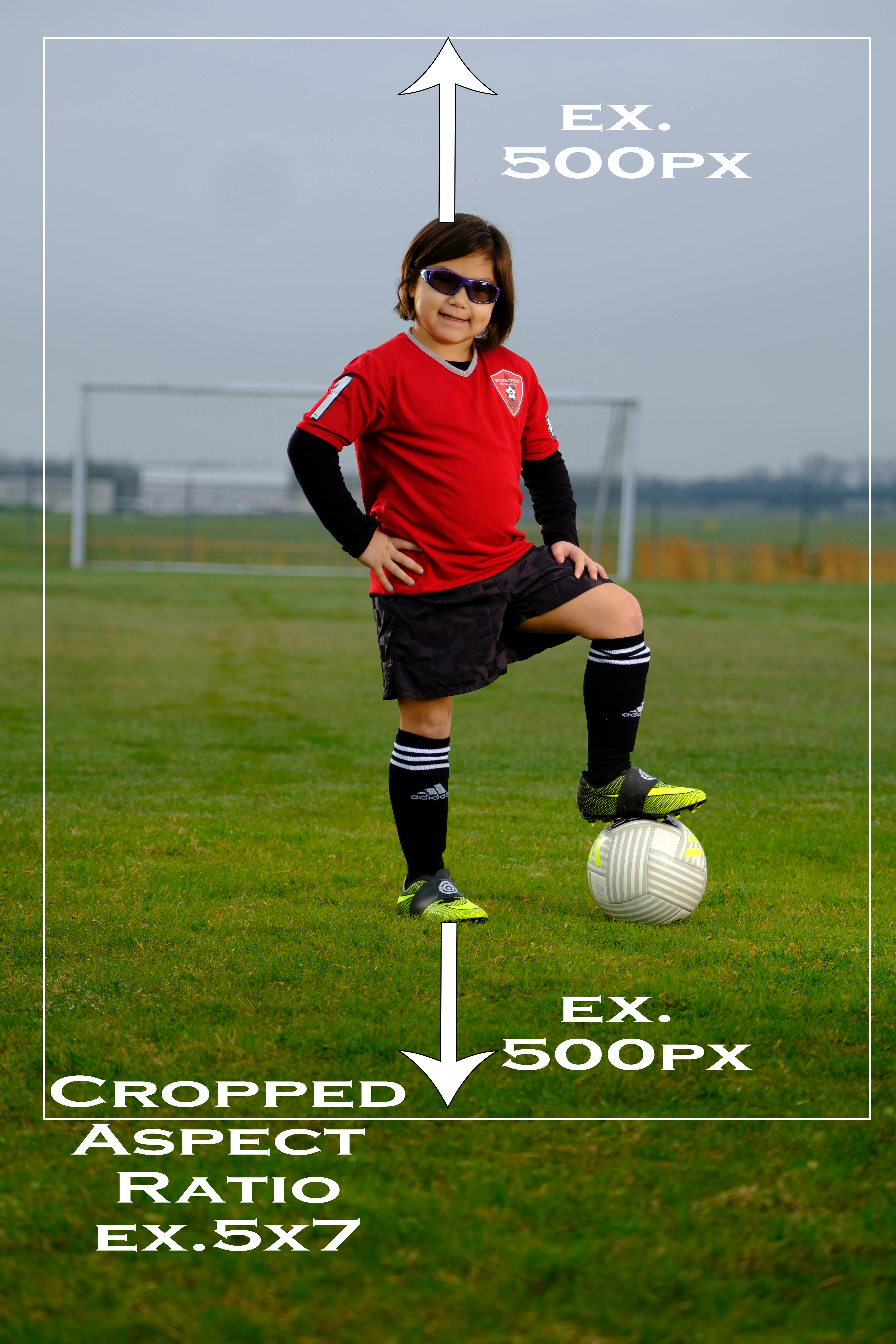
I photograph full length portraits(natural background-Not Green screen).  I am looking to be able to auto crop based on a set amount of pixels above the head and feet(based on the select subject) and then be able to crop in a certain aspect ratio(5x7,8x10,7x10, ect....) keeping the padding above the head and feet keeping the subject in the middle of the photo.
This topic has been closed for replies.

4 replies

willcampbell7
Brainiac
August 26, 2020

In the time since I posted a reply to this message, with some code, I've taken that code and rolled it into a full script with interface. Anyone interested have a look and see if it suits your needs for auto cropping. Download free here Auto Crop

William Campbell
willcampbell7
Brainiac
December 28, 2020

I've updated the script to use content-aware cropping.

Auto Crop

Also I now have a YouTube of using the script. Photoshop Script Auto Crop

William Campbell
Stephen Marsh
Community Expert
May 7, 2019

A related topic thread here:

Batch cropping to aspect ratio

New Participant
March 4, 2020

Anyone tried this plug in

World's Best Volume Photo Cropping!


Seems to be exactly the intended purpose.


I ask because I'm looking for a solution to auto-crop out heads

JJMack
Community Expert
April 12, 2019

While the select subject in the case selection bounds would most likely have a portrait aspect ratio where the height is lager than the width. That will not always be the case.  So you can not simply add 1000 Pixels to the height and set a standard portrait Aspect Ratio that height.  If the select subject selection has a landscape aspect ratio the a standard portrait selection crop would crop off  parts of the subject.

However you could select subject expand the selection 500px and crop to a none standard aspect ratio which may be a portrait or square or landscape aspect ratio,  It would be a very easy action to record. It will work well as long as there are 500PX on all sides of the select subject selection bounds.

JJMack
Participating Frequently
April 12, 2019

Yes you are correct, I have gotten that far, the problem is the crop is then based on the height of the person(+500px) and not an set aspect ratio.  So the the tall athletes, you get a long and skinny crop. 

JJMack
Community Expert
April 12, 2019

If you know how to script Photoshop you could calculate a standard Landscape or Portrait aspect ratio crop once  you get the select subject bounds.  However Select subject does not always get it right IMO. And there would need to be sufficient room for the crop. If the subject is not well centered with room for the crop you will run out of canvas to make the crop

JJMack
Stephen Marsh
Community Expert
April 12, 2019

The following script from JJMack may be of help in an action:


AspectRatioSelection.jsx

JJMacksCraftingActions.zip


I am kicking this around and will post back once I have a workable solution incorporating the script with an action… Otherwise a full custom script would be required.


You may also find this recent discussion helpful:


Guide Lines for Print Sizes Action?

Participating Frequently
April 12, 2019

Awesome, Thank you!  I will take a look at JJmack's action too, 

Stephen Marsh
Community Expert
April 12, 2019

Cropping can be complicated for an automated process, it combines both mathematical and artistic processes. It will also depend on the composition of the original shots. If the images consistently offer a roughly centred subject that is roughly framed with the same space and orientation then you will have more success with an automated process.

(A) Therefore fully automating the process may lead to compromises and potential errors. This would be the preferred approach if there was a large volume of images and working through them fast was the most important factor.

(B) A semi-automated process will speed this up greatly, while still offering you some flexibility if not artistic control over the crop.

Knowing these issues and the pros/cons, my question is – which of the two approaches do you wish use, A or B?