

Answered
Script help? - Export - Merge many picture into one
Hi all, i have 4 pictures 1,2,3,4. i want to make "final" picture with 1,2,3,4 by script :'(

1,2,3,4 => final picture
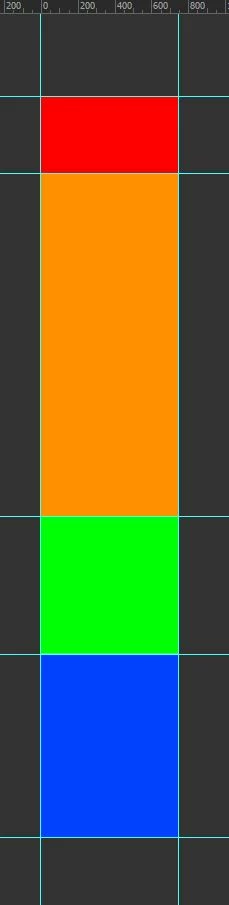
final picture in photoshop
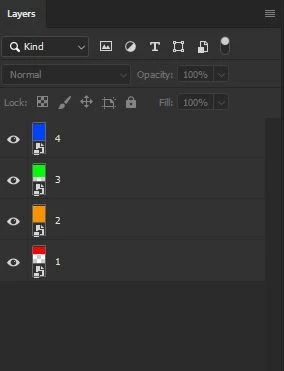
Layer in final.psd

Hi all, i have 4 pictures 1,2,3,4. i want to make "final" picture with 1,2,3,4 by script :'(
1,2,3,4 => final picture
final picture in photoshop
Layer in final.psd
@vnTriNguyen – There was a very basic error in my previous script, the canvas size was updating using the first doc size, when it should have been looping over each new doc size and adding that. I didn't spot this error as my test files were all square and the same height.
Please try this new 1.2 update, I have tested it and it works as you require:
/*
Vertical Stacker.jsx
https://community.adobe.com/t5/photoshop-ecosystem-discussions/script-help-export-merge-many-picture-into-one/td-p/13016395
How to create one big PNG image from multiple PNG images?
Stephen Marsh
v1.2, 20th June 2022
*/

#target photoshop

if (app.documents.length === 0) {

    (function () {

        // Save the current dialog display settings
        var savedDisplayDialogs = app.displayDialogs;
        app.displayDialogs = DialogModes.NO;

        // Capture the original ruler units and set the ruler units to pixels
        var origUnits = app.preferences.rulerUnits;
        app.preferences.rulerUnits = Units.PIXELS;

        // Select the input folder
        var inputFolder = Folder.selectDialog('Please select the input folder:');
        // Test if Cancel button returns null, then do nothing
        if (inputFolder === null) {
            app.beep();
            return;
        }

        // Supported file formats
        var inputFiles = inputFolder.getFiles(/\.(jpg|jpeg|tif|tiff|png|psd|psb)$/i);
        // Alpha numeric sort
        // inputFiles.sort().reverse;
        inputFiles.sort();

        // Process the first "base" file
        var firstFile = app.open(File(inputFiles[0]));
        var firstFileName = app.activeDocument.name.replace(/\.[^\.]+$/, '');
        app.activeDocument.duplicate("Final", false);
        firstFile.close(SaveOptions.DONOTSAVECHANGES);
        var docStack = app.documents[0];
        app.activeDocument = docStack;
        docStack.activeLayer.name = firstFileName;
        // Convert layer to smart object
        //var idnewPlacedLayer = stringIDToTypeID("newPlacedLayer");
        //executeAction( idnewPlacedLayer, undefined, DialogModes.NO );

        // Process the remaining file layers to the "base" file
        for (var i = 1; i < inputFiles.length; i++) {
            var remainingFiles = app.open(File(inputFiles[i]));
            var fileName = remainingFiles.name.replace(/\.[^\.]+$/, '');
            var aggregateHeight = activeDocument.height.value;
            remainingFiles.activeLayer.name = fileName;
            remainingFiles.layers[0].duplicate(docStack, ElementPlacement.PLACEATBEGINNING);
            remainingFiles.close(SaveOptions.DONOTSAVECHANGES);
            relativeCanvasSize(true, aggregateHeight);
            align2SelectAll('AdCH');
            align2SelectAll('AdBt');
            // Convert layer to smart object
            //var idnewPlacedLayer = stringIDToTypeID("newPlacedLayer");
            //executeAction( idnewPlacedLayer, undefined, DialogModes.NO );
        }

        app.runMenuItem(stringIDToTypeID("selectAllLayers"));
        //reverseLayerStack();
        //app.activeDocument.flatten();

        app.beep();
        alert(inputFiles.length + ' files vertically stacked!');

        // Restore the dialogs
        app.displayDialogs = savedDisplayDialogs;

        // Return the original ruler units
        app.preferences.rulerUnits = origUnits;


        // Functions

        function relativeCanvasSize(relative, height) {
            var s2t = function (s) {
                return app.stringIDToTypeID(s);
            };

            var descriptor = new ActionDescriptor();

            descriptor.putBoolean(s2t("relative"), relative);
            descriptor.putUnitDouble(s2t("height"), s2t("pixelsUnit"), height);
            descriptor.putEnumerated(s2t("vertical"), s2t("verticalLocation"), s2t("top"));
            executeAction(s2t("canvasSize"), descriptor, DialogModes.NO);
        }

        function align2SelectAll(method) {

            app.activeDocument.selection.selectAll();

            var desc = new ActionDescriptor();
            var ref = new ActionReference();
            ref.putEnumerated(charIDToTypeID("Lyr "), charIDToTypeID("Ordn"), charIDToTypeID("Trgt"));
            desc.putReference(charIDToTypeID("null"), ref);
            desc.putEnumerated(charIDToTypeID("Usng"), charIDToTypeID("ADSt"), charIDToTypeID(method));
            try {
                executeAction(charIDToTypeID("Algn"), desc, DialogModes.NO);
            } catch (e) { }

            app.activeDocument.selection.deselect();

        }

        function reverseLayerStack() {
            var idreverse = stringIDToTypeID("reverse");
            var desc4653 = new ActionDescriptor();
            var idnull = stringIDToTypeID("null");
            var ref2335 = new ActionReference();
            var idlayer = stringIDToTypeID("layer");
            var idordinal = stringIDToTypeID("ordinal");
            var idtargetEnum = stringIDToTypeID("targetEnum");
            ref2335.putEnumerated(idlayer, idordinal, idtargetEnum);
            desc4653.putReference(idnull, ref2335);
            executeAction(idreverse, desc4653, DialogModes.NO);
        }

    })();

} else {
    alert('Please close all open files before running this script...');
}
Note: This code doesn't use smart objects. It is easy enough to "cheat" and add code to create a smart object for each layer, however, that is not the same as placing the original files to create a smart object layer. This may or may not be a critical difference for you.
Already have an account? Login
Enter your E-mail address. We'll send you an e-mail with instructions to reset your password.
 AdChoices