


Inspiring
July 4, 2016
Question

Script I made: Iterate Action Over Layers

  • July 4, 2016
  • 6 replies
  • 9728 views

Hey, just cobbled together this script that I'm already finding useful in my own work, so I figured I'd share, and maybe see if anyone has suggestions for improvement.

What it does, is apply a selected action to each of the selected layers individually.

So for example, if you had 50 layers that you wanted to each rotate by 90 degrees in place, you'd record a rotate-by-90-degrees action, select all the layers you want to apply it to and run the script with the action selected.
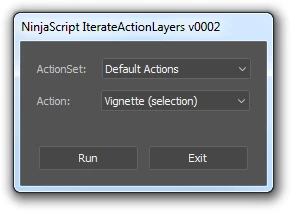
#target photoshop

var scriptName = "NinjaScript IterateActionLayers";

var scriptVersion = "0002";

function cID (inVal) { return charIDToTypeID(inVal);}

function sID (inVal) { return stringIDToTypeID(inVal);}

var currentActionSets = getActionSets();

main();

function main()

{

    app.bringToFront();

    optionsDialog();

}

function optionsDialog()

{

    var ButtonWidth = 100;


  OpenOptionsDialog = new Window("dialog", scriptName + " v" + scriptVersion);

  OpenOptionsDialog.orientation = 'column';

  OpenOptionsDialog.alignChildren = 'left';

    mainGroup = OpenOptionsDialog.add("group");

    mainGroup.orientation = 'column';

    mainGroup.alignChildren = 'left';

    mainGroup.alignment = 'left';    

    var actionSetGroup = mainGroup.add("group");

    actionSetGroup.orientation = 'row';

    actionSetGroup.add("statictext",undefined, "ActionSet: ")

    var DDActionSet = actionSetGroup.add("dropdownlist",undefined, "")

    DDActionSet.preferredSize.width = 150;


    for (var i = 0; i < currentActionSets.length; i++)

    {

            DDActionSet.add("item", currentActionSets);

    }

    DDActionSet.selection = 0;


    var actionGroup = mainGroup.add("group");

    actionGroup.orientation = 'row';

    actionGroup.add("statictext",undefined, "Action:      ")

    DDActions = actionGroup.add("dropdownlist",undefined, "")

    DDActions.preferredSize.width = 150;


    function populateDDActions (inSet)

    {

        DDActions.removeAll();


        for (var i = 0; i < currentActionSets[inSet].actions.length; i++)

        {

            DDActions.add("item", currentActionSets[inSet].actions);

        }

        DDActions.selection = 0;

    }

    DDActionSet.onChange = function()

    {

        populateDDActions(DDActionSet.selection.index);

    }

    DDActionSet.onChange();


    mainGroup.add("statictext", undefined, "");


    ButtonGroup = mainGroup.add("group");

    ButtonGroup.orientation = 'row';

    ButtonGroup.alignChildren = 'center';

    ButtonGroup.alignment = 'top';    


    buttonRun= ButtonGroup.add("button",undefined, "Run")

    buttonRun.preferredSize.width = ButtonWidth;

    buttonRun.onClick = function()

   {

       var SelectedLayers = getSelectedLayers();


        for (var i = 0; i < SelectedLayers.length; i++)

        {

            activeDocument.activeLayer = SelectedLayers;

            doAction(DDActions.selection.text, DDActionSet.selection.text);


        }

        OpenOptionsDialog.close()

    }


    buttonClose= ButtonGroup.add("button",undefined, "Exit")

    buttonClose.preferredSize.width = ButtonWidth;

    buttonClose.onClick = function() {OpenOptionsDialog.close()}      

    //Show window

  OpenOptionsDialog.center();

  var result = OpenOptionsDialog.show();

}

function getActionSets()

  var i = 1; 

  var sets = []; 

  while (true) { 

    var ref = new ActionReference(); 

    ref.putIndex(cID("ASet"), i); 

    var desc; 

    var lvl = $.level; 

    $.level = 0; 

    try { 

      desc = executeActionGet(ref); 

    } catch (e) { 

      break;    // all done 

    } finally { 

      $.level = lvl; 

    } 

    if (desc.hasKey(cID("Nm  "))) { 

      var set = {}; 

      set.index = i; 

      set.name = desc.getString(cID("Nm  ")); 

      set.toString = function() { return this.name; }; 

      set.count = desc.getInteger(cID("NmbC")); 

      set.actions = []; 

      for (var j = 1; j <= set.count; j++) { 

        var ref = new ActionReference(); 

        ref.putIndex(cID('Actn'), j); 

        ref.putIndex(cID('ASet'), set.index); 

        var adesc = executeActionGet(ref); 

        var actName = adesc.getString(cID('Nm  ')); 

        set.actions.push(actName); 

      } 

      sets.push(set); 

    } 

    i++; 

  } 

  return sets; 

}; 

function getSelectedLayers()

{

  var resultLayers=new Array();

  try{

    var descGrp = new ActionDescriptor();

    var refGrp = new ActionReference();

    refGrp.putEnumerated(cID( "Lyr " ),cID( "Ordn" ),cID( "Trgt" ));

    descGrp.putReference(cID( "null" ), refGrp );

    executeAction( sID( "groupLayersEvent" ), descGrp, DialogModes.NO );

    for (var ix=0;ix<app.activeDocument.activeLayer.layers.length;ix++){resultLayers.push(app.activeDocument.activeLayer.layers[ix])}

    var desc5 = new ActionDescriptor();

    var ref2 = new ActionReference();

    ref2.putEnumerated( cID( "HstS" ), cID( "Ordn" ), cID( "Prvs" ) );

    desc5.putReference( cID( "null" ), ref2 );

    executeAction( cID( "slct" ), desc5, DialogModes.NO );

  } catch (err) { }

  return resultLayers;

}  

This topic has been closed for replies.

6 replies

New Participant
September 24, 2020

Hi EnsilZah_,

Thank you for this script!

Fixed it to work in Ps2020 and added feature to choose what layer it will target (selected, visible or all) and bunch of layer type checks, so it won't spam errors:

SomeRandomStuff

Participating Frequently
April 30, 2021

Thanks so much for this! Super helpful for my work. I'm having one issue with your code though.. it's only running the script/action on a few layers before stopping (incompleted). Thoughts? I would really love to be able to use this to its full potential. 

New Participant
July 6, 2021

Sorry for not answering, didn't get any nottification about reply...

That's wierd, i was trying to combine all types of layers/groups/etc when i tested it... Can you send example for me to test and try to fix it?

Also it would be easier to contact somewhere else, meaybe email or discord, i'll DM you my here.

Geppetto Luis
Brainiac
April 14, 2020

You need to edit 2 strings

this
DDActionSet.add ("item", currentActionSets);

with this
  DDActionSet.add ("item", currentActionSets [i]);

this
DDActions.add ("item", currentActionSets [inSet] .actions);

with this
DDActions.add ("item", currentActionSets [inSet] .actions [i]);

Inspiring
April 14, 2020

I am trying to make this script work with Photoshop CC 2020 in OSX Catalina. When I run it, the dialog displays, the dropDown lists display the actions set and action in an erratic mode. The display order of the items is not working correctly. What can be the source of the erratic display? 


Brainiac
April 14, 2020

DDActions.add("item", currentActionSets[inSet].actions);

replace with:

DDActions.add("item", currentActionSets[inSet].actions[i]);

New Participant
May 12, 2020

Dmitry, thank you for your awesome help! I added [i] to lines 63 and 97 to fix the loops. Now the dropdown lists display correctly. After, the script still did not execute the actions correctly. I commented out the getSeelctedFiles() function and edited out the loop for (var i = 0; i < SelectedLayers.length; i++). You can see the changes in the code. The script works well now, the dropdown lists display correctly and the actions run without errors. I am wondering if there is a way to preset the dropdown list to a specific action set and action within the set. Instead of showing the topmost action-set and action in the dropdown list.


#target photoshop

var scriptName = "NinjaScript IterateActionLayers";

var scriptVersion = "0002";

function cID (inVal) { return charIDToTypeID(inVal);}

function sID (inVal) { return stringIDToTypeID(inVal);}

var currentActionSets = getActionSets();

main();

function main()

{

app.bringToFront();

optionsDialog();

}

function optionsDialog()

{

var ButtonWidth = 100;


OpenOptionsDialog = new Window("dialog", scriptName + " v" + scriptVersion);

OpenOptionsDialog.orientation = 'column';

OpenOptionsDialog.alignChildren = 'left';

mainGroup = OpenOptionsDialog.add("group");

mainGroup.orientation = 'column';

mainGroup.alignChildren = 'left';

mainGroup.alignment = 'left';

var actionSetGroup = mainGroup.add("group");

actionSetGroup.orientation = 'row';

actionSetGroup.add("statictext",undefined, "ActionSet: ")

var DDActionSet = actionSetGroup.add("dropdownlist",undefined, "")

DDActionSet.preferredSize.width = 150;


for (var i = 0; i < currentActionSets.length; i++)

{

DDActionSet.add("item", currentActionSets[i]); // edit 041320

}

DDActionSet.selection = 0;


var actionGroup = mainGroup.add("group");

actionGroup.orientation = 'row';

actionGroup.add("statictext",undefined, "Action: ")

DDActions = actionGroup.add("dropdownlist",undefined, "")

DDActions.preferredSize.width = 150;


function populateDDActions (inSet)

{

DDActions.removeAll();


for (var i = 0; i < currentActionSets[inSet].actions.length; i++)

{

DDActions.add("item", currentActionSets[inSet].actions[i]); //edit 041320

}

DDActions.selection = 0;

}

DDActionSet.onChange = function()

{

populateDDActions(DDActionSet.selection.index);

}

DDActionSet.onChange();


mainGroup.add("statictext", undefined, "");


ButtonGroup = mainGroup.add("group");

ButtonGroup.orientation = 'row';

ButtonGroup.alignChildren = 'center';

ButtonGroup.alignment = 'top';


buttonRun= ButtonGroup.add("button",undefined, "Run")

buttonRun.preferredSize.width = ButtonWidth;

buttonRun.onClick = function()

{

doAction(DDActions.selection.text, DDActionSet.selection.text);

// var SelectedLayers = getSelectedLayers();


// for (var i = 0; i < SelectedLayers.length; i++)

// {

// activeDocument.activeLayer = SelectedLayers;

// doAction(DDActions.selection.text, DDActionSet.selection.text);


// }

OpenOptionsDialog.close()

}


buttonClose= ButtonGroup.add("button",undefined, "Exit")

buttonClose.preferredSize.width = ButtonWidth;

buttonClose.onClick = function() {OpenOptionsDialog.close()}

//Show window

OpenOptionsDialog.center();

var result = OpenOptionsDialog.show();

}

function getActionSets()

{

var i = 1;

var sets = [];

while (true) {

var ref = new ActionReference();

ref.putIndex(cID("ASet"), i);

var desc;

var lvl = $.level;

$.level = 0;

try {

desc = executeActionGet(ref);

} catch (e) {

break; // all done

} finally {

$.level = lvl;

}

if (desc.hasKey(cID("Nm "))) {

var set = {};

set.index = i;

set.name = desc.getString(cID("Nm "));

set.toString = function() { return this.name; };

set.count = desc.getInteger(cID("NmbC"));

set.actions = [];

for (var j = 1; j <= set.count; j++) {

var ref = new ActionReference();

ref.putIndex(cID('Actn'), j);

ref.putIndex(cID('ASet'), set.index);

var adesc = executeActionGet(ref);

var actName = adesc.getString(cID('Nm '));

set.actions.push(actName);

}

sets.push(set);

}

i++;

}

return sets;

};

// function getSelectedLayers()

// {

// var resultLayers=new Array();

// try{

// var descGrp = new ActionDescriptor();

// var refGrp = new ActionReference();

// refGrp.putEnumerated(cID( "Lyr " ),cID( "Ordn" ),cID( "Trgt" ));

// descGrp.putReference(cID( "null" ), refGrp );

// executeAction( sID( "groupLayersEvent" ), descGrp, DialogModes.NO );

// for (var ix=0;ix<app.activeDocument.activeLayer.layers.length;ix++){resultLayers.push(app.activeDocument.activeLayer.layers[ix])}

// var desc5 = new ActionDescriptor();

// var ref2 = new ActionReference();

// ref2.putEnumerated( cID( "HstS" ), cID( "Ordn" ), cID( "Prvs" ) );

// desc5.putReference( cID( "null" ), ref2 );

// executeAction( cID( "slct" ), desc5, DialogModes.NO );

// } catch (err) { }

// return resultLayers;

// }


Doesn't work for me. I get this error:


Error 1220: Illegal Argument
Line: 7
-> function cID (inVal) {return charIdToTypeID(inVal);}


Using photoshop cc 2020

joshc64447398
New Participant
November 14, 2017

Hello!

My apologies for bumping this back up. But does anybody know how I'd edit this script to just run a pre-chosen action, rather than giving the dialog box to choose? Or would I be better off writing something from scratch? Basically, I don't know how to make a for loop run only on selected layers.

I want to integrate this into a much broader set of scripts/actions that runs start to finish without the need for any human input, but my scripting knowledge is still pretty rudimentary. Specifically, I want to delete the layer masks of all selected layers, and replace them with a layer mask of the current marquee selection. So maybe it doesn't even need to run an action, but rather the 'replace mask' instruction is just built into the script.

If anyone can help, I'd appreciate this so much!

Known Participant
July 22, 2016

Hi EnsilZah_,

Thanks a lot for posting this script. I am looking to loop an action and I used the code you provided. It almost worked for what I need, but the action did not analyze each layer individually, rather took the first reading (Color Range) from the first layer and applied it to all of the following layers below it. If I "play" the action on each layer individually it works fine. I already have "select next sequential layer" at the end of the action, so I just need my action to loop so that each layer is individually analyzed by the action. Do you know how I can repeat / loop an action?

Thanks!

Jackson

JJMack
Community Expert
July 22, 2016

I Recorded an action to load the current layer transparence as a selection then fill that selection with a random color. I was hoping that the script would make each layer the active layer before playing the action.  I ran the script and only the background layer which was the current layer was filled.  I took a quick look at the script and saw the script would only play the action on  selected Layers. So I select all the layers and each layer retain its transparency and the non transparent pixels were filled.  So each layer selection worked.

It may be your action at fault.  You wrote that you used Color range and the first layers color range  selection  was used on all layers. The would happen If your action did a color range and saved that selection did other stuff than loaded the saved selection and used it.

After using the save selection the action needs to delete the saved selection alpha channel.  For the next time the Action is played It would save the new color range selection and save it This would not replace the first save it would be an additional  alpha channel with the same name or different name.   The Action is recorded to either load the first alpha channel or the alpha channel with the name you used. Which would load the first one with that name.  If you had more than 53 selected layers selected the Action would  also fail with an error Photoshop only  supports up to 53 alpha channels.

The script also has problems.  If a select the background layer and layers in a layer group for example the script does not work.

JJMack
Known Participant
July 22, 2016

Thanks JJMack,

I tried to recreate the action as you mentioned, and make sure to deselect the color range selection at the end of the action. The issue continued to persist, but I noticed that as the script was running, it kept all of the layers visible as it went down the layers (including the top layer, which it was sampling). I added a "hide layer" command at the end of the action, so now the "Color Range" can see the current layer to sample it. It then works.

Thanks so much for your help!

Jackson

tssee
Inspiring
July 6, 2016

I like your sharing

but I prefer that after starting the action the panel remains open

so I can apply other effects.

Davide_Barranca12040269
Community Expert
November 15, 2017

@tssee: just comment out line 97 to prevent the panel from closing on Run button click.

Davide Barranca - PS developer and authorwww.ps-scripting.com