Mohamed Hameed21513110
Inspiring
September 11, 2022
Answered

script that converts images into smartobjects and links images to layer shapes

  • September 11, 2022
  • 2 replies
  • 1015 views

I want a script that converts images into smartobjects and links images to layer shapes based on similar numbers between images and layer shapes.


I have attached examples with pictures that show what I want

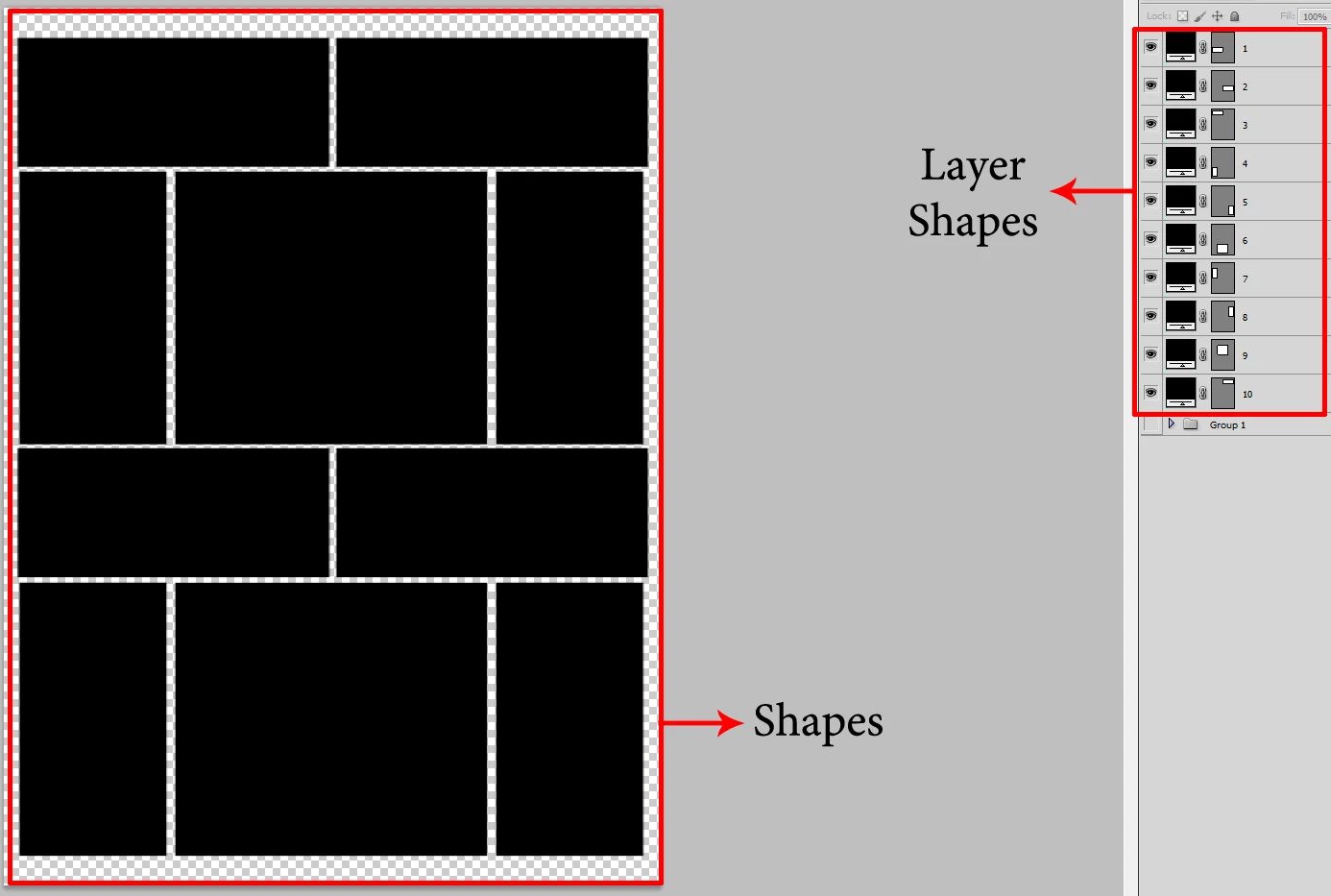
The first picture
I made a model with numbered layer shapes


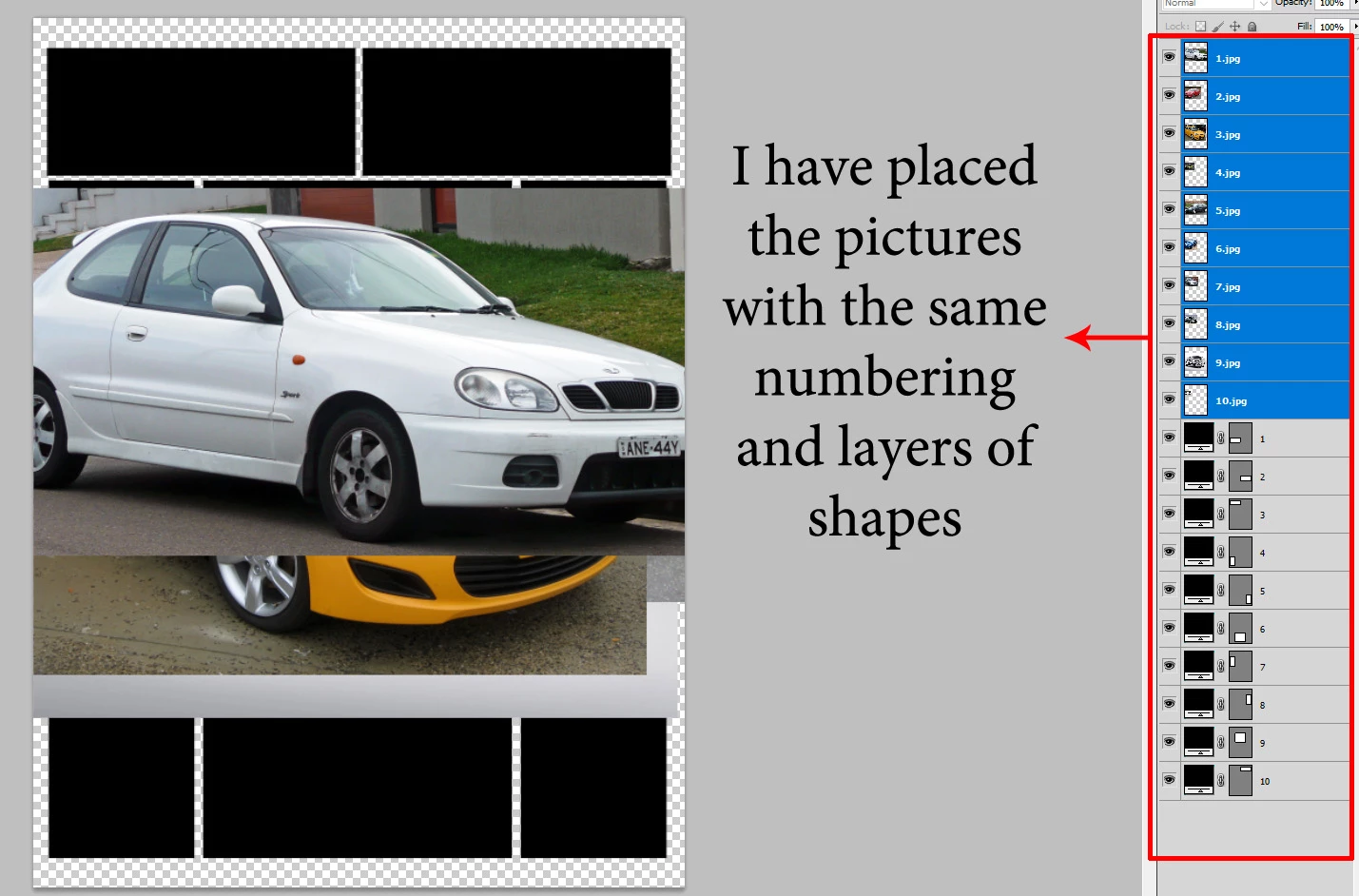
In the second image
I have inserted numbered image layers with the same number of layer shapes


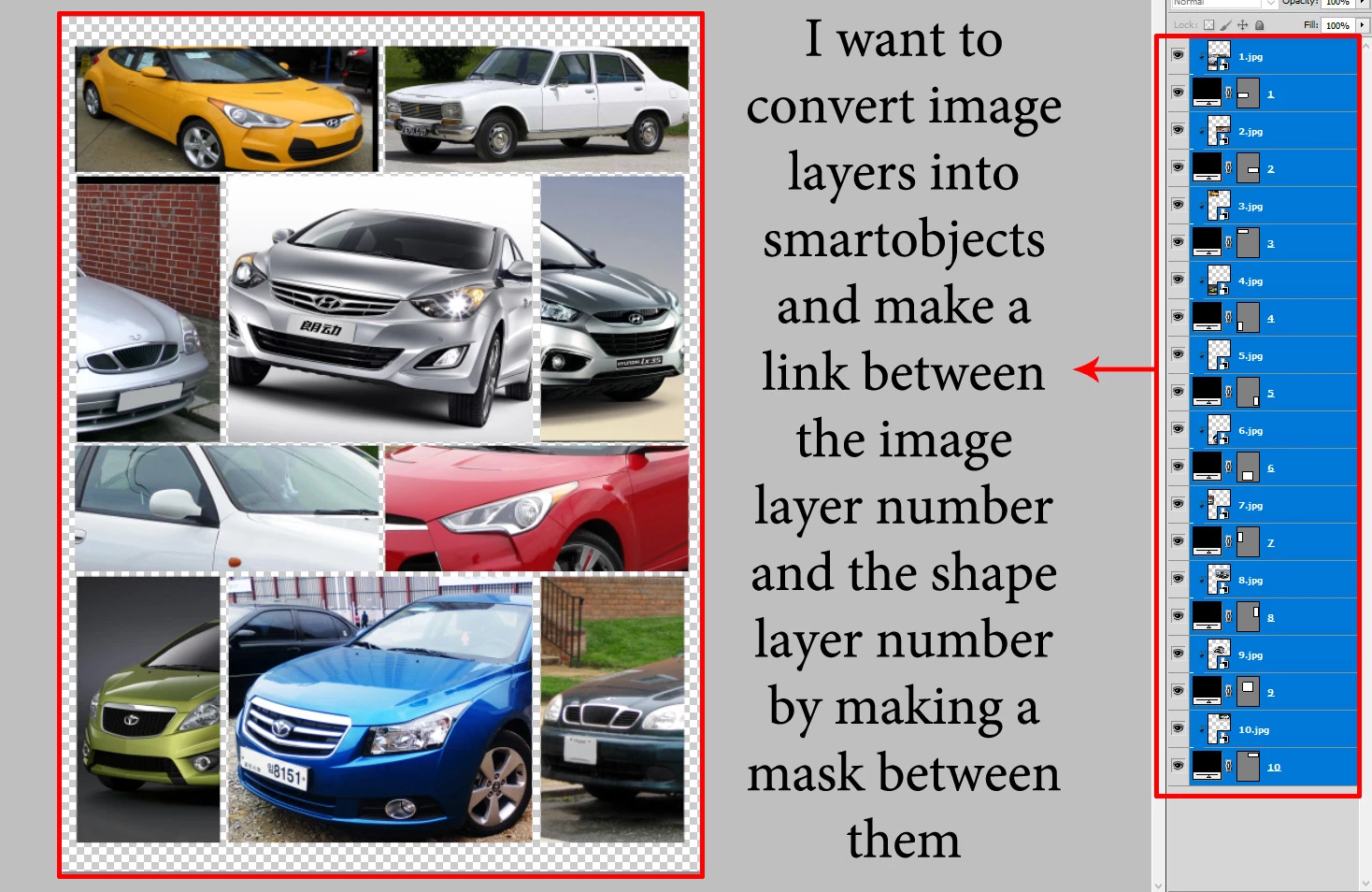
third picture
I want to convert image layers into smartobjects and link them to the shapes of the layers by making a mask between them and resizing the image layers based on the width of the shapes layers

Thanks for the interest
This topic has been closed for replies.
Correct answer Stephen Marsh

@Stephen Marsh 

The code is excellent and does what is required well and excellent

- But I'd like something else if it doesn't bother you

After the linking process, I want to align the image layer and the shape layer from the top and left because most of the image layers are identical to the shape layers

- If there is a problem in this mode, there is no problem
Thanks for your hard work and effort


Try this 1.1 version:


/*
Apply Clipping Mask to All Smart Object Layers.jsx
v1.1, Stephen Marsh, 14th September 2022
https://community.adobe.com/t5/photoshop-ecosystem-discussions/script-that-converts-images-into-smartobjects-and-links-images-to-layer-shapes/td-p/13191501
With special thanks to Christoph Pfaffenbichler for the recursive SO processing framework.
Note: Assumes that there is a pair of layers, with the upper layer a smart object and the lower layer content acting as the source for the clipping mask.
      No special checks or validation are performed to ensure that the layers are in pairs.
*/

#target photoshop

var myDocument = app.activeDocument;
myDocument.suspendHistory("processAllSmartObjects", "processSOLayers(myDocument)");

function processSOLayers(theParent) {
    for (var m = theParent.layers.length - 1; m >= 0; m--) {
        var theLayer = theParent.layers[m];
        // apply the function to layers; 
        if (theLayer.typename == "ArtLayer") {
            if (theLayer.kind == LayerKind.SMARTOBJECT) {
                var theVisibility = theLayer.visible;
                myDocument.activeLayer = theLayer;
                app.runMenuItem(stringIDToTypeID('groupEvent'));
                selectForwardORBackwardLayer("backwardEnum");
                selectionFromVectorMask();
                align2Selection('AdLf');
                align2Selection('AdTp'); 
                activeDocument.selection.deselect();
                theLayer.visible = theVisibility;
            }
        // Run on the contents of layerSets
        } else {
            processSOLayers(theLayer)
        }
    }
    return;
}


// Functions

function selectionFromVectorMask() {
	function s2t(s) {
        return app.stringIDToTypeID(s);
    }
	var descriptor = new ActionDescriptor();
	var reference = new ActionReference();
	var reference2 = new ActionReference();
	reference.putProperty( s2t( "channel" ), s2t( "selection" ));
	descriptor.putReference( s2t( "null" ), reference );
	reference2.putEnumerated( s2t( "path" ), s2t( "path" ), s2t( "vectorMask" ));
	reference2.putEnumerated( s2t( "layer" ), s2t( "ordinal" ), s2t( "targetEnum" ));
	descriptor.putReference( s2t( "to" ), reference2 );
	descriptor.putInteger( s2t( "version" ), 1 );
	descriptor.putBoolean( s2t( "vectorMaskParams" ), true );
	executeAction( s2t( "set" ), descriptor, DialogModes.NO );
}

function selectForwardORBackwardLayer(forwardORbackward) {
	function s2t(s) {
        return app.stringIDToTypeID(s);
    }
	var descriptor = new ActionDescriptor();
	var list = new ActionList();
    var reference = new ActionReference();
    // "forwardEnum" or "backwardEnum"
	reference.putEnumerated( s2t( "layer" ), s2t( "ordinal" ), s2t( forwardORbackward ));
	descriptor.putReference( s2t( "null" ), reference );
	descriptor.putEnumerated( s2t( "selectionModifier" ), s2t( "selectionModifierType" ), s2t( "addToSelection" ));
	descriptor.putBoolean( s2t( "makeVisible" ), false );
	list.putInteger( 10 );
	list.putInteger( 30 );
	descriptor.putList( s2t( "layerID" ), list );
	executeAction( s2t( "select" ), descriptor, DialogModes.NO );
}

function align2Selection(method) {
   /* https://gist.github.com/MarshySwamp/df372e342ac87854ffe08e79cbdbcbb5 */
    var desc = new ActionDescriptor();
    var ref = new ActionReference();
    ref.putEnumerated(charIDToTypeID("Lyr "), charIDToTypeID("Ordn"), charIDToTypeID("Trgt"));
    desc.putReference(charIDToTypeID("null"), ref);
    desc.putEnumerated(charIDToTypeID("Usng"), charIDToTypeID("ADSt"), charIDToTypeID(method));
    try {
        executeAction(charIDToTypeID("Algn"), desc, DialogModes.NO);
    } catch (e) {}
}


 

2 replies

Stephen Marsh
Community Expert
Community Expert
September 14, 2022

@Mohamed Hameed21513110 


Test the following with care, it hasn't had exhaustive testing, however, as it is based on previous scripts most of the wrinkles have hopefully been ironed out.


/*
Apply Clipping Mask to All Smart Object Layers.jsx
v1.0, Stephen Marsh, 14th September 2022
https://community.adobe.com/t5/photoshop-ecosystem-discussions/script-that-converts-images-into-smartobjects-and-links-images-to-layer-shapes/td-p/13191501
With special thanks to Christoph Pfaffenbichler for the recursive SO processing framework.
Note: Assumes that there is a pair of layers, with the upper layer a smart object and the lower layer content acting as the source for the clipping mask.
      No special checks or validation are performed to ensure that the layers are in pairs.
*/

#target photoshop

var myDocument = app.activeDocument;
myDocument.suspendHistory("processAllSmartObjects", "processSOLayers(myDocument)");

function processSOLayers(theParent) {
    for (var m = theParent.layers.length - 1; m >= 0; m--) {
        var theLayer = theParent.layers[m];
        // apply the function to layers; 
        if (theLayer.typename == "ArtLayer") {
            if (theLayer.kind == LayerKind.SMARTOBJECT) {
                var theVisibility = theLayer.visible;
                myDocument.activeLayer = theLayer;
                app.runMenuItem(stringIDToTypeID('groupEvent'));
                theLayer.visible = theVisibility;
            }
        // Run on the contents of layerSets
        } else {
            processSOLayers(theLayer)
        }
    }
    return;
}


Mohamed Hameed21513110
Inspiring
September 14, 2022

@Stephen Marsh 

Thank you for your great and wonderful effort

Mohamed Hameed21513110
Inspiring
September 14, 2022

@Stephen Marsh 

The code is excellent and does what is required well and excellent

- But I'd like something else if it doesn't bother you

After the linking process, I want to align the image layer and the shape layer from the top and left because most of the image layers are identical to the shape layers

- If there is a problem in this mode, there is no problem
Thanks for your hard work and effort

Stephen Marsh
Community Expert
Community Expert
September 13, 2022

This is similar to the late JJMack's BatchMultiImageCollage.jsx:


https://github.com/MarshySwamp/JJMack-Archive


It uses alpha channels instead of shape layers.

Mohamed Hameed21513110
Inspiring
September 13, 2022

Sorry, but I found many files and scripts and it is based on previously saved templates

I came up with a way to convert image layers into smartobjects and filter and arrange layers by numbers

I just want a script that makes a mask between the image layer and the shape layer for all layers sequentially according to numbers

Stephen Marsh
Community Expert
Community Expert
September 13, 2022

Sounds like all you need to do is script making a clipping group, then run it over all the layers in a loop... and it sounds like you know how to do this for all layers anyway, so:


app.runMenuItem(stringIDToTypeID('groupEvent'));


or


createClippingMask();

function createClippingMask() {
var idgroupEvent = stringIDToTypeID( "groupEvent" );
    var desc219 = new ActionDescriptor();
    var idnull = stringIDToTypeID( "null" );
        var ref10 = new ActionReference();
        var idlayer = stringIDToTypeID( "layer" );
        var idordinal = stringIDToTypeID( "ordinal" );
        var idtargetEnum = stringIDToTypeID( "targetEnum" );
        ref10.putEnumerated( idlayer, idordinal, idtargetEnum );
    desc219.putReference( idnull, ref10 );
executeAction( idgroupEvent, desc219, DialogModes.NO );
}


If this isn't the case, please provide a screenshot of the layers panel from where your current script leaves things. Providing your code may also help.