Participating Frequently
November 29, 2021
Answered

Script to export coordinates (X;Y) in pixel

  • November 29, 2021
  • 3 replies
  • 6526 views

Hello.


I could really use some help here. I need to record and export the exact pixel coordinates (X;Y) of certain images out of Photoshop. I know the coordinates are visible by pressing F8, but copy-pasting them manually one at the time is very time-consuming.


Is there a way to automatize the process? Searching around I read about scripts, but I don't think I've seen one to do specifically this. I have no idea how to create one, either >_<


Ideally I'd like to be able to save the coordinates when giving an input (so in other words I position my cursor on the pixel that I need, then I press a button, and that automatically exports the coordinates). Preferably exporting them to excel, but a .txt would already be a great start (I think I can handle the .txt to excel conversion quickly enough afterwards).


Any help would be greatly appreciated x_x
Correct answer jazz-y

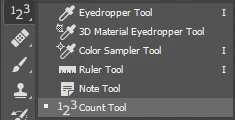
Use the Count Tool to mark the points you want.

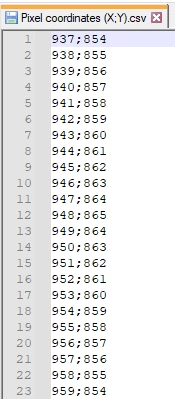
This script will export all marked points in the "Pixel coordinates (X;Y).csv" on Desktop:


#target photoshop
s2t = stringIDToTypeID;

(r = new ActionReference()).putProperty(s2t('property'), p = s2t('countClass'));
r.putEnumerated(s2t('document'), s2t('ordinal'), s2t('targetEnum'));
var items = executeActionGet(r).getList(p),
    logFile = File(Folder.desktop.fsName + '/' + 'Pixel coordinates (X;Y).csv');

logFile.open('a');
for (var i = 0; i < items.count; i++) {
    logFile.writeln(
        Math.floor(items.getObjectValue(i).getUnitDoubleValue(s2t('x'))) + ';'
        + Math.floor(items.getObjectValue(i).getUnitDoubleValue(s2t('y'))))
}
logFile.close();


3 replies

jazz-yCorrect answer
Brainiac
November 30, 2021

Use the Count Tool to mark the points you want.

This script will export all marked points in the "Pixel coordinates (X;Y).csv" on Desktop:


#target photoshop
s2t = stringIDToTypeID;

(r = new ActionReference()).putProperty(s2t('property'), p = s2t('countClass'));
r.putEnumerated(s2t('document'), s2t('ordinal'), s2t('targetEnum'));
var items = executeActionGet(r).getList(p),
    logFile = File(Folder.desktop.fsName + '/' + 'Pixel coordinates (X;Y).csv');

logFile.open('a');
for (var i = 0; i < items.count; i++) {
    logFile.writeln(
        Math.floor(items.getObjectValue(i).getUnitDoubleValue(s2t('x'))) + ';'
        + Math.floor(items.getObjectValue(i).getUnitDoubleValue(s2t('y'))))
}
logFile.close();


Participating Frequently
December 2, 2021

Nice and noob-proof (which is what I need, sadly) lol

Just for the record (if someone else finds this and needs it in the future), the script needs to be executed AFTER marking the points with the Count Tool.

Do you know if it would also be possible to have a script that can draw straight lines between specific coordinates (in X;Y pixels) ? Or any kind of workaround solution (maybe using other tools outside of Photoshop) to do something similar like that, so that one could just input the coordinates and then the software&script could automatically draw lines between those points. I might open up a new question with this query, but I thought I'd ask while we're here.

JJMack
Community Expert
December 2, 2021

A script could add a new top layer create a path from point to points in sort order like left to right x order then stroke the path with a brush. 


JJMack
JJMack
Community Expert
November 29, 2021

If you select the Layers you could likely write as script the would be able to get the selected layers bounds and write the top left corners  X,Y point relative the  canvases top left 0,0 x,y point to a log file.   The Layer Name and  Layer ID could  be written  to go with the x,y point as well as the document name and path. OR text layer could be added at the X Y points. Its up to you to design what your Script would do with the layers X Y info.  Color sampler can not not be used if the layer is not rectangular there will be no visible Pixel you can click on to set the point. 


Target all the layers you want the bound for them run your script. Layer Masks effect the layers bounds.  The layer visible pixels  determine Layers bounds.


#target photoshop 
app.bringToFront();
// ensure at least one document open
if (!documents.length) alert('There are no documents open.', 'No Document');
else {
	// declare Global variables
	var layersInfo = "";
	//main(); // at least one document exists proceed
    app.activeDocument.suspendHistory('ProcessSelectedLayers','main()');
}

// MAIN
function main()  {  
	var orig_ruler_units = app.preferences.rulerUnits;	// Save Ruler Units
	var orig_type_units = app.preferences.typeUnits;	// Save Type Units 	
	var orig_display_dialogs = app.displayDialogs;		// Save Dialog Display 
	app.preferences.rulerUnits = Units.PIXELS;			// Set the ruler units to PIXELS
	app.preferences.typeUnits = TypeUnits.POINTS;   	// Set Type units to POINTS
	app.displayDialogs = DialogModes.NO;				// Set Dialogs off
	var doc = app.activeDocument; 						// Active Document
    var SelectedLayersIdx = getSelectedLayersIndex(doc);// get selected layers ID
	layersInfo = doc.name + "\n";
	try { 
		for (var i = 0; i < SelectedLayersIdx.length; i++)  {  
			selectLayerByIndex(SelectedLayersIdx[i]);
			layersInfo = layersInfo + processLayer(doc.activeLayer) + "\n";	 // process layer
		}
		if (layersInfo != "") logInfo(layersInfo);		// Spit it out
	}
	// display error message if something goes wrong
	catch(e) { alert(e + ': on line ' + e.line, 'Script Error', true); }
	setSelectedLayersIdx(SelectedLayersIdx);			// Restore selected layers
	app.displayDialogs = orig_display_dialogs;			// Restore display dialogs 
	app.preferences.typeUnits  = orig_type_units;		// Restore ruler units to original settings 
	app.preferences.rulerUnits = orig_ruler_units;		// Restore units to original settings	
}
///////////////////////////////////////////////////////////////////////////////////////////////////////////
function processLayer(layer)  { 
	return layerInfo(layer);
}
///////////////////////////////////////////////////////////////////////////////////////////////////////////

function layerInfo(layer) {
	/*
	try {
			if (layer.kind==LayerKind.TEXT) { 
			// Display some TextItem data
			var txtInfo  = "";
			txtInfo  = txtInfo + "\nLayerTextItemContents='" + layer.textItem.contents + "'";
			txtInfo  = txtInfo + "\nLayerTextItemFont='" + layer.textItem.font  + "'";
			txtInfo  = txtInfo + "\nLayerTextItemSize='" + layer.textItem.size + "'";
			txtInfo  = txtInfo + "\nLayerTextItemColor'" + layer.textItem.color.rgb.red + "," + layer.textItem.color.rgb.green + "," + layer.textItem.color.rgb.blue + "'";
			txtInfo  = txtInfo + "\nLayerTextItemDirection='" + layer.textItem.direction   + "'";
			txtInfo  = txtInfo + "\nLayerTextItemAntiAliasMethod='" + layer.textItem.antiAliasMethod  + "'";
			txtInfo  = txtInfo + "\nLayerTextItemPosition='" +layer.textItem.position + "'";	
			txtInfo  = txtInfo + "\nLayerTextItemKind='" + layer.textItem.kind  + "'";
			if (layer.textItem.kind==TextType.PARAGRAPHTEXT) { 
				txtInfo  = txtInfo + "\nLayerTextItemWidth='" + layer.textItem.width + "'"; 
				txtInfo  = txtInfo + "\nLayerTextItemHeight='" + layer.textItem.height + "'";			
				txtInfo  = txtInfo + "\nLayerTextItemTextComposer ='" + layer.textItem.textComposer  + "'";
			}
		}
		else {txtInfo="";}
	}
	catch(e) { 
		txtInfo= txtInfo + "\ntextItem " + e + ': on line ' + e.line
		layer.textItem.contents = layer.textItem.contents;
		layerInfo(layer);
	}
	*/
//	alert(txtInfo);
/*
	alert("typename='" + layer.typename + "'"	
	+ "\nvisible='" + layer.visible + "'"		
	+ "\nlayerName='" + layer.name + "'" 	
	+ "\nisBackgroundLayer = " + layer.isBackgroundLayer	
	+ "\nlayerID='" + layer.id  + "'"
    + "\nitemIndex='" + layer.itemIndex + "'" 	
	+ "\nlayerKind='" + layer.kind + "'"
	+ "\nallLocked='" + layer.allLocked + "'"
	+ "\npixelsLocked = " + layer.pixelsLocked
	+ "\npositionLocked = " + layer.positionLocked 
	+ "\ntransparentPixelsLocked = " + layer.transparentPixelsLocked		
	+ "\nblendMode='" + layer.blendMode + "'"
	+ "\nopacity='" + layer.opacity + "'"
	+ "\nfillOpacity = " + layer.fillOpacity		
	+ "\nbounds='" + layer.bounds + "'"
	+ "\nboundsNoEffects='" + layer.boundsNoEffects + "'"
    + "\nlinkedLayers='" + layer.linkedLayers + "'"
	+ "\nparent='" + layer.parent + "'"	
	+ "\ngrouped = " + layer.grouped
	+ "\nlayerMaskDensity = " + layer.layerMaskDensity
	+ "\nlayerMaskFeather = " + layer.layerMaskFeather
	+ "\nvectorMaskDensity = " + layer.vectorMaskDensity 
	+ "\nvectorMaskFeather = " + layer.vectorMaskFeather	
	+ "\nxmpMetadata='" + obj_to_str(layer.xmpMetadata) + "'"	
	);
*/	
	layerInfo = 
	//+ "typename='" + layer.typename + "'"	
	//+ "\nvisible='" + layer.visible + "'"		
	" layerName='" + layer.name + "'" 
	//+ "\nisBackgroundLayer = " + layer.isBackgroundLayer	
	+ " layerID='" + layer.id  + "'"
    //+ "\nitemIndex='" + layer.itemIndex + "'" 	
	+ " layerKind='" + layer.kind + "'"
	/*
	+ "\nallLocked='" + layer.allLocked + "'"
	+ "\npixelsLocked = " + layer.pixelsLocked
	+ "\npositionLocked = " + layer.positionLocked 
	+ "\ntransparentPixelsLocked = " + layer.transparentPixelsLocked		
	+ "\nblendMode='" + layer.blendMode + "'"
	+ "\nopacity='" + layer.opacity + "'"
	+ "\nfillOpacity = " + layer.fillOpacity	
	*/
	+ " bounds='" + layer.bounds + "'"
	/*
	+ "\nboundsNoEffects='" + layer.boundsNoEffects + "'"
    + "\nlinkedLayers='" + layer.linkedLayers + "'"
	+ "\nparent='" + layer.parent + "'"	
	+ "\ngrouped = " + layer.grouped
	+ "\nlayerMaskDensity = " + layer.layerMaskDensity
	+ "\nlayerMaskFeather = " + layer.layerMaskFeather
	+ "\nvectorMaskDensity = " + layer.vectorMaskDensity 
	+ "\nvectorMaskFeather = " + layer.vectorMaskFeather	
	+ "\nxmpMetadata='" + obj_to_str(layer.xmpMetadata) + "'"	
	+ txtInfo ;
	*/
    return  layerInfo;
	// there is also  additional artlayer info
}
//Thanks to r-bin
function obj_to_str(obj){var str = ""; for (var p in obj) if(obj.hasOwnProperty(p))try{str+=p+"::"+obj[p]+"\n";}catch(e){};return str;}  
/*
TextItem Properties * indicates in the not always available
			//txtInfo  = txtInfo + "\nLayerTextItemLanguage='" + layer.textItem.language    + "'"
			//txtInfo  = txtInfo + "\nLayerTextItemFauxBold='" + layer.textItem.fauxBold   + "'"
			//txtInfo  = txtInfo + "\nLayerTextItemFauxItalic='" + layer.textItem.fauxItalic + "'"
			//txtInfo  = txtInfo + "\nLayerTextItemUnderline='" + layer.textItem.underline  + "'"
			//txtInfo  = txtInfo + "\nLayerTextItemCapitalization='" + layer.textItem.capitalization  + "'"


*antiAliasMethod 
autoKerning 
autoLeadingAmount 
baselineShift 
capitalization
*color 
*contents 
desiredGlyphScaling
desiredLetterScaling  
desiredWordScaling
*direction
fauxBold 
fauxItalic 
firstLineIndent 
*font
hangingPunctuation 
*height 
hyphenateAfterFirst 
hyphenateBeforeLast 
hyphenateCapitalWords 
hyphenateWordsLongerThan 
hyphenation 
hyphenationZone 
hyphenLimit 
justification
*kind 
language 
leading
leftIndent
ligatures
maximumGlyphScaling
maximumLetterScaling 
maximumWordScaling 
minimumGlyphScaling 
minimumLetterScaling 
minimumWordScaling 
noBreak 
oldStyle 
*parent
*position
rightIndent
*size
spaceAfter
spaceBefore
strikeThru 
*textComposer 
tracking 
typename
underline
useAutoLeading
verticalScale
warpBend
warpDirection
warpHorizontalDistortion 
warpStyle
warpVerticalDistortion
*width
*/
/////////////////////////////////////////////////////////////////////////////////////////////////////////////
function cTID(s) {return app.charIDToTypeID(s);}
function sTID(s) {return app.stringIDToTypeID(s);}

// SELECT LAYER MASK
function Select_Layermask(enabled, withDialog) {
    if (enabled != undefined && !enabled)  return;
    var dialogMode = (withDialog ? DialogModes.ALL : DialogModes.NO);
    var desc1 = new ActionDescriptor();
    var ref1 = new ActionReference();
    ref1.putEnumerated(cTID('Chnl'), cTID('Chnl'), cTID('Msk '));
    desc1.putReference(cTID('null'), ref1);
    desc1.putBoolean(cTID('MkVs'), false);
    executeAction(cTID('slct'), desc1, dialogMode);
};
///////////////////////////////////////////////////////////////////////////////   
// Function: hasLayerMask   
// Usage: see if there is a raster layer mask   
// Input: <none> Must have an open document   
// Return: true if there is a vector mask   
///////////////////////////////////////////////////////////////////////////////   
function hasLayerMask() {   
	var hasLayerMask = false;   
	try {   
		var ref = new ActionReference();   
		var keyUserMaskEnabled = app.charIDToTypeID( 'UsrM' );   
		ref.putProperty( app.charIDToTypeID( 'Prpr' ), keyUserMaskEnabled );   
		ref.putEnumerated( app.charIDToTypeID( 'Lyr ' ), app.charIDToTypeID( 'Ordn' ), app.charIDToTypeID( 'Trgt' ) );   
		var desc = executeActionGet( ref );   
		if ( desc.hasKey( keyUserMaskEnabled ) ) { hasLayerMask = true; }   
		}
	catch(e) { hasLayerMask = false; }   
	return hasLayerMask;   
} 

// GET SELECTED LAYERS 
function getSelectedLayers()  {  
	var resultLayers=new Array();  
	try {  
		var descGrp = new ActionDescriptor();  
		var refGrp = new ActionReference();  
		refGrp.putEnumerated(cTID( "Lyr " ),cTID( "Ordn" ),cTID( "Trgt" ));  
		descGrp.putReference(cTID( "null" ), refGrp );  
		executeAction( sTID( "groupLayersEvent" ), descGrp, DialogModes.NO ); 
	
		for (var ix=0;ix<app.activeDocument.activeLayer.layers.length;ix++){resultLayers.push(app.activeDocument.activeLayer.layers[ix])}  
	
		var desc5 = new ActionDescriptor();  
		var ref2 = new ActionReference();  
		ref2.putEnumerated( cTID( "HstS" ), cTID( "Ordn" ), cTID( "Prvs" ) );  
		desc5.putReference( cTID( "null" ), ref2 );  
		executeAction( cTID( "slct" ), desc5, DialogModes.NO );  
	} 
	catch (err) { }  
	return resultLayers;  
}     

///////////////////////////////////////////////////////////////////////////////
// Function: GetSelectedLayers Index
// Input:  Document
// Return: array selectedLayers indexes
///////////////////////////////////////////////////////////////////////////////

function getSelectedLayersIndex(doc) {
    var selectedLayers = [];
    var ref = new ActionReference();
    ref.putEnumerated(cTID('Dcmn'), cTID('Ordn'), cTID('Trgt'));
    var desc = executeActionGet(ref);
    if (desc.hasKey(sTID('targetLayers'))) {
        desc = desc.getList(sTID('targetLayers'));
        var c = desc.count;
        for (var i = 0; i < c; i++) {
            try {
                doc.backgroundLayer;
                selectedLayers.push(desc.getReference(i).getIndex());
            } 
			catch (e) { selectedLayers.push(desc.getReference(i).getIndex() + 1); }
        }
    } else {
        var ref = new ActionReference();
        ref.putProperty(cTID('Prpr'), cTID('ItmI'));
        ref.putEnumerated(cTID('Lyr '), cTID('Ordn'), cTID('Trgt'));
        try {
            doc.backgroundLayer;
            selectedLayers.push(executeActionGet(ref).getInteger(cTID('ItmI')) - 1);
        } 
		catch (e) { selectedLayers.push(executeActionGet(ref).getInteger(cTID('ItmI'))); }
    }
    return selectedLayers;
}

///////////////////////////////////////////////////////////////////////////////
// Function: setSelectedLayers
// Usage: Selects Layers
// Input: Array selectedLayers index
// Return: <none>
///////////////////////////////////////////////////////////////////////////////
function setSelectedLayersIdx( layerIndexes ) {
	selectLayerByIndex( layerIndexes[0] ); 	// first select the first one
	for ( var i = 1; i < layerIndexes.length; i++) {	// then add to the selection
		selectLayerByIndex( layerIndexes[i], true  );
	} 
}

function selectLayerByIndex(index, add) {
	var ref = new ActionReference();
	ref.putIndex(charIDToTypeID("Lyr "), index);
	var desc = new ActionDescriptor();
	desc.putReference(charIDToTypeID("null"), ref);
	if (add) desc.putEnumerated(stringIDToTypeID("selectionModifier"), stringIDToTypeID("selectionModifierType"), stringIDToTypeID("addToSelection"));
	desc.putBoolean(charIDToTypeID("MkVs"), false);
	try { executeAction(charIDToTypeID("slct"), desc, DialogModes.NO); }
	catch (e) {}
}

///////////////////////////////////////////////////////////////////////////////
// Function: setSelectedLayers
// Usage: Selects Layers
// Input:  Array selectedLayers
// Return: <none>
///////////////////////////////////////////////////////////////////////////////
function setSelectedLayers( layerIndexesOrNames ) {
	setSelectedLayer( layerIndexesOrNames[0] ); 	// first select the first one
	for ( var i = 1; i < layerIndexesOrNames.length; i++) {	// then add to the selection
		addSelectedLayer( layerIndexesOrNames[i] );
	} 
}

function logInfo(Txt){
    try {	
       var file = new File(Folder.desktop + "/LayersBounds.txt"); 
       file.open("w", "TEXT", "????"); 
       //alert(file.encoding);
       file.encoding = "UTF8";
       file.seek(0,2);   
       $.os.search(/windows/i)  != -1 ? file.lineFeed = 'windows'  : file.lineFeed = 'macintosh';
       file.writeln(Txt); 
       if (file.error) alert(file.error);
       file.close();
       file.execute(); 
    }
    catch(e) { alert(e + ': on line ' + e.line, 'Script Error', true); }
};   


JJMack
JJMack
Community Expert
November 30, 2021

JJMack
Stephen Marsh
Community Expert
November 29, 2021

I'm not sure that the cursor position is possible, but a selection or colour sampler would be.

Stephen Marsh
Community Expert
November 29, 2021

As a proof of concept, the upper left coordinates of an active selection:


var selBounds = app.activeDocument.selection.bounds;
var selBoundsX = selBounds[0];
var selBoundsY = selBounds[1];
// X value
alert(selBoundsX);
// Y value
alert(selBoundsY);


Then the values would be written to a CSV text file.


https://prepression.blogspot.com/2017/11/downloading-and-installing-adobe-scripts.html


Stephen Marsh
Community Expert
November 29, 2021

@defaultfqxx073j8q80 – Try this script, which presumes that the rulers are at the default 0, 0 origin position:


/* Upper Left Selection Coordinates to CSV.jsx
https://community.adobe.com/t5/photoshop-ecosystem-discussions/script-to-export-coordinates-x-y-in-pixel/td-p/12558105
Script to export coordinates (X;Y) in pixel
Stephen Marsh
v1.0 - 30th November 2021
*/

#target photoshop

if (hasSelection(app.activeDocument)) {

    // Save the current ruler units and set to pixels
    var savedRuler = app.preferences.rulerUnits;
    app.preferences.rulerUnits = Units.PIXELS;

    // X value
    var selBounds0 = app.activeDocument.selection.bounds[0];

    // Y value
    var selBounds1 = app.activeDocument.selection.bounds[1];

    // CSV filename
    var docName = app.activeDocument.name.replace(/\.[^\.]+$/, '');

    // Create a text file on the desktop
    var textFile = new File('~/Desktop' + '/' + docName + '_XY-Pos.csv');
    textFile.encoding = 'UTF-8';

    // Text options: a = append | e = edit | r = read

    // Edit the Header row
    textFile.open('e');
    textFile.write('X coordinate,Y coordinate' + '\r');

    // Append (single or multiple) upper left selection values
    textFile.open('a');
    textFile.write(selBounds0.value + ',' + selBounds1.value + '\r');
    textFile.close();

    // Deselect the selection
    app.activeDocument.selection.deselect();

    // Restore the ruler units
    app.preferences.rulerUnits = savedRuler;

    // End of script
    app.beep();

    // Open the CSV in the default app
    textFile.execute();

}
else {
    alert('This script requires an active selection');
}

/* https://community.adobe.com/t5/photoshop-ecosystem-discussions/warning-active-selection/m-p/8331912#M421992 */
// Warning active selection
function hasSelection() {
    var ref10 = new ActionReference();
    ref10.putProperty(stringIDToTypeID("property"), stringIDToTypeID("selection"));
    ref10.putEnumerated(charIDToTypeID("Dcmn"), charIDToTypeID("Ordn"), charIDToTypeID("Trgt"));
    var docDesc = executeActionGet(ref10);
    return docDesc.hasKey(stringIDToTypeID("selection"));

    // Alternative code:
    // https://gist.github.com/theMikeD/a8ddb2a1f21307e4a21a
}