


soziblewuup
Participant
May 26, 2017
Answered

Separate Logo from Background (same colour)

  • May 26, 2017
  • 3 replies
  • 680 views

Hi,

How would you separate a logo from a white background if elements of the logo were also white?

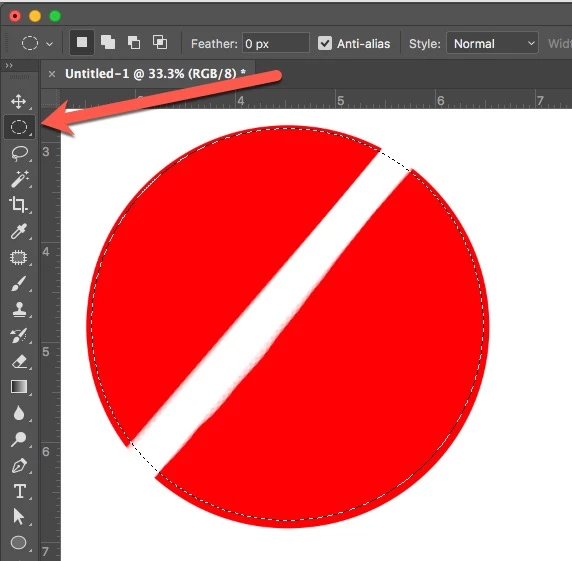
Imagine a blue 2D circle on a white background. The blue circle has a diagonal white line running through the circle all the way to the outer edges. Ordinarily I would just use the Magic selection tool and copy the whole logo to a new layer, but in this scenario the diagonal white line running through the logo cannot be selected without selecting the white background as well. 

Any help would be greatly appreciated.
This topic has been closed for replies.
Correct answer melissapiccone

I would use the elliptical marquee...

3 replies

soziblewuup
Participant
May 26, 2017

Thanks both. I tried both methods successfully. Just what I was after!

melissapiccone
Community Expert
Community Expert
May 26, 2017

Great - can you mark this question answered please?

Melissa Piccone | Adobe Trainer | Online Courses Author | Fine Artist
melissapiccone
Community Expert
melissapicconeCommunity ExpertCorrect answer
Community Expert
May 26, 2017

I would use the elliptical marquee...

Melissa Piccone | Adobe Trainer | Online Courses Author | Fine Artist
c.pfaffenbichler
Community Expert
Community Expert
May 26, 2017

Good day!

Please post the image in question.

You may want to use the Pen Tool or one of the other Path Tools for clipping in such a case or to amend a Layer Mask created with Selection Tools.

Regards,

Pfaffenbichler