


New Participant
June 5, 2013
Answered

Setting an exact size in pixels to a rectangular selection area.

  • June 5, 2013
  • 1 reply
  • 42380 views

I need to set an exact size to my rectangular selection area. Is there a way to do this? I tried using the crop tool as an alternative method but I'm finding I wasn't able to figure out how to set the crop to exact dimensions in pixels or how to move the crop selection area once it was placed over the image.

Thanks in advance...
This topic has been closed for replies.
Correct answer Jeff Arola

Hi,

What version of photoshop are you using?

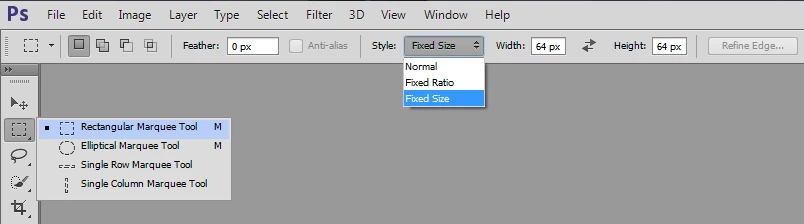
One way is to use the Rectangular Marquee Tool and set the Style to Fixed Size and then enter the numbers into the Width and Height fields.

You can also move the selection area by dragging inside the selection if you have the tool option for the rectanagular marguee tool set to New Selection.

Then Image>Crop if you want to crop the image.

1 reply

Jeff Arola
Jeff ArolaCorrect answer
Community Expert
June 5, 2013

Hi,

What version of photoshop are you using?

One way is to use the Rectangular Marquee Tool and set the Style to Fixed Size and then enter the numbers into the Width and Height fields.

You can also move the selection area by dragging inside the selection if you have the tool option for the rectanagular marguee tool set to New Selection.

Then Image>Crop if you want to crop the image.

esepich42Author
New Participant
June 5, 2013

Version CS6. Thank you for asking.