Participating Frequently
November 26, 2016
Answered

Shortcut for switching between layers - no bracket keys

  • November 26, 2016
  • 3 replies
  • 12547 views

Hi!

I'm getting a bit frustrated that I can't use shortcuts to switch from a layer to the one above or beneath. I know the shortcut exists, but I'd need the bracket keys, which don't exist on my Norwegian keyboard. I've looked everywhere for a preference allowing me to change it to a custom shortcut, but I can't find it?

Any help is very much appreciated (:

This topic has been closed for replies.
Correct answer Jeff Arola

Hi, thanks for your reply! (:

I might have been a bit unclear on what I want to do though - I'd like to switch my active layer to the one above or beneath the currently selected one without having to click on it, so that I won't need to move the cursor in between. And I don't think I can record that as an action ):

Oh and brackets are definitely supported, they're just not included in the Norwegian layout because of a few other characters taking their place.


It's weird that on the Norwegian keyboard one can type the "Brackets" using Alt F8 or F9 but photoshop doesn't respond to that shortcut for selecting layers.


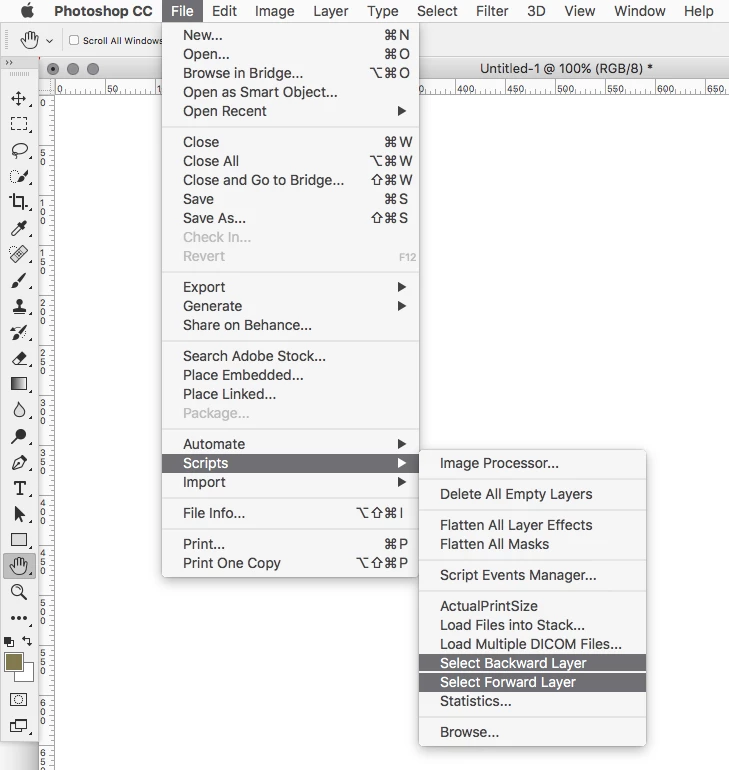
Anyway, you could use 2 scripts, one for Select Forward Layer and one to Select Backward Layer, then put them in the photoshop>presets>scripts folder and use Edit>Keyboard Shortcuts to assign a keyboard shortcut to each script.


The following are the script codes for Select Forward and Backward Layers.


Select Forward Layer


// =======================================================

var idslct = charIDToTypeID( "slct" );

    var desc52 = new ActionDescriptor();

    var idnull = charIDToTypeID( "null" );

        var ref7 = new ActionReference();

        var idLyr = charIDToTypeID( "Lyr " );

        var idOrdn = charIDToTypeID( "Ordn" );

        var idFrwr = charIDToTypeID( "Frwr" );

        ref7.putEnumerated( idLyr, idOrdn, idFrwr );

    desc52.putReference( idnull, ref7 );

    var idMkVs = charIDToTypeID( "MkVs" );

    desc52.putBoolean( idMkVs, false );

    var idLyrI = charIDToTypeID( "LyrI" );

        var list8 = new ActionList();

        list8.putInteger( 18 );

    desc52.putList( idLyrI, list8 );

executeAction( idslct, desc52, DialogModes.NO );


Select Backward Layer


// =======================================================

var idslct = charIDToTypeID( "slct" );

    var desc53 = new ActionDescriptor();

    var idnull = charIDToTypeID( "null" );

        var ref8 = new ActionReference();

        var idLyr = charIDToTypeID( "Lyr " );

        var idOrdn = charIDToTypeID( "Ordn" );

        var idBckw = charIDToTypeID( "Bckw" );

        ref8.putEnumerated( idLyr, idOrdn, idBckw );

    desc53.putReference( idnull, ref8 );

    var idMkVs = charIDToTypeID( "MkVs" );

    desc53.putBoolean( idMkVs, false );

    var idLyrI = charIDToTypeID( "LyrI" );

        var list9 = new ActionList();

        list9.putInteger( 17 );

    desc53.putList( idLyrI, list9 );

executeAction( idslct, desc53, DialogModes.NO );


Just copy the codes above and paste into a text editor or ExtendScript Toolkit and save as a .jsx


For example, i saved each one as Select Forward Layer.jsx and Select Backward Layer.jsx


Then put the scripts in the Photoshop>Preset>Scripts folder and they will show under File>Scripts.


Then using Edit>Keyboard Shortcuts assign whatever keyboard shortcuts you want to the scripts.


3 replies

PECourtejoie
Community Expert
Community Expert
July 24, 2020

In case you are using the localized version, did you try: 

Merke øverste lag

Alt + . (punktum)


Merke nederste lag

Alt + , (komma)

https://helpx.adobe.com/no/photoshop/using/default-keyboard-shortcuts.html

If using the US version, please disregard.

Participant
July 24, 2020
Yes, but Alt + . and Alt + , only go to the top or bottom layers. I need a
way to scroll through layers.
PECourtejoie
Community Expert
Community Expert
July 24, 2020

My bad, topmost, I thought it was the next layer on top.

Participant
July 24, 2020

Thank you Jeff. This was perfect -- exactly what I needed and solved my problem.
I'll add a couple of things ... I had to adjust permissions on my folders. First find the scripts folders, hit cmd-I to get info on the folder, and then set the permission to Read and Write. Then I had to do the same on the keyboard shortcuts folder.

In the end, it worked great. For those of you working with a Norwegian keyboard, the Å and Æ keys are wide open for using as keyboard shortcuts!

mytaxsite
Inspiring
November 26, 2016

Why not use the Layers Panel?  If you don't see the Layers Panel then press F7 and you'll see all your layers and you can then click on the layer you want to make active.

I don't think there is a shortcut for what you want to do.  However, see this old list:

<Default keyboard shortcuts in Adobe Photoshop >

It may or may not work in 2017.

Good luck.

Participating Frequently
November 26, 2016

Oh thanks but I do see the panel (: It's not that big of a problem, it's just that I use layers a lot and I'd like to speed up my work a little. It says in the shortcut list that alt + bracket should do it.

Participant
December 9, 2021

It's weird that on the Norwegian keyboard one can type the "Brackets" using Alt F8 or F9 but photoshop doesn't respond to that shortcut for selecting layers.


Anyway, you could use 2 scripts, one for Select Forward Layer and one to Select Backward Layer, then put them in the photoshop>presets>scripts folder and use Edit>Keyboard Shortcuts to assign a keyboard shortcut to each script.


The following are the script codes for Select Forward and Backward Layers.


Select Forward Layer


// =======================================================

var idslct = charIDToTypeID( "slct" );

    var desc52 = new ActionDescriptor();

    var idnull = charIDToTypeID( "null" );

        var ref7 = new ActionReference();

        var idLyr = charIDToTypeID( "Lyr " );

        var idOrdn = charIDToTypeID( "Ordn" );

        var idFrwr = charIDToTypeID( "Frwr" );

        ref7.putEnumerated( idLyr, idOrdn, idFrwr );

    desc52.putReference( idnull, ref7 );

    var idMkVs = charIDToTypeID( "MkVs" );

    desc52.putBoolean( idMkVs, false );

    var idLyrI = charIDToTypeID( "LyrI" );

        var list8 = new ActionList();

        list8.putInteger( 18 );

    desc52.putList( idLyrI, list8 );

executeAction( idslct, desc52, DialogModes.NO );


Select Backward Layer


// =======================================================

var idslct = charIDToTypeID( "slct" );

    var desc53 = new ActionDescriptor();

    var idnull = charIDToTypeID( "null" );

        var ref8 = new ActionReference();

        var idLyr = charIDToTypeID( "Lyr " );

        var idOrdn = charIDToTypeID( "Ordn" );

        var idBckw = charIDToTypeID( "Bckw" );

        ref8.putEnumerated( idLyr, idOrdn, idBckw );

    desc53.putReference( idnull, ref8 );

    var idMkVs = charIDToTypeID( "MkVs" );

    desc53.putBoolean( idMkVs, false );

    var idLyrI = charIDToTypeID( "LyrI" );

        var list9 = new ActionList();

        list9.putInteger( 17 );

    desc53.putList( idLyrI, list9 );

executeAction( idslct, desc53, DialogModes.NO );


Just copy the codes above and paste into a text editor or ExtendScript Toolkit and save as a .jsx


For example, i saved each one as Select Forward Layer.jsx and Select Backward Layer.jsx


Then put the scripts in the Photoshop>Preset>Scripts folder and they will show under File>Scripts.


Then using Edit>Keyboard Shortcuts assign whatever keyboard shortcuts you want to the scripts.
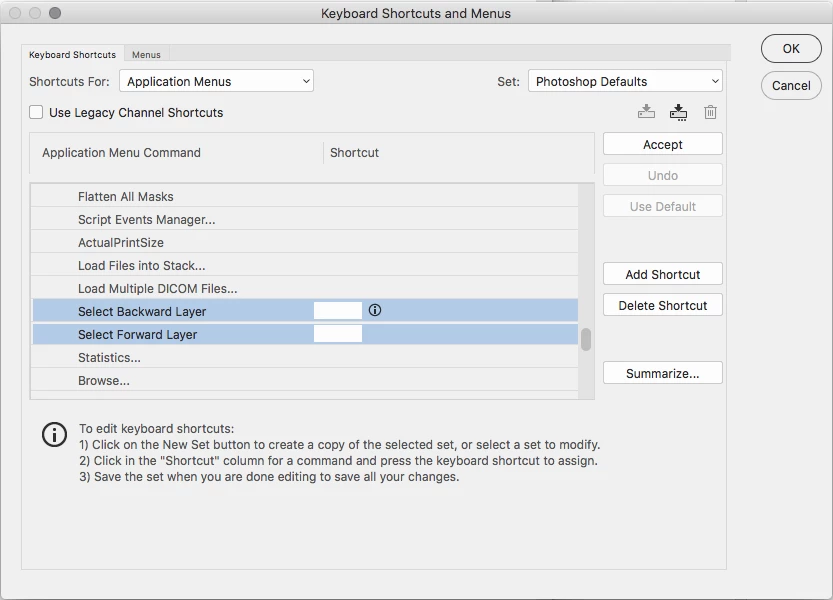


Trying to run the script gave me
"Error 25: Expected: ;.

Line; 35
-> Select Backward Layer

So I tried instead to record two actions where I select above/below layer (had to switch keyboard layout mode to US for this) but that only allows me to use the F keys as shortcut. Guess I'll just try to make it a habit to use US layout whenever using photoshop (alt+  å  and  ¨  keys then become the equivalent of brackets by default)


